Django Under Hood 10: Django’s Test Client - How Your Tests Fake HTTP Requests
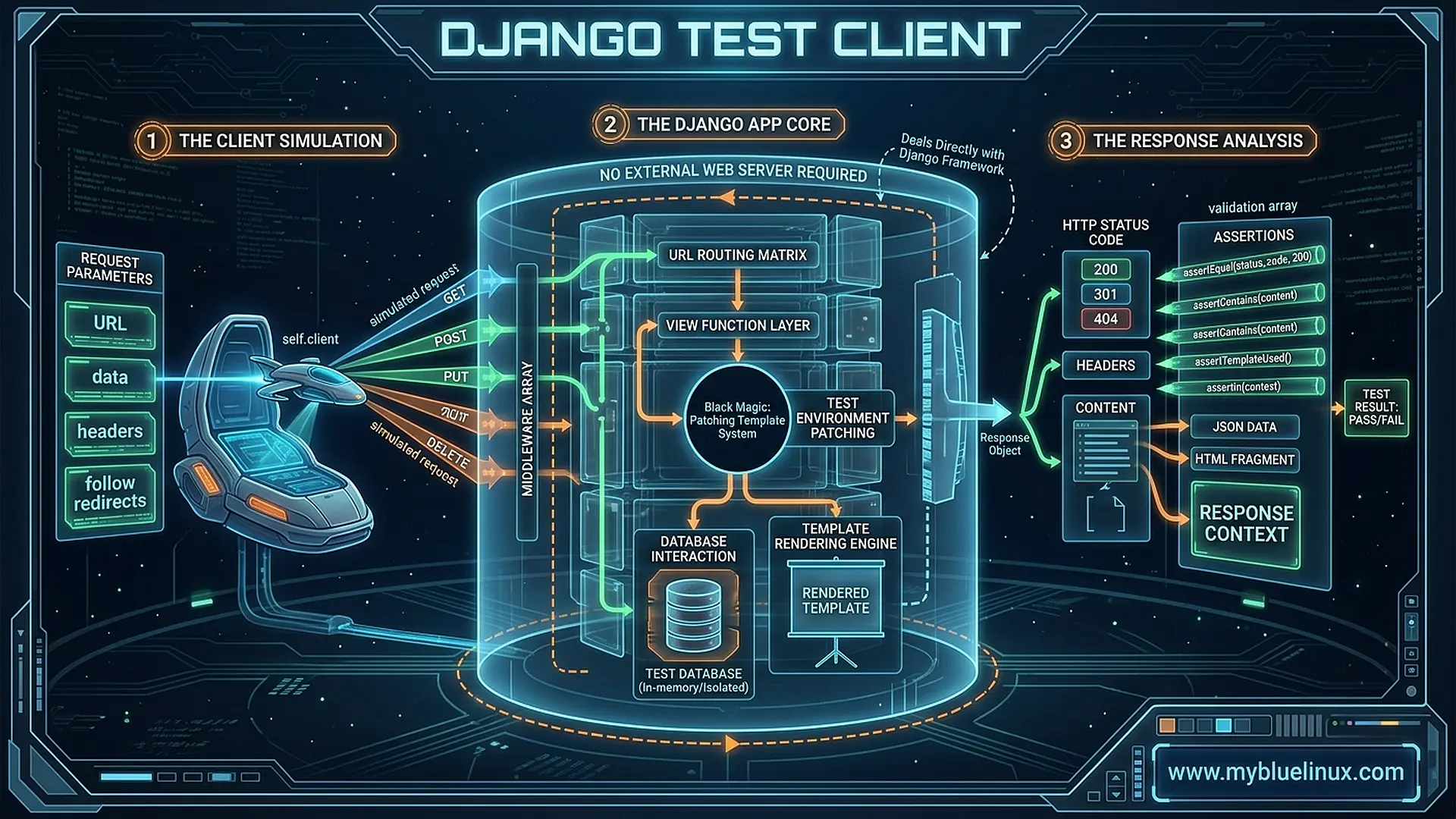
Part 10 of the “Django Under the Hood ” series — deep dives into Django’s internals, edge cases, and the mechanics that separate production-grade applications from tutorial code.
response = self.client.get('/api/users/')
self.assertEqual(response.status_code, 200)
This doesn’t make an HTTP request.
No socket opens. No TCP handshake. No bytes travel over a network. Yet your view runs, your middleware executes, and you get back a response object.
The test client is a simulation — a carefully crafted fake that mimics HTTP requests while staying entirely in-process. It’s fast. It’s convenient. And it’s subtly different from real requests in ways that can make tests pass while production fails.
Understanding these differences is the difference between tests that give you confidence and tests that give you false confidence.
Let’s trace what happens when you call self.client.get().
The Test Client
# django/test/client.py
class Client(ClientMixin, RequestFactory):
    """
    A class that can act as a client for testing purposes.
    """
    def __init__(self, enforce_csrf_checks=False, raise_request_exception=True, **defaults):
        super().__init__(**defaults)
        self.handler = ClientHandler(enforce_csrf_checks)
        self.raise_request_exception = raise_request_exception
        self.exc_info = None
The client combines:
RequestFactory: Creates fake request objectsClientHandler: Processes requests through Django
class ClientMixin:
    """Mixin with common methods between Client and AsyncClient."""

    def get(self, path, data=None, follow=False, secure=False, **extra):
        return self.generic('GET', path, data=data, secure=secure, **extra)

    def post(self, path, data=None, content_type=MULTIPART_CONTENT, follow=False, secure=False, **extra):
        return self.generic('POST', path, data=data, content_type=content_type, secure=secure, **extra)

    def generic(self, method, path, data='', content_type='application/octet-stream',
                secure=False, **extra):
        # Build the request
        request = self._base_environ(**{
            'REQUEST_METHOD': method,
            'PATH_INFO': path,
            **extra,
        })

        # Process through handler
        response = self.request(**request)

        return response
RequestFactory: Building Fake Requests
# django/test/client.py
class RequestFactory:
    """
    Class that lets you create mock Request objects for use in testing.
    """
    def __init__(self, *, json_encoder=DjangoJSONEncoder, **defaults):
        self.json_encoder = json_encoder
        self.defaults = defaults
        self.cookies = SimpleCookie()

    def _base_environ(self, **request):
        """Build a WSGI environ dict."""
        return {
            'HTTP_COOKIE': self.cookies.output(header='', sep='; '),
            'PATH_INFO': '/',
            'REMOTE_ADDR': '127.0.0.1',
            'REQUEST_METHOD': 'GET',
            'SCRIPT_NAME': '',
            'SERVER_NAME': 'testserver',
            'SERVER_PORT': '80',
            'SERVER_PROTOCOL': 'HTTP/1.1',
            'wsgi.version': (1, 0),
            'wsgi.url_scheme': 'http',
            'wsgi.input': FakePayload(''),
            'wsgi.errors': sys.stderr,
            'wsgi.multiprocess': True,
            'wsgi.multithread': False,
            'wsgi.run_once': False,
            **self.defaults,
            **request,
        }
Key insight: The test client builds a WSGI environ dict — the same format that Gunicorn or uWSGI would create. But it's constructed from Python, not parsed from network bytes.
Creating Requests Without Full Cycle
from django.test import RequestFactory

factory = RequestFactory()

# Create a request object directly
request = factory.get('/api/users/')
request.user = some_user  # Manually attach user

# Call view directly
response = my_view(request)
RequestFactory creates request objects without processing them through Django's handler. No middleware runs. No URL resolution. Just a bare request object.
ClientHandler: The Fake Server
# django/test/client.py
class ClientHandler(BaseHandler):
    """
    An HTTP Handler that can be used for testing purposes.
    """
    def __init__(self, enforce_csrf_checks=True, *args, **kwargs):
        self.enforce_csrf_checks = enforce_csrf_checks
        super().__init__(*args, **kwargs)
        self.load_middleware()  # Load middleware at init

    def __call__(self, environ):
        # Disable CSRF checks unless explicitly enabled
        if not self.enforce_csrf_checks:
            environ['csrf_processing_done'] = True

        # Create request
        request = WSGIRequest(environ)

        # Process through middleware and view
        response = self.get_response(request)

        return response
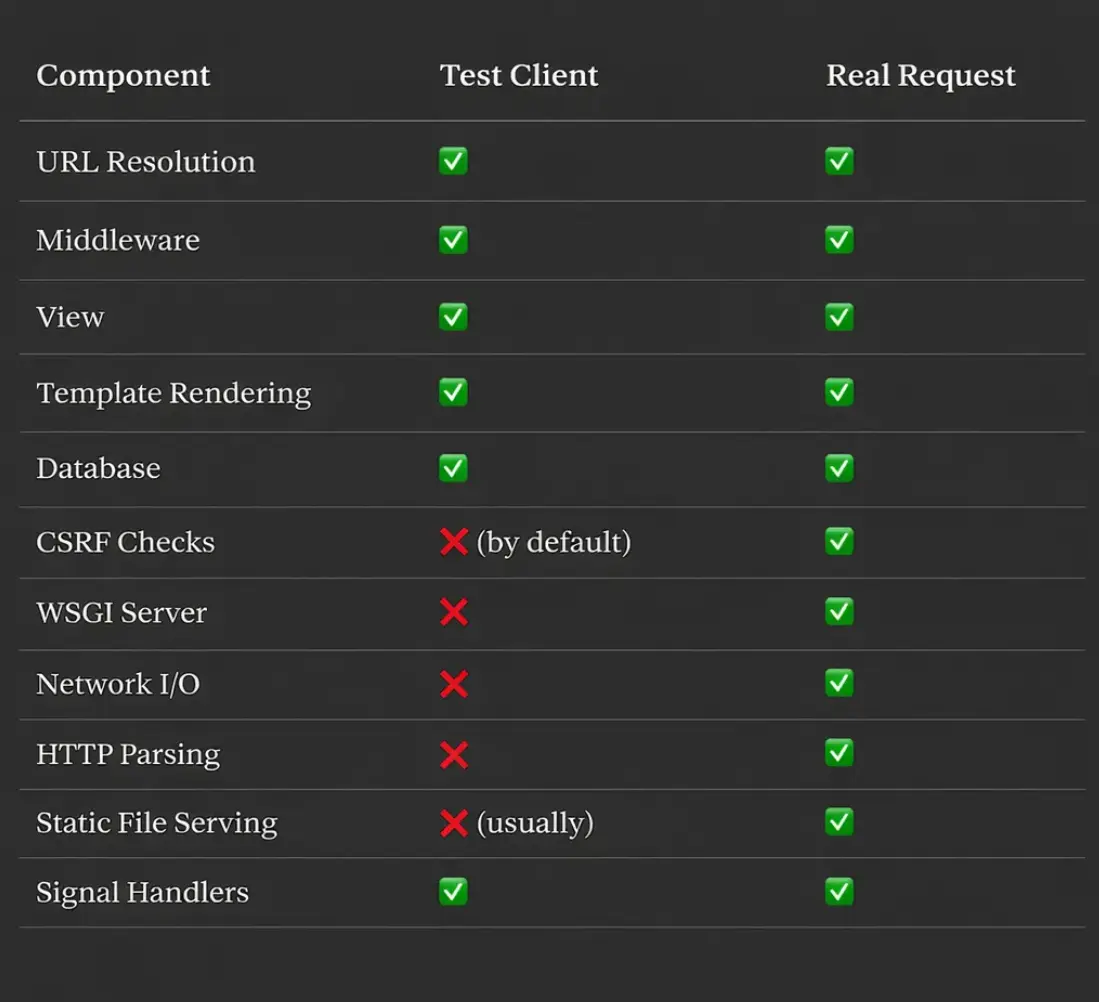
The ClientHandler is essentially Django's WSGIHandler modified for testing:
- CSRF checks disabled by default
- No actual WSGI server
- Responses stay in-memory
The Processing Path
# Simplified flow
def get_response(self, request):
    # 1. Request middleware
    for middleware in self._request_middleware:
        response = middleware(request)
        if response:
            return response

    # 2. URL resolution
    resolver_match = resolve(request.path_info)
    request.resolver_match = resolver_match

    # 3. View middleware
    for middleware in self._view_middleware:
        response = middleware(request, resolver_match.func, ...)
        if response:
            return response

    # 4. Call view
    response = resolver_match.func(request, *args, **kwargs)

    # 5. Response middleware
    for middleware in self._response_middleware:
        response = middleware(request, response)

    return response
This is the same path as production requests — middleware runs, URL resolves, view executes.
What Runs vs What Doesn’t
Response Object: Enhanced for Testing
# django/test/client.py
def request(self, **request):
    response = self.handler(environ)

    # Add testing conveniences
    response.client = self
    response.request = request

    # Capture templates used
    if hasattr(response, 'templates'):
        response.templates = response.templates

    # Capture context
    if hasattr(response, 'context'):
        response.context = response.context

    return response
Test responses have extra attributes:
response = self.client.get('/articles/')

# Standard response attributes
response.status_code  # 200
response.content      # b'<html>...'
response.headers      # {'Content-Type': 'text/html'}

# Test-only attributes
response.templates    # [<Template: 'articles/list.html'>]
response.context      # {'articles': [...], 'user': ...}
response.resolver_match  # ResolverMatch object
response.request      # The request dict
Accessing Context
def test_article_list(self):
    response = self.client.get('/articles/')

    # Access template context
    articles = response.context['articles']
    self.assertEqual(len(articles), 10)

    # Check which template was used
    self.assertTemplateUsed(response, 'articles/list.html')
This is only possible because the response is captured before leaving Python — in production, context is garbage collected after rendering.
Session and Authentication
Session Handling
# django/test/client.py
class Client(ClientMixin, RequestFactory):
    @property
    def session(self):
        """Return the current session."""
        if 'django.contrib.sessions' not in settings.INSTALLED_APPS:
            raise AssertionError("Sessions not enabled")

        cookie = self.cookies.get(settings.SESSION_COOKIE_NAME)
        if cookie:
            return SessionStore(session_key=cookie.value)

        session = SessionStore()
        session.create()
        self.cookies[settings.SESSION_COOKIE_NAME] = session.session_key
        return session
Sessions persist across requests within a test:
def test_session_data(self):
    # First request
    self.client.get('/set-session/')

    # Session persists
    session = self.client.session
    self.assertEqual(session['key'], 'value')

    # Second request sees same session
    response = self.client.get('/read-session/')
    self.assertContains(response, 'value')
Login Helper
class ClientMixin:
    def login(self, **credentials):
        """Log in with the given credentials."""
        from django.contrib.auth import authenticate

        user = authenticate(**credentials)
        if user:
            self._login(user)
            return True
        return False

    def _login(self, user, backend=None):
        # Get session
        session = self.session

        # Do what django.contrib.auth.login() does
        session[SESSION_KEY] = user.pk
        session[BACKEND_SESSION_KEY] = backend or user.backend
        session[HASH_SESSION_KEY] = user.get_session_auth_hash()
        session.save()

        # Set session cookie
        self.cookies[settings.SESSION_COOKIE_NAME] = session.session_key

    def force_login(self, user, backend=None):
        """Log in without needing credentials."""
        self._login(user, backend or settings.AUTHENTICATION_BACKENDS[0])
def test_authenticated_view(self):
    user = User.objects.create_user('alice', password='secret')

    # Method 1: With credentials
    self.client.login(username='alice', password='secret')

    # Method 2: Force (no password needed)
    self.client.force_login(user)

    response = self.client.get('/profile/')
    self.assertEqual(response.status_code, 200)
JSON Requests and Responses
Sending JSON
def test_api_create(self):
    response = self.client.post(
        '/api/articles/',
        data={'title': 'Hello', 'content': 'World'},
        content_type='application/json',
    )
What happens internally:
class ClientMixin:
    def generic(self, method, path, data='', content_type='application/octet-stream', **extra):
        if content_type == 'application/json':
            # Serialize data to JSON
            data = json.dumps(data, cls=self.json_encoder)

        return super().generic(method, path, data, content_type, **extra)
Parsing JSON Response
def test_api_response(self):
    response = self.client.get('/api/articles/')

    # Method 1: Parse manually
    data = json.loads(response.content)

    # Method 2: Use .json() (Django 3.1+)
    data = response.json()

    self.assertEqual(data['count'], 10)
Follow Redirects
def test_redirect(self):
    # Without follow - get the redirect response
    response = self.client.post('/login/', data={...})
    self.assertEqual(response.status_code, 302)
    self.assertEqual(response.url, '/dashboard/')

    # With follow - automatically follow redirects
    response = self.client.post('/login/', data={...}, follow=True)
    self.assertEqual(response.status_code, 200)
    self.assertRedirects(response, '/dashboard/')
class ClientMixin:
    def generic(self, method, path, ..., follow=False, **extra):
        response = self._make_request(...)

        if follow:
            response = self._handle_redirects(response, **extra)

        return response

    def _handle_redirects(self, response, **extra):
        redirect_chain = []

        while response.status_code in (301, 302, 303, 307, 308):
            redirect_chain.append((response.url, response.status_code))

            # Follow the redirect
            response = self.get(response.url, **extra)

        response.redirect_chain = redirect_chain
        return response
File Uploads
def test_file_upload(self):
    with open('test.pdf', 'rb') as f:
        response = self.client.post('/upload/', {'file': f})

    self.assertEqual(response.status_code, 200)
Internally, the client constructs multipart form data:
class ClientMixin:
    def post(self, path, data=None, content_type=MULTIPART_CONTENT, **extra):
        if content_type == MULTIPART_CONTENT:
            data = encode_multipart(BOUNDARY, data)

        return super().post(path, data, content_type, **extra)

def encode_multipart(boundary, data):
    """Encode data as multipart/form-data."""
    lines = []

    for key, value in data.items():
        if hasattr(value, 'read'):
            # File-like object
            lines.extend([
                f'--{boundary}',
                f'Content-Disposition: form-data; name="{key}"; filename="{value.name}"',
                f'Content-Type: application/octet-stream',
                '',
                value.read(),
            ])
        else:
            # Regular field
            lines.extend([
                f'--{boundary}',
                f'Content-Disposition: form-data; name="{key}"',
                '',
                str(value),
            ])

    lines.append(f'--{boundary}--')
    return '\r\n'.join(lines)
SimpleUploadedFile
from django.core.files.uploadedfile import SimpleUploadedFile

def test_upload_in_memory(self):
    file = SimpleUploadedFile(
        name='test.pdf',
        content=b'PDF content here',
        content_type='application/pdf',
    )

    response = self.client.post('/upload/', {'file': file})
Differences That Bite
1. CSRF Tokens
# Test client disables CSRF by default
response = self.client.post('/transfer/', {'amount': 100})  # Works!

# Production requires CSRF token
# POST without token → 403 Forbidden
✅ Fix: Enable CSRF checks explicitly:
from django.test import Client

client = Client(enforce_csrf_checks=True)
2. Request IP Address
# Test client always uses 127.0.0.1
request.META['REMOTE_ADDR']  # '127.0.0.1'
✅ Fix: Override in request:
response = self.client.get('/geo/', REMOTE_ADDR='203.0.113.1')
3. Hostname
# Test client uses 'testserver'
request.get_host()  # 'testserver'
✅ Fix: Set HTTP_HOST:
response = self.client.get('/', HTTP_HOST='www.example.com')
4. HTTPS
# Test client is HTTP by default
request.is_secure()  # ❌False
✅ Fix: Use secure=True:
response = self.client.get('/', secure=True)
5. Static Files
# Test client doesn't serve static files (usually)
response = self.client.get('/static/js/app.js')  # ❌404!
✅ Fix: Use StaticLiveServerTestCase or configure staticfiles in test settings.
6. Async Views
# Test client runs async views synchronously
async def my_view(request):
    await some_async_operation()
    return JsonResponse({'status': 'ok'})

# Works, but loses async benefits
response = self.client.get('/async-view/')
✅ Fix: Use AsyncClient (Django 4.0+):
from django.test import AsyncClient

async def test_async_view(self):
    client = AsyncClient()
    response = await client.get('/async-view/')
LiveServerTestCase: Real HTTP
from django.test import LiveServerTestCase
from selenium import webdriver

class BrowserTest(LiveServerTestCase):
    def setUp(self):
        self.browser = webdriver.Chrome()

    def tearDown(self):
        self.browser.quit()

    def test_login_flow(self):
        # This makes REAL HTTP requests!
        self.browser.get(f'{self.live_server_url}/login/')

        self.browser.find_element_by_name('username').send_keys('alice')
        self.browser.find_element_by_name('password').send_keys('secret')
        self.browser.find_element_by_css_selector('button[type=submit]').click()

        self.assertEqual(self.browser.current_url, f'{self.live_server_url}/dashboard/')
LiveServerTestCase starts an actual HTTP server in a thread:
class LiveServerTestCase(TransactionTestCase):
    @classmethod
    def setUpClass(cls):
        super().setUpClass()

        # Start server in a thread
        cls.server_thread = LiveServerThread(...)
        cls.server_thread.start()

        # Wait for it to be ready
        cls.server_thread.is_ready.wait()
        cls.live_server_url = f'http://{cls.server_thread.host}:{cls.server_thread.port}'
Performance Tips
Use RequestFactory for Unit Tests
# Slow: Full request cycle
def test_view_slow(self):
    response = self.client.get('/users/')  # Middleware, URL resolution, etc.

# Fast: Direct view call
def test_view_fast(self):
    factory = RequestFactory()
    request = factory.get('/users/')
    request.user = self.user
    response = user_list(request)  # Just the view
Use setUpTestData
class ArticleTests(TestCase):
    @classmethod
    def setUpTestData(cls):
        # Runs once for the class, not per test
        cls.author = User.objects.create_user('author')
        cls.articles = [
            Article.objects.create(title=f'Article {i}', author=cls.author)
            for i in range(100)
        ]

    def test_list(self):
        response = self.client.get('/articles/')
        self.assertEqual(len(response.context['articles']), 100)
Disable Unnecessary Features
# settings/testing.py
PASSWORD_HASHERS = ['django.contrib.auth.hashers.MD5PasswordHasher']  # Faster
EMAIL_BACKEND = 'django.core.mail.backends.locmem.EmailBackend'
CACHES = {'default': {'BACKEND': 'django.core.cache.backends.dummy.DummyCache'}}
Summary: Test Client vs Reality
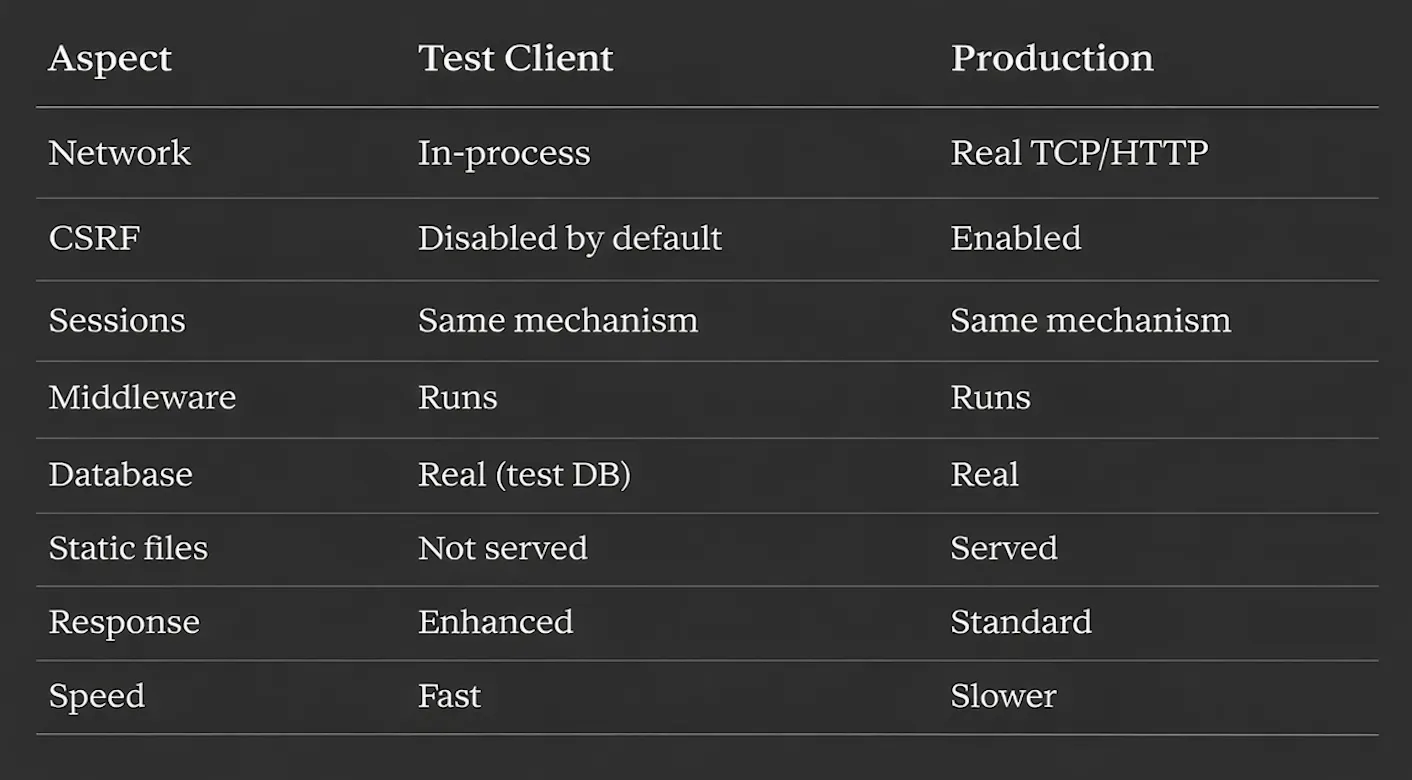
The test client is an excellent simulation, but always remember: it’s a simulation. For full confidence, complement unit tests with integration tests using LiveServerTestCase or real HTTP clients.
Series Complete
This concludes the “Django Under the Hood ” series — 10 deep dives into Django’s internals:
- Request Lifecycle
- ORM Query Compiler
- Connection Management
- Signal Dispatch
- Template Engine
- Form Pipeline
- Authentication Chain
- Static Files
- Migration System
- Test Client ← You are here
Understanding these internals transforms Django from a black box into a transparent tool. Debug faster. Optimize smarter. Build with confidence.