Django Under Hood 05: Django’s Template Engine - From HTML to Python Bytecode

Part 5 of the “Django Under the Hood ” series — deep dives into Django’s internals, edge cases, and the mechanics that separate production-grade applications from tutorial code.
{% for item in items %}
    <li>{{ item.name|title }}</li>
{% endfor %}
This isn’t HTML. It’s source code.
Django doesn’t interpret templates at runtime. It compiles them. That {% for %} tag becomes a Python for loop. That {{ item.name }} becomes a method call. The entire template transforms into executable Python code.
Most developers treat templates as “just HTML with some tags.” They add complex logic, nest loops deeply, and call expensive methods in {{ }} tags—never realizing each operation has a compilation cost and a runtime cost.
Understanding the template engine isn’t about optimization tricks. It’s about seeing templates for what they are: compiled programs with real performance characteristics.
Let’s trace a template from source text to rendered output.
The Template Class
When you render a template, Django creates a Template object:
from django.template import Template, Context

template = Template("Hello, {{ name }}!")
context = Context({'name': 'World'})
output = template.render(context)
What happens inside Template.__init__:
# django/template/base.py
class Template:
    def __init__(self, template_string, origin=None, name=None, engine=None):
        self.source = template_string
        self.engine = engine or Engine.get_default()

        # The compilation step
        self.nodelist = self.compile_nodelist()

    def compile_nodelist(self):
        # 1. Lexing: string → tokens
        lexer = Lexer(self.source)
        tokens = lexer.tokenize()

        # 2. Parsing: tokens → node tree
        parser = Parser(tokens, ...)
        return parser.parse()
Two phases: lexing (text to tokens) and parsing (tokens to nodes).
Phase 1: The Lexer
The lexer scans the template string and produces tokens:
# django/template/base.py
class Lexer:
    def __init__(self, template_string):
        self.template_string = template_string

    def tokenize(self):
        # Split on template syntax
        # {{ }}, {% %}, {# #}
        ...
For this template:
Hello, {{ name }}! {% if show_greeting %}Welcome{% endif %}
The lexer produces:
[
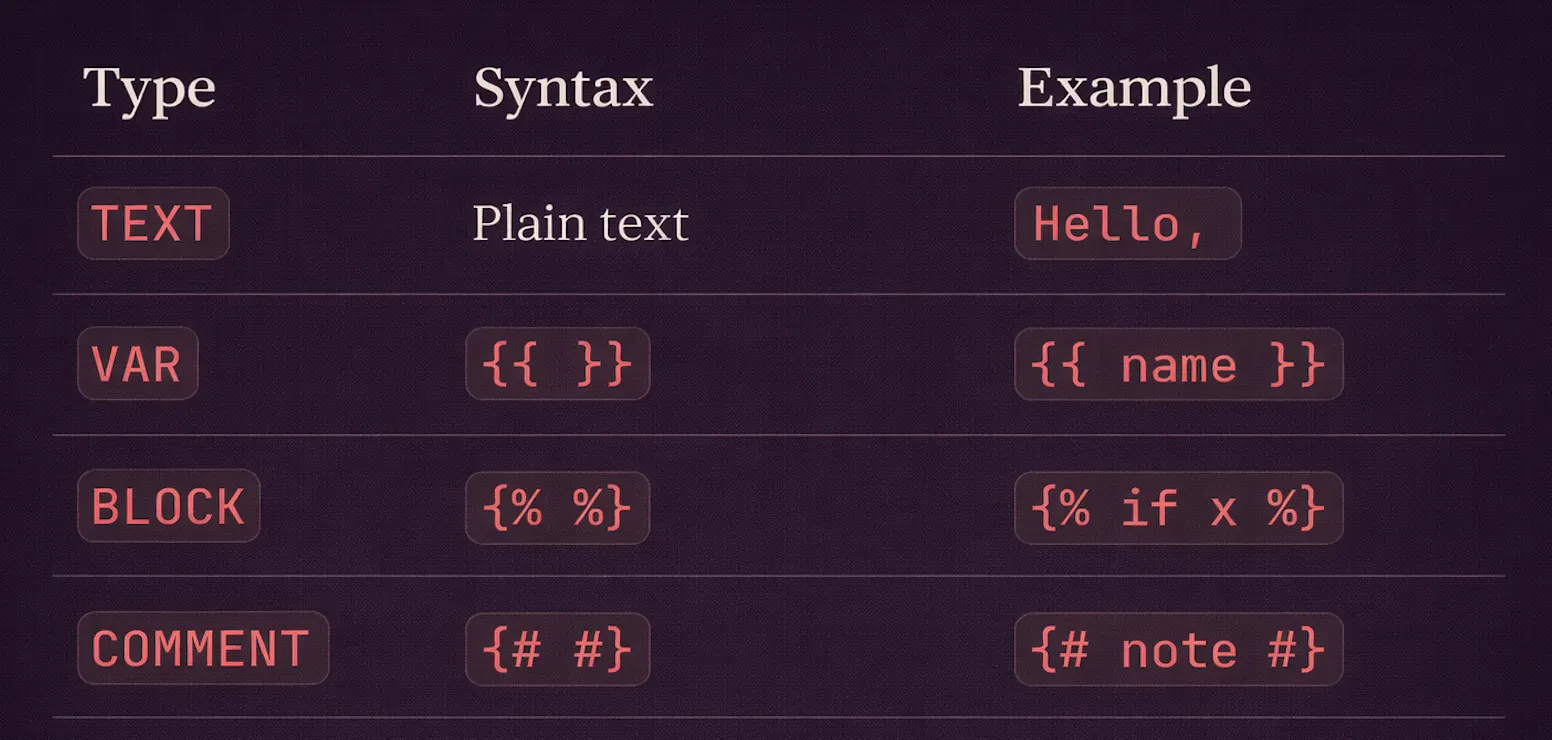
    Token(token_type=TEXT, contents='Hello, '),
    Token(token_type=VAR, contents='name'),
    Token(token_type=TEXT, contents='! '),
    Token(token_type=BLOCK, contents='if show_greeting'),
    Token(token_type=TEXT, contents='Welcome'),
    Token(token_type=BLOCK, contents='endif'),
]
Token types:
The Regex Behind Lexing
# django/template/base.py
tag_re = re.compile(r'({%.*?%}|{{.*?}}|{#.*?#})', re.DOTALL)
This single regex splits the template into alternating sections of plain text and template syntax.
template = "Hello, {{ name }}!"
parts = tag_re.split(template)
# ['Hello, ', '{{ name }}', '!']
Phase 2: The Parser
The parser transforms tokens into a node tree:
# django/template/base.py
class Parser:
    def __init__(self, tokens, libraries, ...):
        self.tokens = tokens
        self.tags = {}  # Registered template tags
        self.filters = {}  # Registered filters

        # Load built-in tags and filters
        self.add_library(builtins)

    def parse(self, parse_until=None):
        nodelist = NodeList()

        while self.tokens:
            token = self.next_token()

            if token.token_type == TEXT:
                nodelist.append(TextNode(token.contents))

            elif token.token_type == VAR:
                nodelist.append(self.create_variable_node(token.contents))

            elif token.token_type == BLOCK:
                command = token.contents.split()[0]

                if parse_until and command in parse_until:
                    return nodelist  # End of block

                # Look up the tag compiler
                compile_func = self.tags[command]
                nodelist.append(compile_func(self, token))

        return nodelist
For {% for item in items %}...{% endfor %}:
# The 'for' tag compiler
@register.tag('for')
def do_for(parser, token):
    # Parse: "for item in items"
    bits = token.split_contents()
    # bits = ['for', 'item', 'in', 'items']

    loopvars = bits[1:-2]  # ['item']
    sequence = bits[-1]     # 'items'

    # Parse until we hit 'endfor' or 'empty'
    nodelist_loop = parser.parse(('empty', 'endfor'))

    # Check if there's an empty clause
    token = parser.next_token()
    if token.contents == 'empty':
        nodelist_empty = parser.parse(('endfor',))
        parser.next_token()  # consume 'endfor'
    else:
        nodelist_empty = NodeList()

    return ForNode(loopvars, sequence, nodelist_loop, nodelist_empty)
The Node Tree
After parsing, you have a tree of Node objects:
{% if user.is_authenticated %}
    Hello, {{ user.name }}!
{% else %}
    Please log in.
{% endif %}
Becomes:
NodeList
└── IfNode
    ├── condition: "user.is_authenticated"
    ├── nodelist_true: NodeList
    │   ├── TextNode: "\n    Hello, "
    │   ├── VariableNode: "user.name"
    │   └── TextNode: "!\n"
    └── nodelist_false: NodeList
        └── TextNode: "\n    Please log in.\n"
Each node type knows how to render itself:
# django/template/base.py
class TextNode(Node):
    def __init__(self, s):
        self.s = s

    def render(self, context):
        return self.s  # Just return the text


class VariableNode(Node):
    def __init__(self, filter_expression):
        self.filter_expression = filter_expression

    def render(self, context):
        return self.filter_expression.resolve(context)
Variable Resolution
{{ user.name }} isn't just attribute access. It's a resolution chain:
# django/template/base.py
class Variable:
    def __init__(self, var):
        self.var = var
        self.lookups = var.split('.')  # ['user', 'name']

    def resolve(self, context):
        value = context

        for lookup in self.lookups:
            value = self._resolve_lookup(value, lookup)

        return value

    def _resolve_lookup(self, context, bit):
        # Try dictionary lookup
        try:
            return context[bit]
        except (TypeError, KeyError):
            pass

        # Try attribute lookup
        try:
            return getattr(context, bit)
        except AttributeError:
            pass

        # Try list index
        try:
            return context[int(bit)]
        except (ValueError, IndexError, TypeError):
            pass

        raise VariableDoesNotExist(...)
The resolution order for obj.foo:
obj['foo']— dictionary keyobj.foo— attributeobj[int('foo')]— list index (if foo is numeric)
This is why {{ user.items }} can be problematic — it might call the dict method items() instead of accessing an attribute!
Filters: The Pipeline
{{ name|lower|truncatewords:5 }}
Filters chain through a FilterExpression:
# django/template/base.py
class FilterExpression:
    def __init__(self, token, parser):
        # Parse: "name|lower|truncatewords:5"
        self.var = Variable('name')
        self.filters = [
            (lower_filter, []),
            (truncatewords_filter, [5]),
        ]

    def resolve(self, context):
        value = self.var.resolve(context)

        for func, args in self.filters:
            value = func(value, *args)

        return value
Filter Registration
# django/template/library.py
@register.filter(name='lower')
def lower(value):
    return value.lower()

@register.filter(name='truncatewords')
def truncatewords(value, arg):
    words = value.split()[:arg]
    return ' '.join(words) + '...'
Filters are just functions. They receive the current value and return a new value.
The safe and escape Dance
# Default: everything is escaped
{{ user_input }}  # <script> becomes visible

# Mark as safe: no escaping
{{ user_input|safe }}  # <script> renders as HTML!
How it works:
# django/utils/safestring.py
class SafeString(str):
    """A string that's been marked as safe for HTML output."""
    pass

def mark_safe(s):
    return SafeString(s)
During rendering:
# django/template/base.py
class VariableNode:
    def render(self, context):
        value = self.filter_expression.resolve(context)

        # Auto-escape unless marked safe
        if self.filter_expression.is_var and context.autoescape:
            if not isinstance(value, SafeString):
                value = escape(value)

        return value
Template Caching
Parsing templates is expensive. Django caches compiled templates:
# django/template/loader.py
@functools.lru_cache(maxsize=None)
def get_template(template_name):
    # This parses the template
    return engine.get_template(template_name)
The cache key is the template name, not the content. If you modify a template file, Django doesn’t automatically see the change (in production with caching enabled).
Cached Template Loaders
# settings.py
TEMPLATES = [{
    'BACKEND': 'django.template.backends.django.DjangoTemplates',
    'OPTIONS': {
        'loaders': [
            ('django.template.loaders.cached.Loader', [
                'django.template.loaders.filesystem.Loader',
                'django.template.loaders.app_directories.Loader',
            ]),
        ],
    },
}]
The cached.Loader wraps other loaders and memoizes results:
# django/template/loaders/cached.py
class Loader(BaseLoader):
    def __init__(self, engine, loaders):
        self.get_template_cache = {}

    def get_template(self, template_name, skip=None):
        if template_name in self.get_template_cache:
            return self.get_template_cache[template_name]

        template = super().get_template(template_name, skip)
        self.get_template_cache[template_name] = template

        return template
Template Inheritance: How extends Works
<!-- base.html -->
<html>
<body>
{% block content %}Default{% endblock %}
</body>
</html>

<!-- child.html -->
{% extends "base.html" %}
{% block content %}Child content{% endblock %}
The {% extends %} tag triggers special handling:
# django/template/loader_tags.py
class ExtendsNode(Node):
    def __init__(self, nodelist, parent_name):
        self.nodelist = nodelist
        self.parent_name = parent_name

    def render(self, context):
        # 1. Load parent template
        parent = self.get_parent(context)

        # 2. Find all blocks in child
        child_blocks = {
            node.name: node
            for node in self.nodelist.get_nodes_by_type(BlockNode)
        }

        # 3. Replace parent blocks with child blocks
        for block in parent.nodelist.get_nodes_by_type(BlockNode):
            if block.name in child_blocks:
                block.nodelist = child_blocks[block.name].nodelist

        # 4. Render parent (with replaced blocks)
        return parent.render(context)
Key insight: The parent template is rendered, not the child. Block replacement happens before rendering.
The block.super Variable
{% block content %}
    {{ block.super }}
    <p>Additional content</p>
{% endblock %}
class BlockNode(Node):
    def render(self, context):
        # Make parent's content available as block.super
        context['block'] = BlockContext(
            super=self.parent.nodelist.render(context) if self.parent else ''
        )
        return self.nodelist.render(context)
Include vs Extends: Performance Implications
{% include %}
{% include "partials/header.html" %}
class IncludeNode(Node):
    def render(self, context):
        # Load template (potentially cached)
        template = self.template.resolve(context)

        # Create isolated context (by default)
        values = {name: var.resolve(context) for name, var in self.extra_context.items()}

        # Render included template
        return template.render(context.new(values))
Every {% include %} is a separate render call. The included template is loaded, context is copied, and nodes are rendered.
{% extends %}
With extends, there’s only one render call. The child’s blocks are inserted into the parent’s node tree, and the combined tree renders once.
Performance comparison:
<!-- Slower: 10 include calls -->
{% for item in items %}
    {% include "partials/item.html" %}
{% endfor %}

<!-- Faster: inline the template -->
{% for item in items %}
    <div class="item">{{ item.name }}</div>
{% endfor %}
Custom Template Tags: Compilation vs Runtime
Simple Tags (Runtime)
@register.simple_tag
def current_time(format_string):
    return datetime.now().strftime(format_string)
Simple tags are evaluated at render time. Each render calls the function.
Compilation Tags (Parse Time)
@register.tag('cache')
def do_cache(parser, token):
    # This runs during template compilation
    nodelist = parser.parse(('endcache',))
    parser.delete_first_token()

    # Return a node that handles caching logic
    return CacheNode(nodelist, expire_time, cache_key)
The tag function runs once (at compile time). The returned Node’s render() runs every time.
Assignment Tags
@register.simple_tag(takes_context=True)
def get_current_user(context):
    return context['request'].user

# Usage: {% get_current_user as user %}
# What the 'as' syntax generates
class AssignmentNode(Node):
    def render(self, context):
        result = self.func(context, *self.args)
        context[self.target_var] = result
        return ''  # Output nothing, just assign
Performance Characteristics
What’s Expensive
1. Variable resolution with deep lookups:
{{ user.profile.settings.preferences.theme.name }}
Each . is a separate resolution step with multiple type checks.
2. Method calls in templates:
{{ user.get_full_name }}
If get_full_name hits the database, every render hits the database.
3. Filters on large values:
{{ large_html_string|safe|linebreaks|truncatewords:100 }}
Each filter processes the entire string.
4. Include in loops:
{% for item in thousand_items %}
    {% include "item.html" %}
{% endfor %}
1000 template loads, 1000 context copies, 1000 render calls.
What’s Cheap
1. Text nodes:
<div class="container">Static HTML is essentially free</div>
Text nodes just return their string.
2. Simple variable access:
{{ simple_var }}
One dictionary lookup.
3. Cached templates:
After first load, template compilation is skipped.
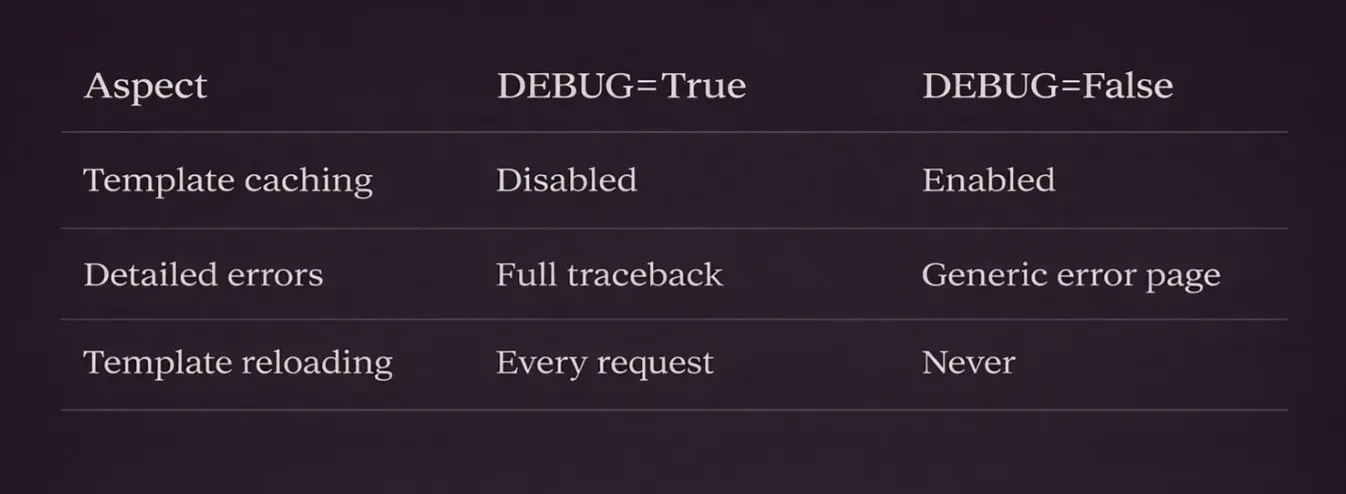
Debug Mode vs Production
# settings.py
DEBUG = True  # vs False
# django/template/loaders/filesystem.py
class Loader(BaseLoader):
    def get_template(self, template_name, skip=None):
        if settings.DEBUG:
            # Always reload from disk
            return self._load_template(template_name)
        else:
            # Use cached version
            return self._get_cached_template(template_name)
Common Mistakes
Mistake 1: Logic in Templates
<!-- ❌ Don't do this -->
{% if user.orders.count > 0 and user.orders.last.status == 'pending' and user.profile.notifications_enabled %}
This is:
- Hard to read
- Multiple database queries
- Not testable
✅ Fix: Move to view or model method
# models.py
class User(models.Model):
    def should_show_order_notification(self):
        if not self.profile.notifications_enabled:
            return False
        last_order = self.orders.order_by('-created').first()
        return last_order and last_order.status == 'pending'
{% if user.should_show_order_notification %}
Mistake 2: N+1 in Templates
{% for order in orders %}
    <li>{{ order.customer.name }}</li>  <!-- ❌ N queries! -->
{% endfor %}
✅ Fix: Prefetch in view
orders = Order.objects.select_related('customer')
Mistake 3: Expensive Defaults
{{ description|default:get_default_description }}
get_default_description is called even if description exists!
✅ Fix: Use default_if_none or check first
{% if description %}{{ description }}{% else %}{{ get_default_description }}{% endif %}
What’s Next
This was the template engine — lexing, parsing, and rendering.
Next in the series: Form and Validation Pipeline — how Django forms transform POST data into validated Python objects, the field resolution order, and why validation sometimes behaves unexpectedly.
Series: Django Under the Hood
- Request Lifecycle
- ORM Query Compiler
- Connection Management
- Signal Dispatch
- Template Engine Compilation ← You are here
- Form Pipeline
- Authentication Chain
- Static Files
- Migration System
- Test Client