Django Under Hood 09: Django’s Migration System - From Model Changes to ALTER TABLE
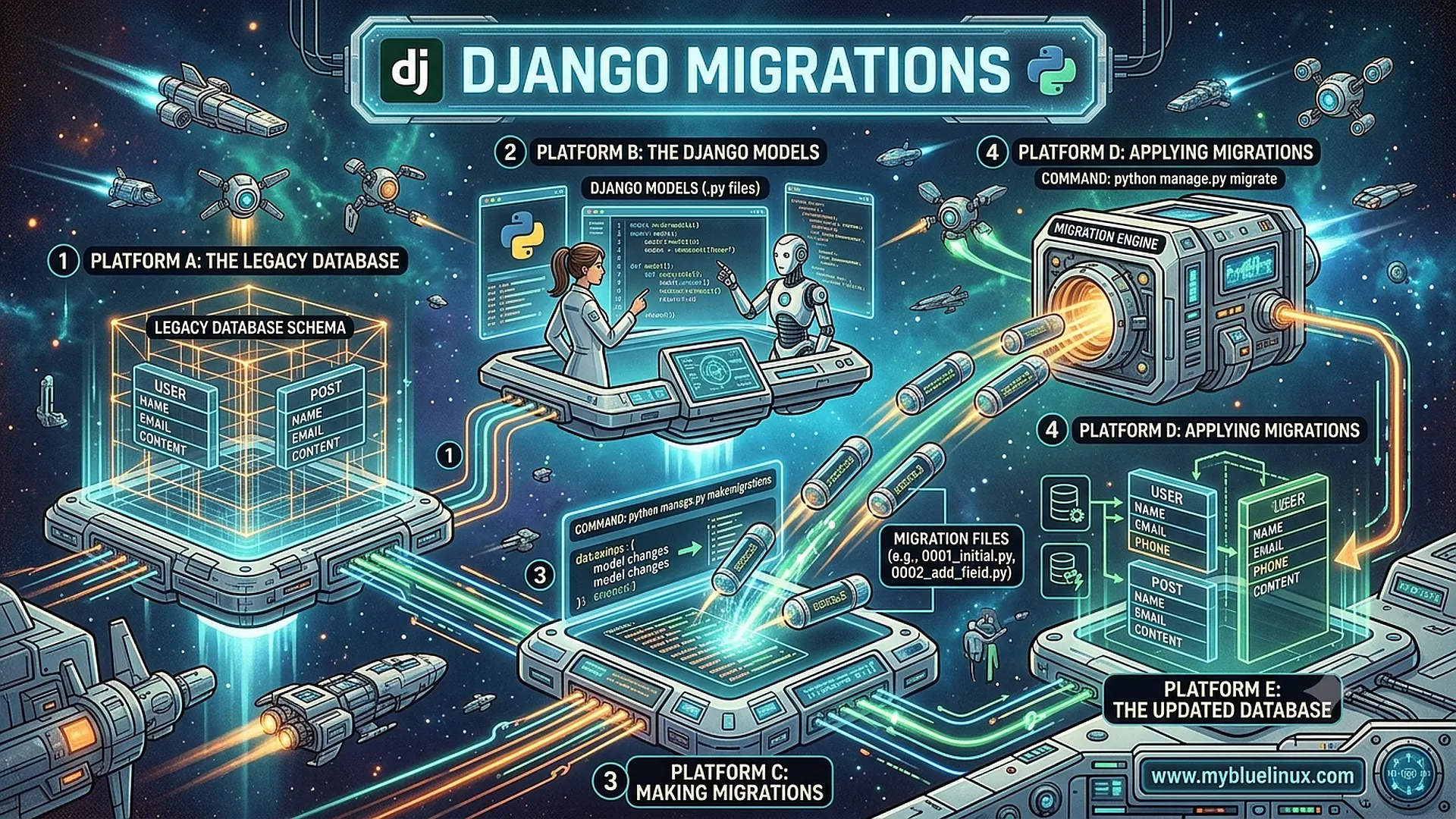
Part 9 of the “Django Under the Hood ” series — deep dives into Django’s internals, edge cases, and the mechanics that separate production-grade applications from tutorial code.
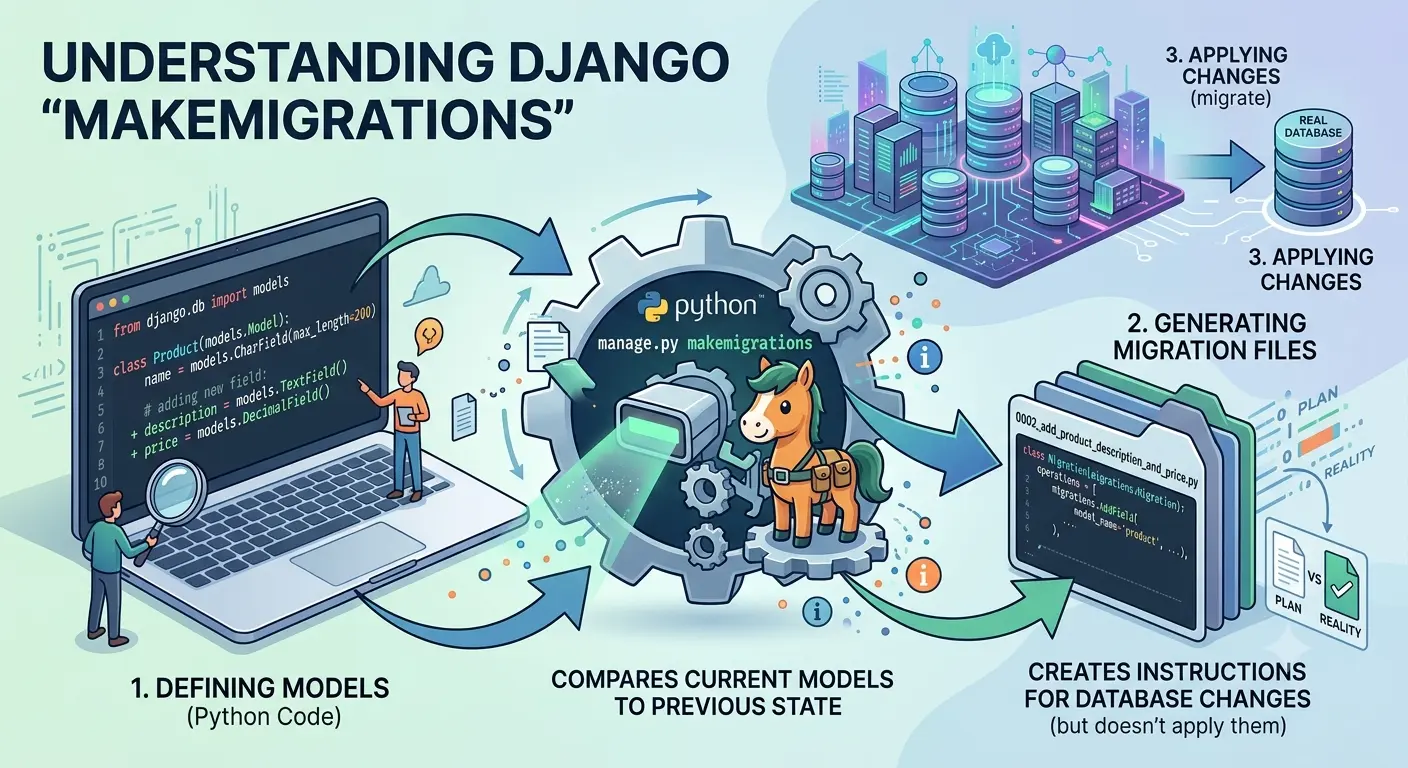
python manage.py makemigrations
Migrations for 'myapp':
  myapp/migrations/0003_auto_20240115_1423.py
    - Add field published_at to article
    - Alter field title on article
How does Django know what changed?
You didn’t tell it. You just modified your model class. Yet Django correctly detected that you added a field and changed another. It generated the exact SQL operations needed to transform your database schema.
This isn’t magic. It’s a sophisticated diff algorithm that compares your current model definitions against a reconstructed state from previous migrations. Understanding this system prevents migration disasters: operations that lose data, migrations that can’t be reversed, and the dreaded “conflicting migrations” in team environments.
Let’s trace from makemigrations to ALTER TABLE.
The Migration File
# myapp/migrations/0003_auto_20240115_1423.py
from django.db import migrations, models

class Migration(migrations.Migration):
    dependencies = [
        ('myapp', '0002_article_author'),
    ]

    operations = [
        migrations.AddField(
            model_name='article',
            name='published_at',
            field=models.DateTimeField(null=True),
        ),
        migrations.AlterField(
            model_name='article',
            name='title',
            field=models.CharField(max_length=255),  # Was 100
        ),
    ]
A migration is:
- Dependencies: What must run before this
- Operations: Changes to apply
The migration file is Python code, but it’s also a data structure that Django can inspect, reverse, and combine.
makemigrations: The Detection Pipeline
python manage.py makemigrations
Step 1: Load Current Models (ProjectState)
Django builds a representation of your current models:
# django/db/migrations/state.py
class ProjectState:
    def __init__(self, models=None):
        self.models = models or {}  # {(app_label, model_name): ModelState}

    @classmethod
    def from_apps(cls, apps):
        """Build state from current installed apps."""
        state = cls()
        for app_config in apps.get_app_configs():
            for model in app_config.get_models():
                state.add_model(ModelState.from_model(model))
        return state
ModelState captures everything about a model:
class ModelState:
    def __init__(self, app_label, name, fields, options=None, bases=None, managers=None):
        self.app_label = app_label
        self.name = name
        self.fields = dict(fields)  # {field_name: field_instance}
        self.options = options or {}
        self.bases = bases or (models.Model,)
        self.managers = managers or []
Step 2: Reconstruct State from Migrations (Historical State)
Django replays all existing migrations to build what the database should look like:
# django/db/migrations/loader.py
class MigrationLoader:
    def __init__(self, connection):
        self.migrated_apps = set()
        self.disk_migrations = {}
        self.load_disk()

    def load_disk(self):
        """Load migration files from disk."""
        for app_config in apps.get_app_configs():
            migrations_dir = os.path.join(app_config.path, 'migrations')

            for name in os.listdir(migrations_dir):
                if name.endswith('.py') and not name.startswith('_'):
                    module = import_module(f'{app_config.name}.migrations.{name[:-3]}')
                    self.disk_migrations[(app_config.label, name[:-3])] = module.Migration

    def project_state(self, nodes=None):
        """Replay migrations to get historical state."""
        state = ProjectState()

        for migration in self.get_migration_plan(nodes):
            state = migration.mutate_state(state)

        return state
Step 3: Diff the States (Autodetector)
The autodetector compares current state vs historical state:
# django/db/migrations/autodetector.py
class MigrationAutodetector:
    def __init__(self, from_state, to_state):
        self.from_state = from_state  # Historical (from migrations)
        self.to_state = to_state      # Current (from models)

    def changes(self, graph, ...):
        """Detect all changes between states."""
        self.generated_operations = {}

        # Order matters - detect in dependency order
        self._detect_changes()

        return self._build_migration_list()

    def _detect_changes(self):
        # 1. New models
        self.generate_created_models()

        # 2. Deleted models
        self.generate_deleted_models()

        # 3. Renamed models
        self.generate_renamed_models()

        # 4. Field changes
        self.generate_added_fields()
        self.generate_removed_fields()
        self.generate_altered_fields()
        self.generate_renamed_fields()

        # 5. Index/constraint changes
        self.generate_added_indexes()
        self.generate_removed_indexes()
        self.generate_added_constraints()
        self.generate_removed_constraints()

        # 6. Other changes
        self.generate_altered_options()
        self.generate_altered_managers()
The Diffing Logic
How does Django know a field was renamed vs deleted and added?
def generate_renamed_fields(self):
    """Detect field renames by comparing old/new fields."""
    for app_label, model_name in self.kept_model_keys:
        old_model = self.from_state.models[app_label, model_name]
        new_model = self.to_state.models[app_label, model_name]

        old_fields = set(old_model.fields.keys())
        new_fields = set(new_model.fields.keys())

        removed = old_fields - new_fields
        added = new_fields - old_fields

        # Try to match removed → added by field properties
        for old_name in removed:
            old_field = old_model.fields[old_name]

            for new_name in added:
                new_field = new_model.fields[new_name]

                if self.fields_match(old_field, new_field):
                    # Likely a rename - ask user to confirm
                    if self.questioner.ask_rename(model_name, old_name, new_name):
                        self.add_operation(
                            app_label,
                            operations.RenameField(model_name, old_name, new_name)
                        )
                        removed.discard(old_name)
                        added.discard(new_name)
                        break
This is why makemigrations asks questions:
Did you rename article.name to article.title? [y/N]
Django detects a removed field and an added field with similar properties, and asks if it’s a rename.
Operations: The Building Blocks
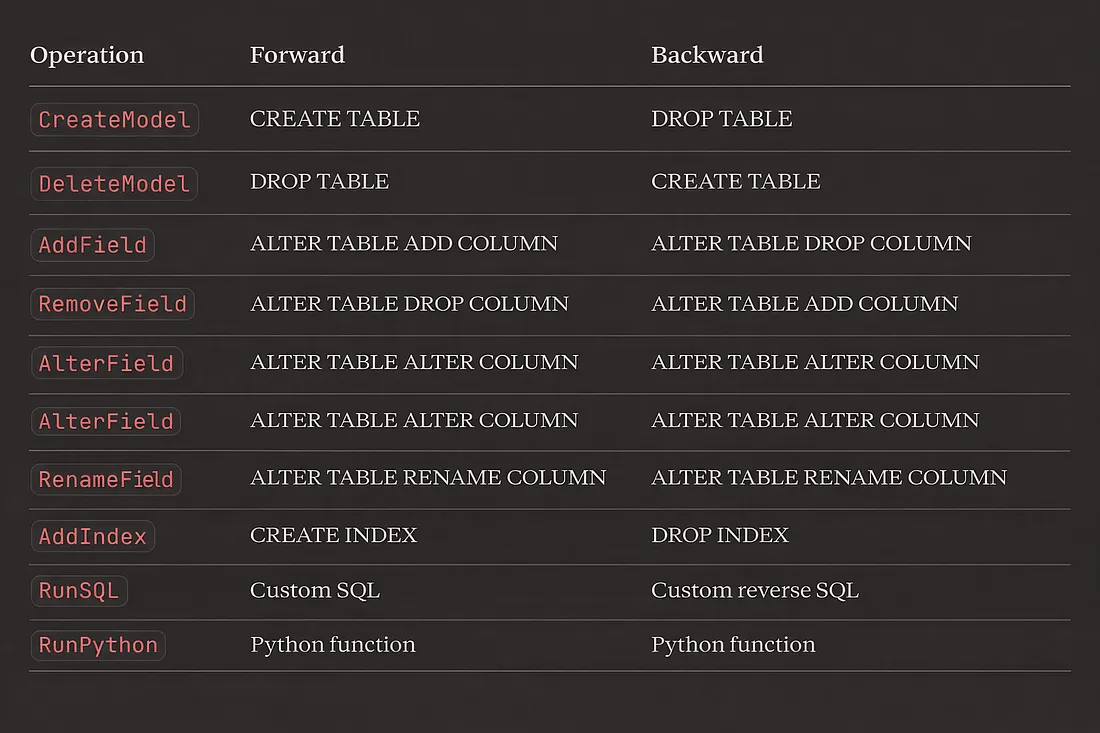
Each operation knows how to:
- Modify the project state (for future diffs)
- Generate forward SQL
- Generate reverse SQL (for rollback)
# django/db/migrations/operations/fields.py
class AddField(FieldOperation):
    def __init__(self, model_name, name, field):
        self.model_name = model_name
        self.name = name
        self.field = field

    def state_forwards(self, app_label, state):
        """Update ProjectState to include this field."""
        state.models[app_label, self.model_name].fields[self.name] = self.field.clone()

    def database_forwards(self, app_label, schema_editor, from_state, to_state):
        """Apply to database."""
        to_model = to_state.apps.get_model(app_label, self.model_name)
        field = to_model._meta.get_field(self.name)
        schema_editor.add_field(to_model, field)

    def database_backwards(self, app_label, schema_editor, from_state, to_state):
        """Reverse the operation."""
        from_model = from_state.apps.get_model(app_label, self.model_name)
        field = from_model._meta.get_field(self.name)
        schema_editor.remove_field(from_model, field)
Operation Types
migrate: The Execution Pipeline
~] python manage.py migrate
Step 1: Build the Migration Graph
Migrations form a directed acyclic graph (DAG):
# django/db/migrations/graph.py
class MigrationGraph:
    def __init__(self):
        self.nodes = {}  # (app, name) → Migration
        self.dependencies = {}  # (app, name) → [(app, name), ...]

    def add_node(self, key, migration):
        self.nodes[key] = migration
        self.dependencies[key] = []

    def add_dependency(self, migration, child, parent):
        self.dependencies[child].append(parent)
Visualized:
myapp/0001_initial
         ↓
myapp/0002_add_author ← auth/0001_initial
         ↓
myapp/0003_add_published_at
Step 2: Determine What to Run
# django/db/migrations/executor.py
class MigrationExecutor:
    def __init__(self, connection):
        self.connection = connection
        self.loader = MigrationLoader(connection)
        self.recorder = MigrationRecorder(connection)

    def migration_plan(self, targets):
        """Determine which migrations to run."""
        applied = self.recorder.applied_migrations()

        plan = []
        for target in targets:
            for migration in self.loader.graph.forwards_plan(target):
                if migration not in applied:
                    plan.append((migration, False))  # False = forward

        return plan
Step 3: Execute Each Migration
def migrate(self, targets, plan=None, fake=False):
    if plan is None:
        plan = self.migration_plan(targets)

    for migration, backwards in plan:
        if backwards:
            self.unapply_migration(migration, fake=fake)
        else:
            self.apply_migration(migration, fake=fake)

def apply_migration(self, migration_key, fake=False):
    migration = self.loader.get_migration(*migration_key)

    if fake:
        # Just record it as applied
        self.recorder.record_applied(*migration_key)
        return

    # Get state before this migration
    state = self.loader.project_state(migration_key, at_end=False)

    # Apply operations
    with self.connection.schema_editor(atomic=migration.atomic) as schema_editor:
        state = migration.apply(state, schema_editor)

    # Record as applied
    self.recorder.record_applied(*migration_key)
Step 4: Schema Editor Generates SQL
# django/db/backends/base/schema.py
class BaseDatabaseSchemaEditor:
    def add_field(self, model, field):
        """Generate ALTER TABLE ADD COLUMN."""

        # Get column definition
        definition, params = self.column_sql(model, field)

        # Build SQL
        sql = self.sql_create_column % {
            'table': self.quote_name(model._meta.db_table),
            'column': self.quote_name(field.column),
            'definition': definition,
        }

        self.execute(sql, params)

    sql_create_column = "ALTER TABLE %(table)s ADD COLUMN %(column)s %(definition)s"
Each database backend has its own schema editor with vendor-specific SQL:
# PostgreSQL
sql_create_column = "ALTER TABLE %(table)s ADD COLUMN %(column)s %(definition)s"

# MySQL
sql_create_column = "ALTER TABLE %(table)s ADD COLUMN %(column)s %(definition)s"

# SQLite (more complex - often requires table recreation)
The Migration Recorder
# django/db/migrations/recorder.py
class MigrationRecorder:
    """Tracks which migrations have been applied."""

    class Migration(models.Model):
        app = models.CharField(max_length=255)
        name = models.CharField(max_length=255)
        applied = models.DateTimeField(default=now)

        class Meta:
            db_table = 'django_migrations'

    def applied_migrations(self):
        return {(m.app, m.name) for m in self.Migration.objects.all()}

    def record_applied(self, app, name):
        self.Migration.objects.create(app=app, name=name)

    def record_unapplied(self, app, name):
        self.Migration.objects.filter(app=app, name=name).delete()
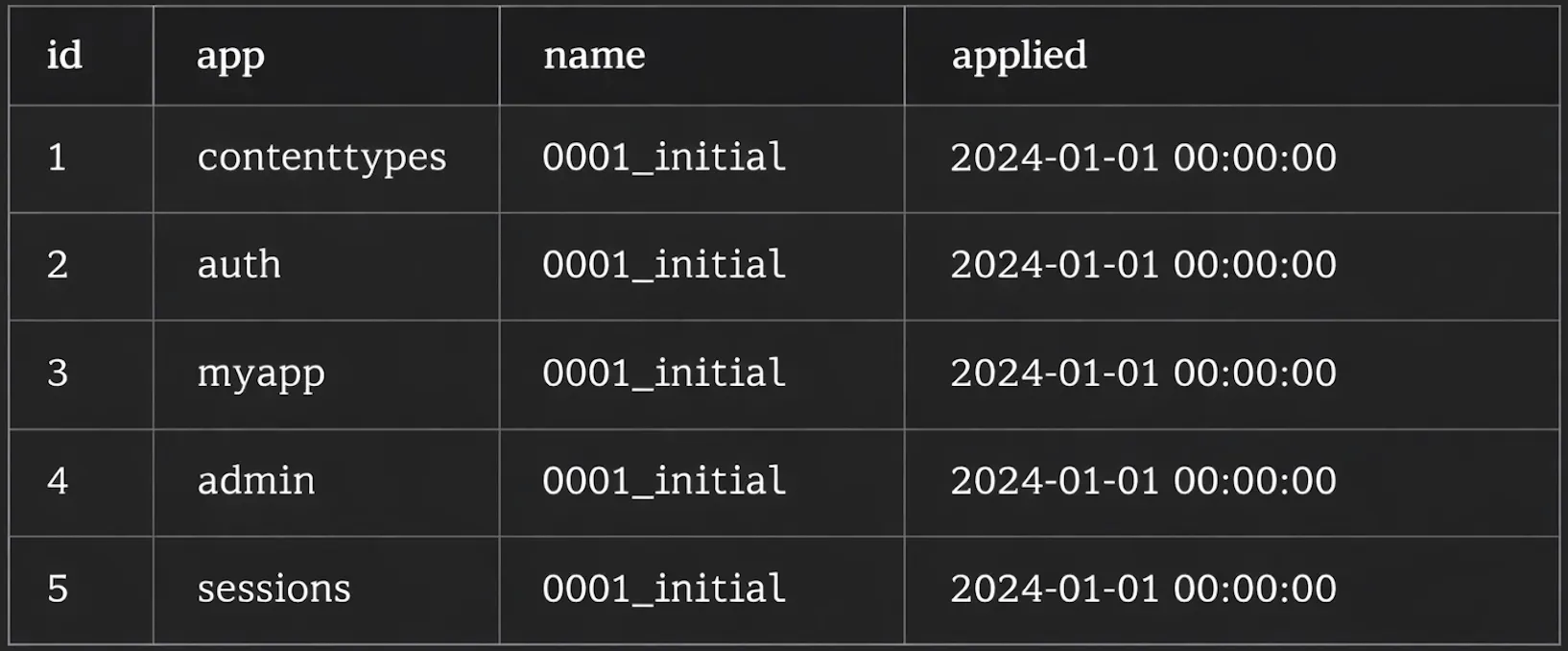
The django_migrations table is the source of truth:
SELECT * FROM django_migrations;
Squashing Migrations
~] python manage.py squashmigrations myapp 0001 0010
Squashing combines multiple migrations into one:
# django/core/management/commands/squashmigrations.py
class Command(BaseCommand):
    def handle(self, *args, **options):
        # Load migrations to squash
        migrations_to_squash = self.get_migrations_to_squash(...)

        # Combine all operations
        operations = []
        for migration in migrations_to_squash:
            operations.extend(migration.operations)

        # Optimize: remove redundant operations
        optimizer = MigrationOptimizer()
        operations = optimizer.optimize(operations, app_label)

        # Generate squashed migration
        new_migration = Migration(
            f'0001_squashed_0010_{...}',
            operations=operations,
            replaces=[m.name for m in migrations_to_squash],
        )
The Optimizer
# django/db/migrations/optimizer.py
class MigrationOptimizer:
    def optimize(self, operations, app_label):
        """Remove redundant operations."""
        result = list(operations)

        # Keep optimizing until no changes
        while True:
            new_result = self.optimize_inner(result, app_label)
            if new_result == result:
                break
            result = new_result

        return result

    def optimize_inner(self, operations, app_label):
        """Single optimization pass."""
        new_operations = []

        for i, operation in enumerate(operations):
            # Try to merge with previous operations
            merged = False

            for j in range(len(new_operations) - 1, -1, -1):
                result = operation.reduce(new_operations[j], app_label)

                if result is not None:
                    # Operations can be merged
                    new_operations = new_operations[:j] + list(result) + new_operations[j+1:]
                    merged = True
                    break

            if not merged:
                new_operations.append(operation)

        return new_operations
Example optimizations:
# Before optimization
AddField('title')
AlterField('title')
AlterField('title')

# After optimization
AddField('title')  # Final state only
# Before optimization
AddField('temp')
RemoveField('temp')

# After optimization
(nothing)  # Field never existed
RunPython: Custom Operations
def populate_slugs(apps, schema_editor):
    Article = apps.get_model('myapp', 'Article')
    for article in Article.objects.all():
        article.slug = slugify(article.title)
        article.save()

def reverse_slugs(apps, schema_editor):
    pass  # Can't reverse slug generation

class Migration(migrations.Migration):
    operations = [
        migrations.RunPython(populate_slugs, reverse_slugs),
    ]
Critical: Use apps.get_model(), not direct imports:
# WRONG - uses current model definition
from myapp.models import Article

def populate_slugs(apps, schema_editor):
    for article in Article.objects.all():  # Might have fields that don't exist yet!
        ...

# RIGHT - uses historical model state
def populate_slugs(apps, schema_editor):
    Article = apps.get_model('myapp', 'Article')
    for article in Article.objects.all():  # Has only fields from this migration point
        ...
Common Issues
Issue 1: Conflicting Migrations
CommandError: Conflicting migrations detected; multiple leaf nodes in the migration graph
Two developers created migrations from the same parent:
0002_add_author
         ↓
0003_feature_a (developer 1)
0003_feature_b (developer 2)  ← Conflict!
✅ Fix: Merge migrations
~] python manage.py makemigrations --merge
Creates a merge migration:
class Migration(migrations.Migration):
    dependencies = [
        ('myapp', '0003_feature_a'),
        ('myapp', '0003_feature_b'),
    ]
    operations = []  # Just merges the graph
Issue 2: Cannot Add Non-Nullable Field
django.db.utils.IntegrityError: column "published_at" contains null values
Cause: Adding required field to table with existing data.
✅ Fix: Add with default, or allow null then backfill:
# Option 1: Provide default
migrations.AddField(
    model_name='article',
    name='published_at',
    field=models.DateTimeField(default=timezone.now),
)

# Option 2: Allow null, backfill, then make required
migrations.AddField(
    model_name='article',
    name='published_at',
    field=models.DateTimeField(null=True),
),
migrations.RunPython(backfill_published_at),
migrations.AlterField(
    model_name='article',
    name='published_at',
    field=models.DateTimeField(),
),
Issue 3: Migration Timeout on Large Tables
Adding column to a table with millions of rows can lock the table.
✅ Fix: Use AddField with db_default (Django 5.0+):
migrations.AddField(
    model_name='article',
    name='view_count',
    field=models.IntegerField(db_default=0),  # Database-level default
)
Or use database-specific concurrent operations:
# PostgreSQL: CREATE INDEX CONCURRENTLY
migrations.AddIndex(
    model_name='article',
    index=models.Index(fields=['title']),
)
# Then manually add CONCURRENTLY in RunSQL
Issue 4: Circular Dependencies
# app1/models.py
class Author(models.Model):
    favorite_article = models.ForeignKey('app2.Article', ...)

# app2/models.py
class Article(models.Model):
    author = models.ForeignKey('app1.Author', ...)
✅ Fix: Use string references and ensure migrations are ordered correctly, or break the cycle with nullable fields.
Issue 5: State vs Database Mismatch
~] python manage.py migrate --fake myapp 0003
Marks migration as applied without running it. Dangerous if database doesn’t match!
✅ Fix: Use --fake-initial for initial migrations only, or manually sync state:
# See current state
~] python manage.py showmigrations

# Reset app migrations (nuclear option)
~] python manage.py migrate myapp zero --fake
~] python manage.py migrate myapp --fake
Best Practices
1. One logical change per migration
# Good: separate migrations
# 0003_add_published_at.py
# 0004_add_view_count.py

# Bad: unrelated changes together
# 0003_add_published_at_and_view_count.py
2. Always test rollback
~] python manage.py migrate myapp 0002  # Rollback
~] python manage.py migrate myapp       # Forward again
3. Use --plan before migrating production
~] python manage.py migrate --plan
4. Squash periodically
Keep migration count manageable for new developers.
5. Never edit applied migrations
If it’s in production, create a new migration to fix it.
What’s Next
This was the migration system — from model diff to ALTER TABLE.
Next and final in the series: Test Client and Request Factory Mechanics — how Django simulates HTTP requests, the test client internals, and why some tests don’t behave like real requests.
Series: Django Under the Hood
- Request Lifecycle
- ORM Query Compiler
- Connection Management
- Signal Dispatch
- Template Engine
- Form Pipeline
- Authentication Chain
- Static Files
- Migration System Deep Dive ← You are here
- Test Client