Mastering Sorting in Python: From Basics to Advanced

Sorting data is a fundamental task in programming. Python makes this incredibly easy, powerful, and readable through its built-in functions and methods.
In this article, we will dive deep into how Python handles sorting, explore the crucial difference between the sorted() function and the .sort() method, and master custom sorting using key and lambda functions.
1. The Fundamentals: Two Ways to Sort
Python provides two primary ways to sort an iterable (lists, tuples, dictionaries, sets, etc.). It is critical to understand the distinction between them.
The .sort() Method (In-Place)
The .sort() method is available only on lists. It modifies the list in place and returns None. It does not create a new copy of the list.
# Example 1: Basic in-place sorting
numbers = [5, 2, 9, 1, 5, 6]
result = numbers.sort()

print(f"Original list: {numbers}")
print(f"Return value of .sort(): {result}")

# Output:
# Original list: [1, 2, 5, 5, 6, 9]
# Return value of .sort(): None
The sorted() Function (New Object)
The sorted() function is a built-in Python function that accepts any iterable. It leaves the original iterable untouched and returns a new, sorted list containing the elements.
# Example 2: Sorting with sorted()
# Works on tuples
tuple_data = (5, 2, 9, 1, 5, 6)
sorted_tuple = sorted(tuple_data)

print(f"Original tuple: {tuple_data}")
print(f"Sorted list from sorted(): {sorted_tuple}")

# Output:
# Original tuple: (5, 2, 9, 1, 5, 6)
# Sorted list from sorted(): [1, 2, 5, 5, 6, 9]
💡 Key Takeaway: Use .sort() when you want to save memory and don't need the original list anymore. Use sorted() when you want to preserve the original data structure or are sorting a non-list iterable (like a tuple or set).
2. The reverse Parameter
Both .sort() and sorted() accept a boolean parameter, reverse=True, to sort in descending order instead of the default ascending order.
# Example 3: Descending order
data = [30, 10, 40, 20, 50]
data.sort(reverse=True)
print(f"Descending: {data}")

# Using sorted()
names = ["Charlie", "Alice", "Bob"]
rev_names = sorted(names, reverse=True)
print(f"Descending: {rev_names}")

# Output:
# Descending: [50, 40, 30, 20, 10]
# Descending: ['Charlie', 'Bob', 'Alice']
3. Advanced Sorting with the key Parameter
This is where Python's sorting truly shines. Both .sort() and sorted() accept an optional key argument. The value passed to key must be a function (or callable) that accepts one argument.
Python will call this function on every element of the iterable before making comparisons. The resulting return values are used to determine the order of the elements.
The Simple lambda Function
Usually, when defining a key function, we don't need a full def statement. We use a lambda function—a small, anonymous, single-expression function.
- Syntax:
lambda arguments: expression
Example 4a: Sorting by Length of Strings
Imagine we have a list of strings and we want to sort them not alphabetically, but by how long they are.
words = ["apple", "banana", "cherry", "date"]

# We want Python to sort based on len(item)
words.sort(key=lambda item: len(item))

print(f"Sorted by length: {words}")

# Output:
# Sorted by length: ['date', 'apple', 'cherry', 'banana']
How it works:
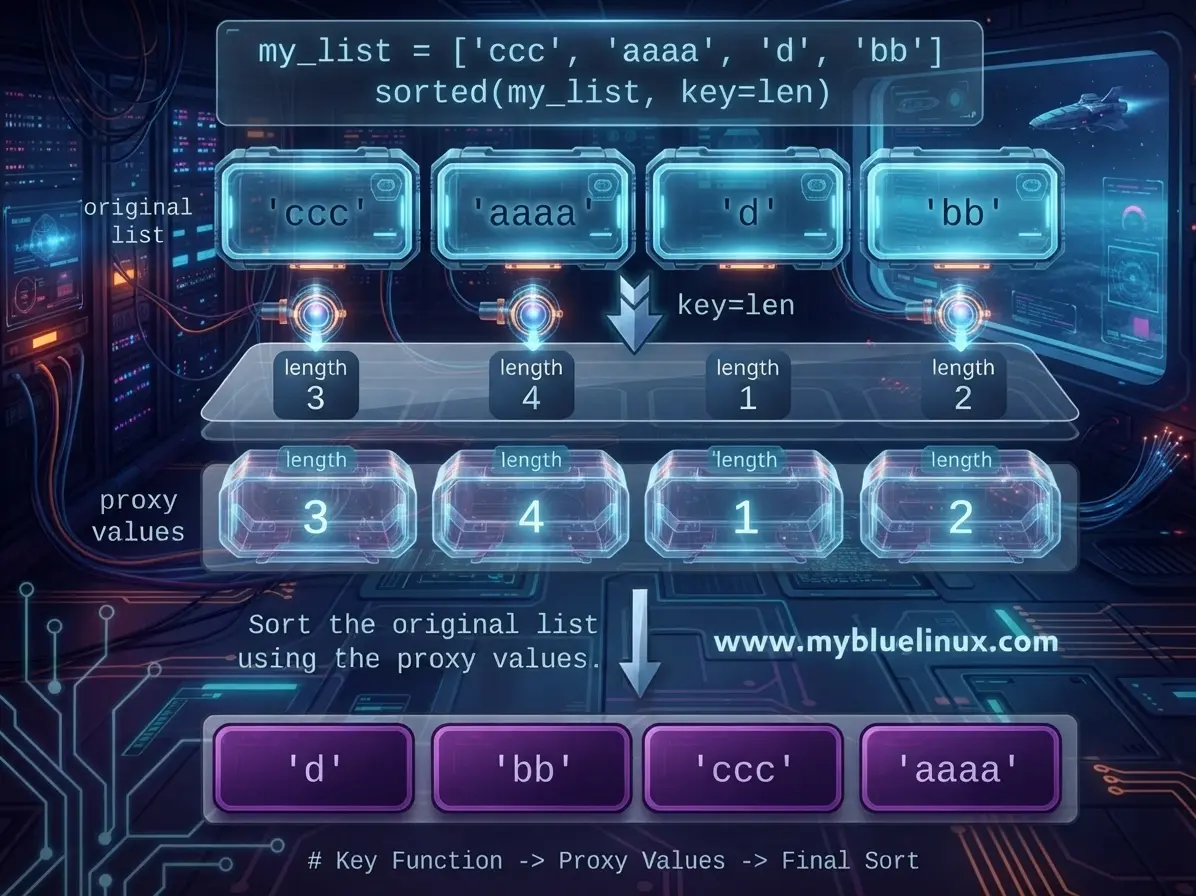
Behind the scenes, Python calculates len('apple'), len('banana'), etc. It compares the resulting numbers (5, 6, 6, 4) and arranges the original strings based on those comparisons.

Example 4b: Sorting with key parameter
my_list = ['ccc', 'aaaa', 'd', 'bb']
print(sorted(my_list, key=len))
# Output: ['d', 'bb', 'ccc', 'aaaa']

# or the same with lambda function
print(sorted(strs, key=lambda x: len(x)))
# Output: ['d', 'bb', 'ccc', 'aaaa']
Example 5: Sorting a List of Dictionaries
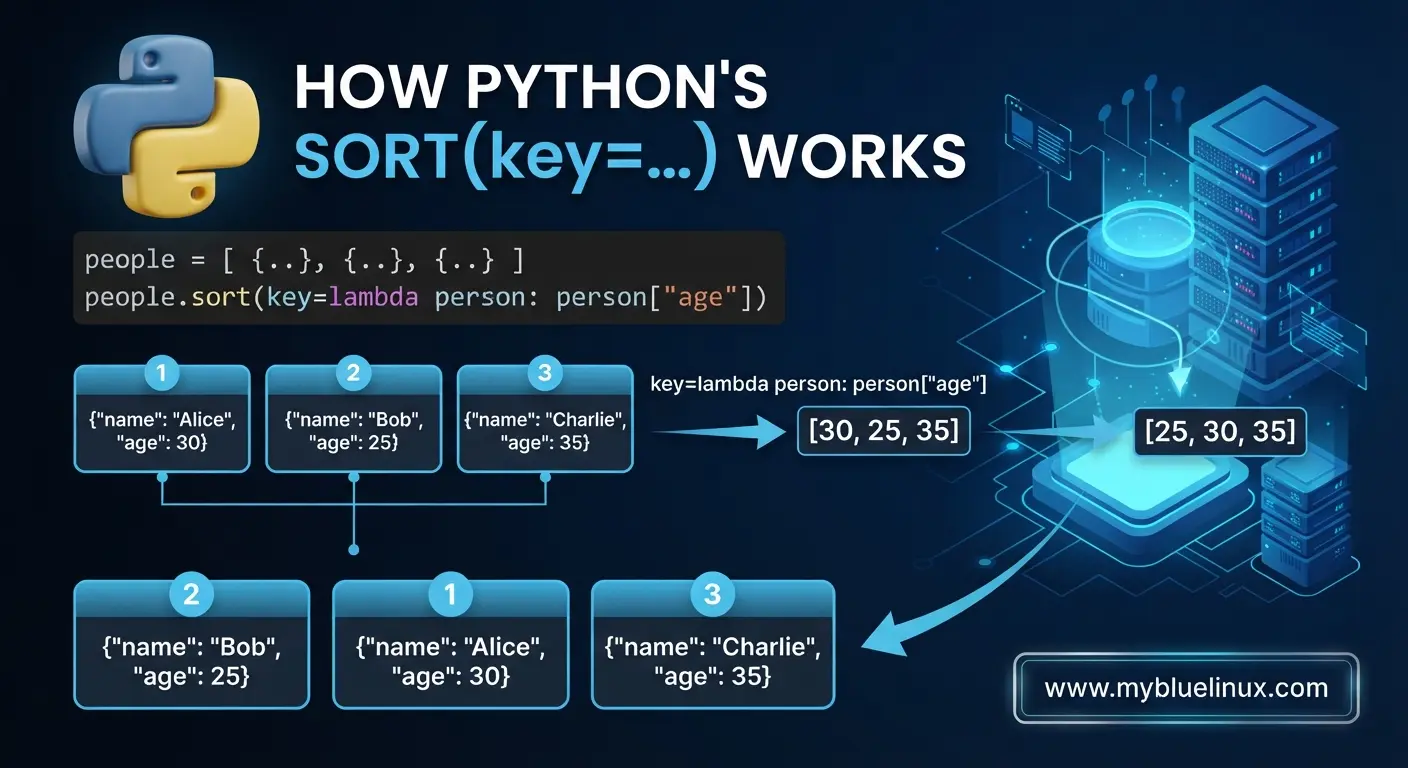
A very common real-world task. We have a list of dictionaries representing people, and we want to sort them by their age.
people = [
    {"name": "Alice", "age": 30},
    {"name": "Bob", "age": 25},
    {"name": "Charlie", "age": 35}
]

# Sort by the value associated with the key "age"
people.sort(key=lambda person: person["age"])

print("Sorted by age:")
for p in people:
    print(p)

# Output:
# Sorted by age:
# {'name': 'Bob', 'age': 25}
# {'name': 'Alice', 'age': 30}
# {'name': 'Charlie', 'age': 35}
4. Real-World Complexity: The operator Module
While lambda is flexible, Python provides the operator module for common key functions. These are slightly faster and often more readable.
The main functions we use for sorting are:
operator.itemgetter(index_or_key): Used for tuples, lists, or dictionaries.operator.attrgetter(attribute_name): Used for objects (instances of classes).
Example 6: itemgetter with Tuples (Database Rows)
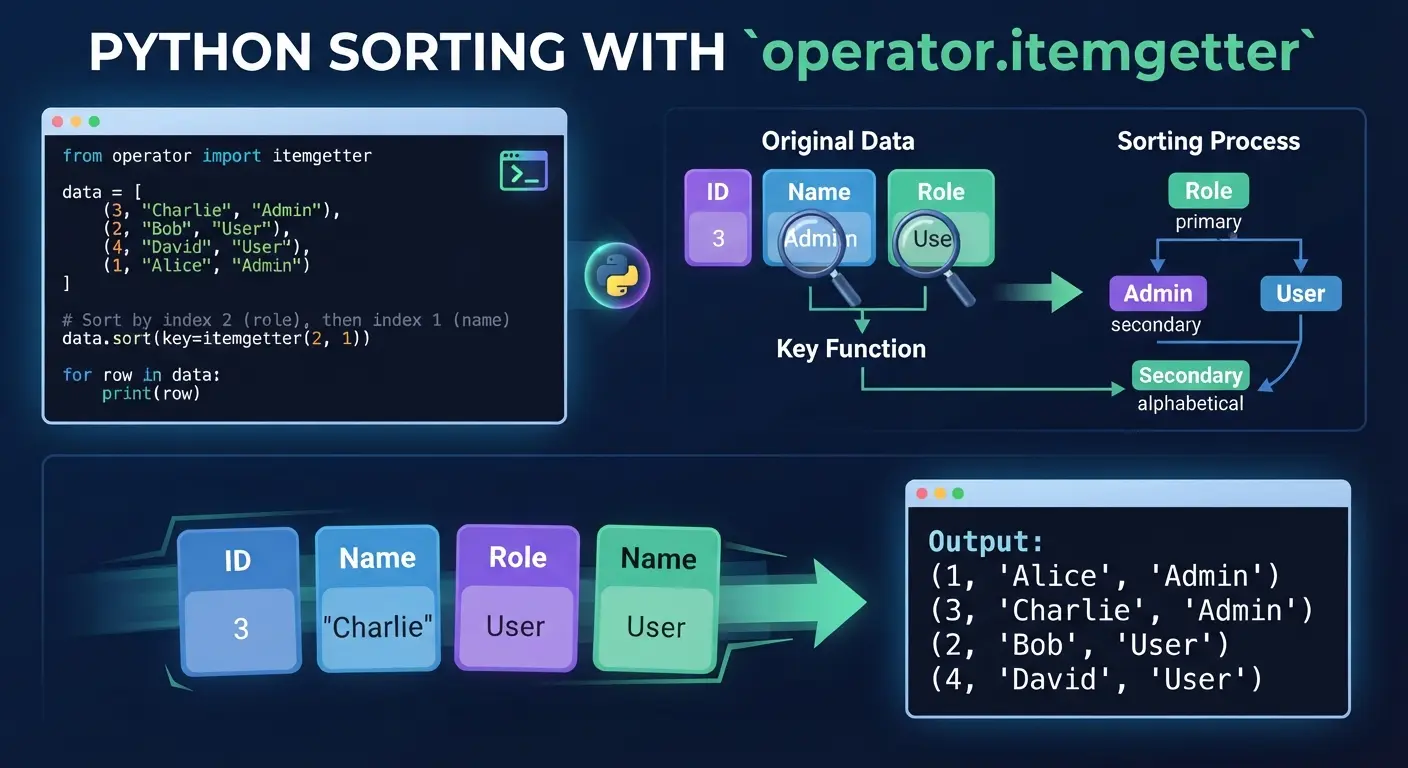
Consider data representing database rows: (id, name, role). We want to sort by role, then name.
from operator import itemgetter

data = [
    (3, "Charlie", "Admin"),
    (2, "Bob", "User"),
    (4, "David", "User"),
    (1, "Alice", "Admin")
]

# Sort by index 2 (role), then index 1 (name)
data.sort(key=itemgetter(2, 1))

for row in data:
    print(row)

# Output:
# (1, 'Alice', 'Admin')
# (3, 'Charlie', 'Admin')
# (2, 'Bob', 'User')
# (4, 'David', 'User')
Example 6b: itemgetter with Dictionaries
While lambda is perfectly fine for dictionaries (as shown in Example 5), itemgetter is slightly faster and can look cleaner when dealing with multiple keys.
from operator import itemgetter

# A list of inventory items
inventory = [
    {'item': 'Widget A', 'price': 20, 'count': 10},
    {'item': 'Widget B', 'price': 15, 'count': 20},
    {'item': 'Widget C', 'price': 20, 'count': 5},
    {'item': 'Widget D', 'price': 15, 'count': 15}
]

# Sort by 'price' (primary), then by 'count' (secondary)
# equivalent to: key=lambda x: (x['price'], x['count'])
inventory.sort(key=itemgetter('price', 'count'))

for item in inventory:
    print(item)

# Output:
# {'item': 'Widget B', 'price': 15, 'count': 20}
# {'item': 'Widget D', 'price': 15, 'count': 15}
# {'item': 'Widget C', 'price': 20, 'count': 5}
# {'item': 'Widget A', 'price': 20, 'count': 10}
Example 7: attrgetter with Custom Objects
When dealing with objects, lambda can be clunky. attrgetter is cleaner.
from operator import attrgetter

class User:
    def __init__(self, username, privilege_level):
        self.username = username
        self.privilege = privilege_level

    def __repr__(self):
        return f"User({self.username}, Lvl:{self.privilege})"

users = [
    User("admin", 1),
    User("editor", 3),
    User("viewer", 2)
]

# Sort by the 'privilege' attribute
users.sort(key=attrgetter('privilege'))

print(users)

# Output:
# [User(admin, Lvl:1), User(viewer, Lvl:2), User(editor, Lvl:3)]
5. Complex Multi-Level Sorting (Tuple Comparison)
Python's sorting algorithm (Timsort) is stable. This means that if two records have equal keys, their original order is preserved.
This allows us to perform complex, multi-level sorts by sorting multiple times in specific orders (least significant key first), or by utilizing tuples as return values for key parameter in sort/sorted function.
Example 8: Sort by Status (Priority) then Alphabetical
Let's use a list of tasks. We want tasks marked "critical" to appear first, sorted alphabetically by their description within that critical group.
tasks = [
    {"id": 1, "desc": "Fix critical bug", "priority": 1},
    {"id": 2, "desc": "Update documentation", "priority": 3},
    {"id": 3, "desc": "Deploy to staging", "priority": 2},
    {"id": 4, "desc": "Write tests", "priority": 1}
]

# Key returns a tuple: (priority_value, description_value)
# Python sorts by the first item in tuple, then the second if first ties.
tasks.sort(key=lambda t: (t["priority"], t["desc"]))

for task in tasks:
    print(task)

# Output:
# {'id': 1, 'desc': 'Fix critical bug', 'priority': 1}
# {'id': 4, 'desc': 'Write tests', 'priority': 1}
# {'id': 3, 'desc': 'Deploy to staging', 'priority': 2}
# {'id': 2, 'desc': 'Update documentation', 'priority': 3}
To sort by priority ascending but description descending, we can negate numeric values (if applicable) or combine key functions (though that requires more advanced tooling like functools.cmp_to_key, which is rarely needed nowadays).
More Python complex sorting examples
Example 9: Sort list from both integers and strings, integers first
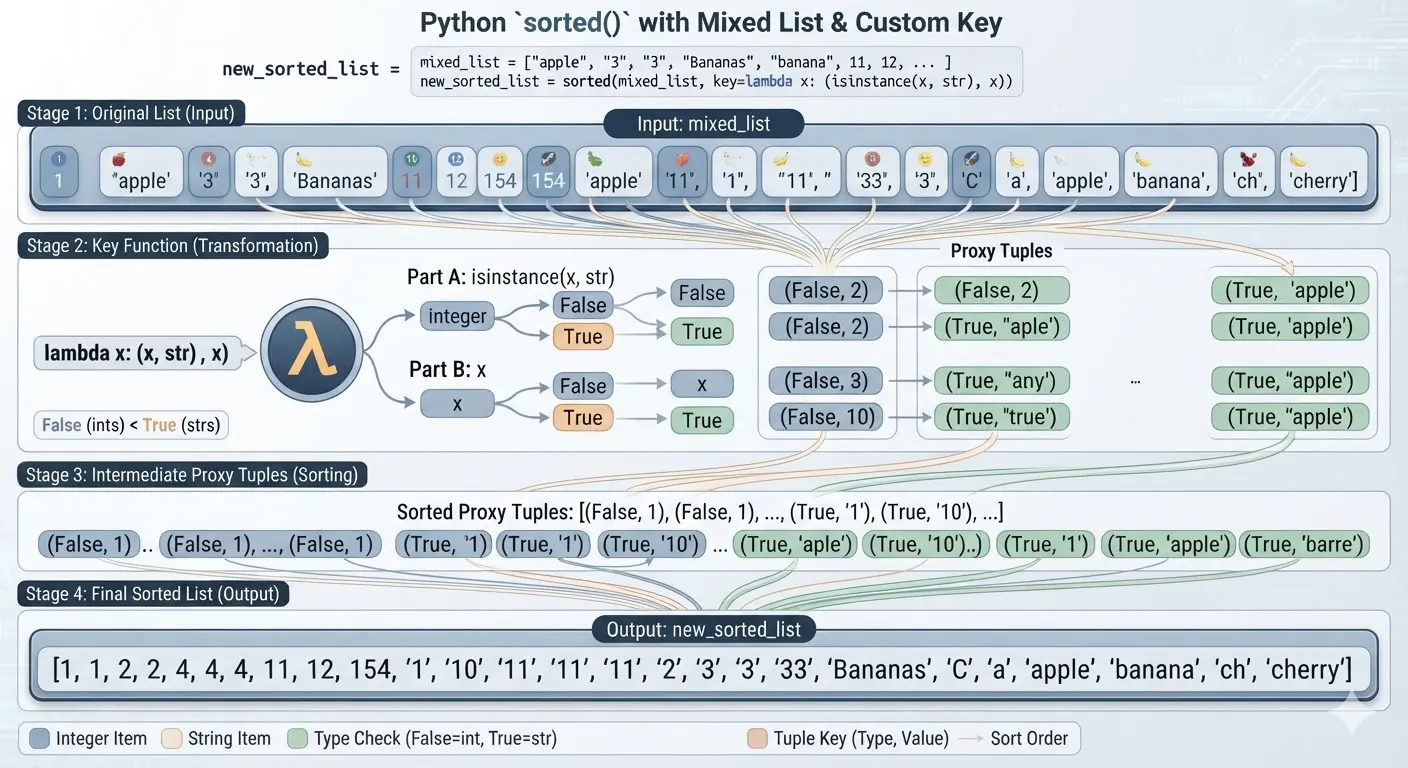
mixed_list = ["apple", "3", "3", "Bananas", "banana", 11, 12, "33", 154, 1, 2, 4, 1, 4, 4, "10", "1", "2", "11", "11", "11", "cherry", 2, "a", "C", "ch"]

new_sorted_list = sorted(mixed_list,
    key=lambda x: (isinstance(x, str), x)
)
print(new_sorted_list)
# Output:
[1, 1, 2, 2, 4, 4, 4, 11, 12, 154, '1', '10', '11', '11', '11', '2', '3', '3', '33', 'Bananas', 'C', 'a', 'apple', 'banana', 'ch', 'cherry']
How It Works
- Tuple Comparison: Python sorts tuples element by element.
- Type Checking:
isinstance(x, str)returnsFalsefor integers andTruefor strings. - Boolean Evaluation: Because
False(0) is less thanTrue(1), all integers get grouped before all strings. - Tie-Breaking: If two elements have the same type, Python moves to the second value in the
tuple(x)and sorts them normally against each other.
This tuple is used as proxy values in sorting example above
[(isinstance(x, str), x) for x in mixed_list]
# return:
[(True, 'apple'), (True, '3'), (True, '3'), (True, 'Bananas'), (True, 'banana'), (False, 11), (False, 12), (True, '33'), (False, 154), (False, 1), (False, 2), (False, 4),
(False, 1), (False, 4), (False, 4), (True, '10'), (True, '1'), (True, '2'), (True, '11'), (True, '11'), (True, '11'), (True, 'cherry'), (False, 2), (True, 'a'), (True, 'C'), (True, 'ch')]
- Alphabetical sorting
- In standard character encoding (ASCII/Unicode), lowercase letters have higher numeric values than uppercase letters.
'b'has an ASCII value of 98'B'has an ASCII value of 66- Because
98 > 66, the string"b"is considered greater than"B". "B" < "b" # --> True "b" > "B" # --> True- Ascending order (smallest to largest):
"B"comes first, then"b". - Descending order (largest to smallest):
"b"comes first, then"B".
Example 9b: Sort list from both integers and strings, strings First
mixed_list = ["apple", "3", "3", "Bananas", "banana", 11, 12, "33", 154, 1, 2, 4, 1, 4, 4, "10", "1", "2", "11", "11", "11", "cherry", 2, "a", "C", "ch"]

new_sorted_list = sorted(mixed_list,
    key=lambda x: (isinstance(x, int), x)
)
print(new_sorted_list)
# Output:
['1', '10', '11', '11', '11', '2', '3', '3', '33', 'Bananas', 'C', 'a', 'apple', 'banana', 'ch', 'cherry', 1, 1, 2, 2, 4, 4, 4, 11, 12, 154]
Example 10: Sort list contains integers as strings and strings, integers first, than integers as text, last strings
Use this custom sorted() configuration to group all numeric items first in mathematical order, followed by alphabetical text:
mixed_list = ["apple", "3", "3", "Bananas", "banana", 11, 12, "33", 154, 1, 2, 4, 1, 4, 4, "10", "1", "2", "11", "11", "11", "cherry", 2, "a", "C", "ch"]

new_sorted_list = sorted(mixed_list,
    key=lambda x: (
        not (str(x).isdigit()),            # Group 1: Numbers first, text second
        int(x) if str(x).isdigit() else x  # Group 2: Sort numbers numerically, text alphabetically
    )
)

print(new_sorted_list)
# Output:
[1, 1, '1', 2, '2', 2, '3', '3', 4, 4, 4, '10', 11, '11', '11', '11', 12, '33', 154, 'Bananas', 'C', 'a', 'apple', 'banana', 'ch', 'cherry']
How It Works
str(x).isdigit(): This instantly normalizes both actual integers and string integers into text to check if they are entirely numeric.not (str(x).isdigit()): Evaluates toFalse(0) for numbers andTrue(1) for text. Because0 < 1, all numbers shift to the front of the list.int(x) if str(x).isdigit() else x: Ties are broken safely. Numbers are converted to pure integers so that "10" correctly sorts after 2. Text values are left as strings to sort alphabetically.
What is sorting tuple?:
[(not (str(x).isdigit()), int(x) if str(x).isdigit() else x) for x in mixed_list]
[(True, 'apple'), (False, 3), (False, 3), (True, 'Bananas'), (True, 'banana'), (False, 11), (False, 12), (False, 33), (False, 154), (False, 1), (False, 2), (False, 4), (False, 1), (False, 4), (False, 4), (False, 10), (False, 1), (False, 2), (False, 11), (False, 11), (False, 11), (True, 'cherry'), (False, 2), (True, 'a'), (True, 'C'), (True, 'ch')]
Summary Checklist of Python Sorting
list.sort(): Modifies list in-place, returnsNone. Use for memory efficiency.sorted(iterable): Returns a new sorted list. Use for any iterable, preserves original.reverse=True: Sorts descending.key=...: Defines how items are transformed before comparison.lambda: Quick, one-line functions for thekeyparameter.operatormodule: Faster, cleaner alternatives to lambda (itemgetter,attrgetter).- Stability: Python preserves the relative order of equal keys, allowing complex multi-pass or tuple-based sorting.