Django Testing Strategies with Examples
What this article teaches:
How to build a test suite that catches real bugs, the testing layers that matter in Django applications, and the patterns that keep tests fast, readable, and worth maintaining.
The Test Suite Nobody Trusts
Every team has experienced it. The test suite has 800 tests. They all pass. The deployment goes out. And then a customer reports that the checkout flow is broken.
The problem isn’t that the team didn’t write tests. The problem is that they wrote the wrong tests. Unit tests that verify individual functions in isolation but never test how those functions work together. Integration tests that mock so aggressively they’re testing the mocks, not the application. No end-to-end tests because “they’re too slow and flaky.”
A useful test suite is layered. Different types of tests catch different types of bugs, and the ratio between them matters. Too many unit tests and you miss integration failures. Too many end-to-end tests and your suite takes an hour to run. The right balance depends on your application, but the principles are consistent.
This article covers each testing layer in a Django application, when each one earns its keep, and the practical patterns that make the difference between a test suite that catches bugs and one that just makes CI green.
The Testing Pyramid in Django
 Django Testing Pyramid Structure
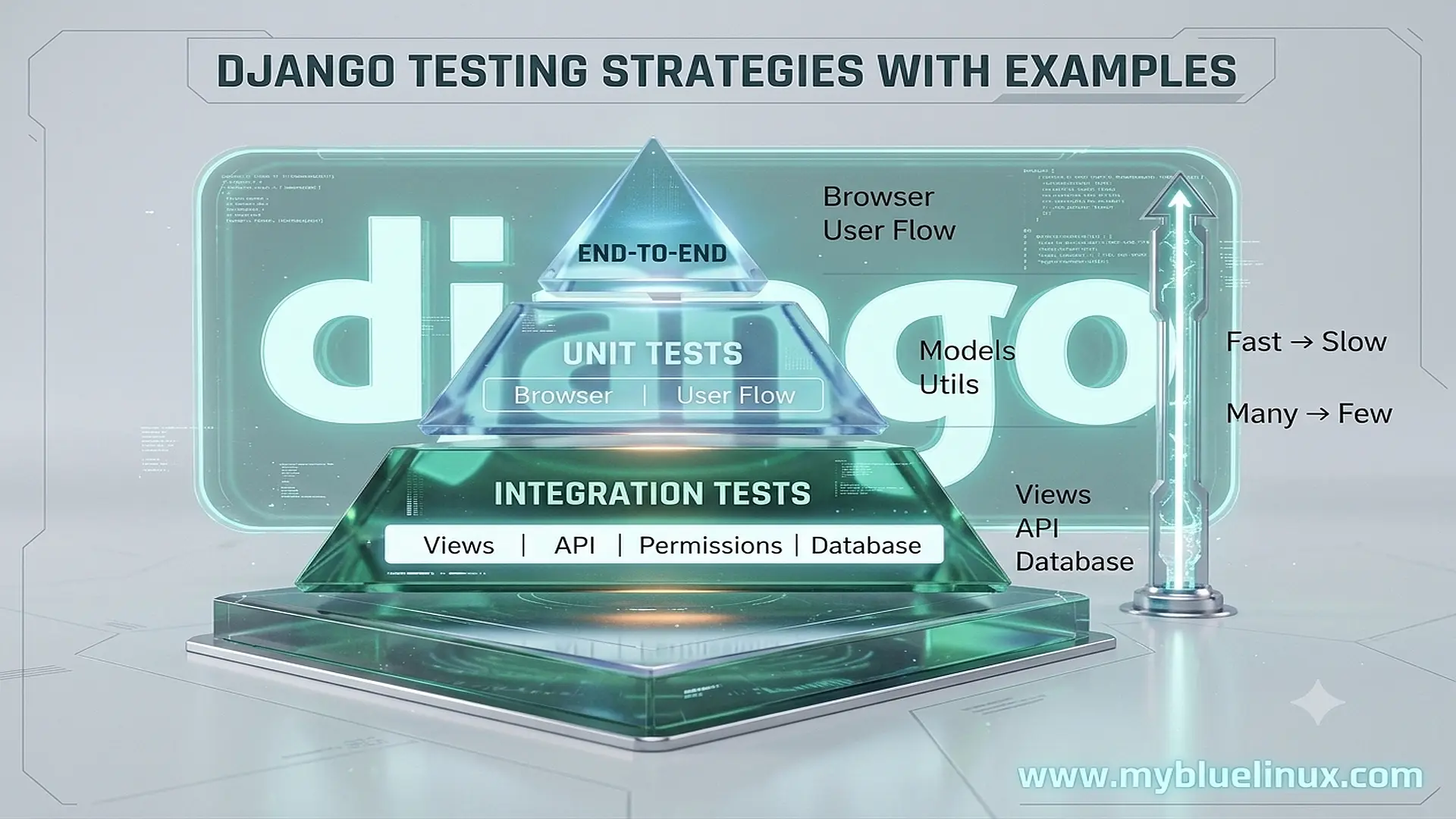
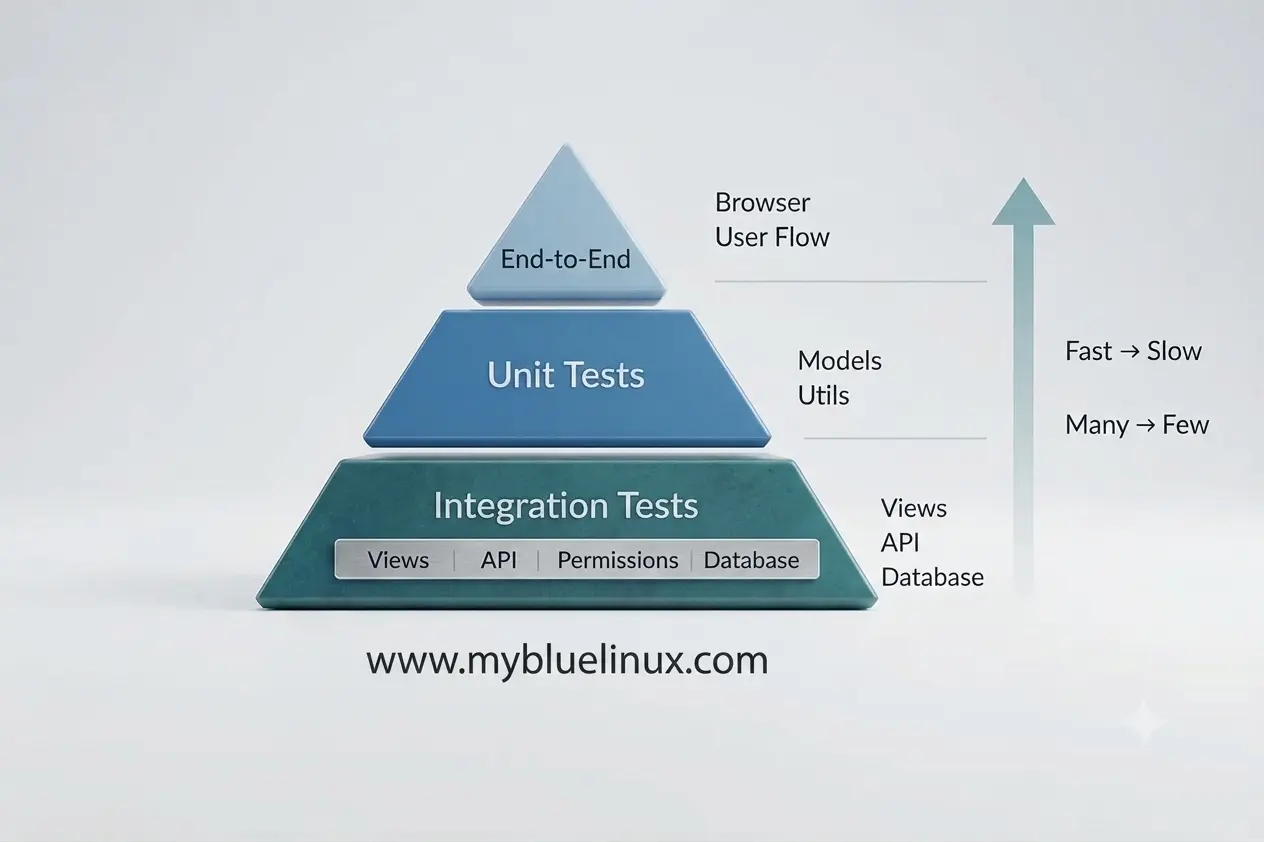
The testing pyramid is a useful mental model. At the base, you have many fast unit tests. In the middle, fewer integration tests that verify components working together. At the top, a small number of end-to-end tests that exercise the full stack.
In Django, these layers map to specific concerns:
Unit tests verify models, utility functions, validators, and custom template tags in isolation. They don’t make HTTP requests. They might or might not touch the database.
Integration tests verify views, serializers, forms, and middleware by making requests through Django’s test client. They exercise URL routing, authentication, permissions, and database queries together.
End-to-end tests verify complete user flows through a browser. They cover the full stack including JavaScript, form submissions, redirects, and multi-step workflows.
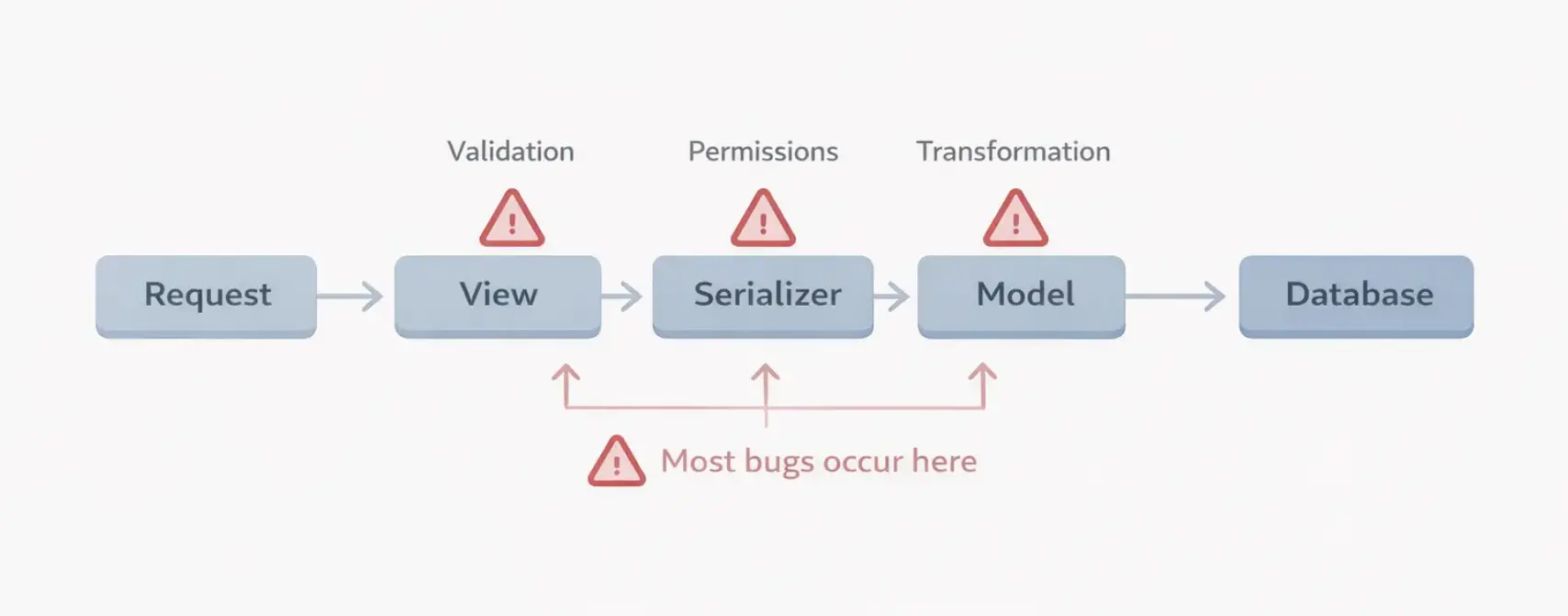
Most Django applications should be heavy on integration tests. The reason is practical: Django’s architecture means that most bugs live at the boundaries — a view that calls a model method, passes data to a serializer, checks permissions, and returns a response. Testing each piece in isolation misses the failures that happen when they’re connected.
 Django - Where Bugs Actually Happen
Setting Up a Test Environment
Before writing tests, your test infrastructure needs to be right. Small decisions here compound across thousands of test runs.
pytest-django Over unittest
 Pytest Fixture Composition
Django ships with unittest-based testing, but pytest-django is the standard in production projects. The reasons are practical: less boilerplate, better assertion output, fixtures that are more flexible than setUp methods, and a plugin ecosystem.
Further reading: Django Test Client
# conftest.py
import pytest

@pytest.fixture
def api_client():
    from rest_framework.test import APIClient
    return APIClient()

@pytest.fixture
def authenticated_user(db):
    from django.contrib.auth import get_user_model
    User = get_user_model()
    user = User.objects.create_user(
        username='testuser',
        email='test@example.com',
        password='testpass123',
    )
    return user

@pytest.fixture
def auth_client(api_client, authenticated_user):
    api_client.force_authenticate(user=authenticated_user)
    return api_client
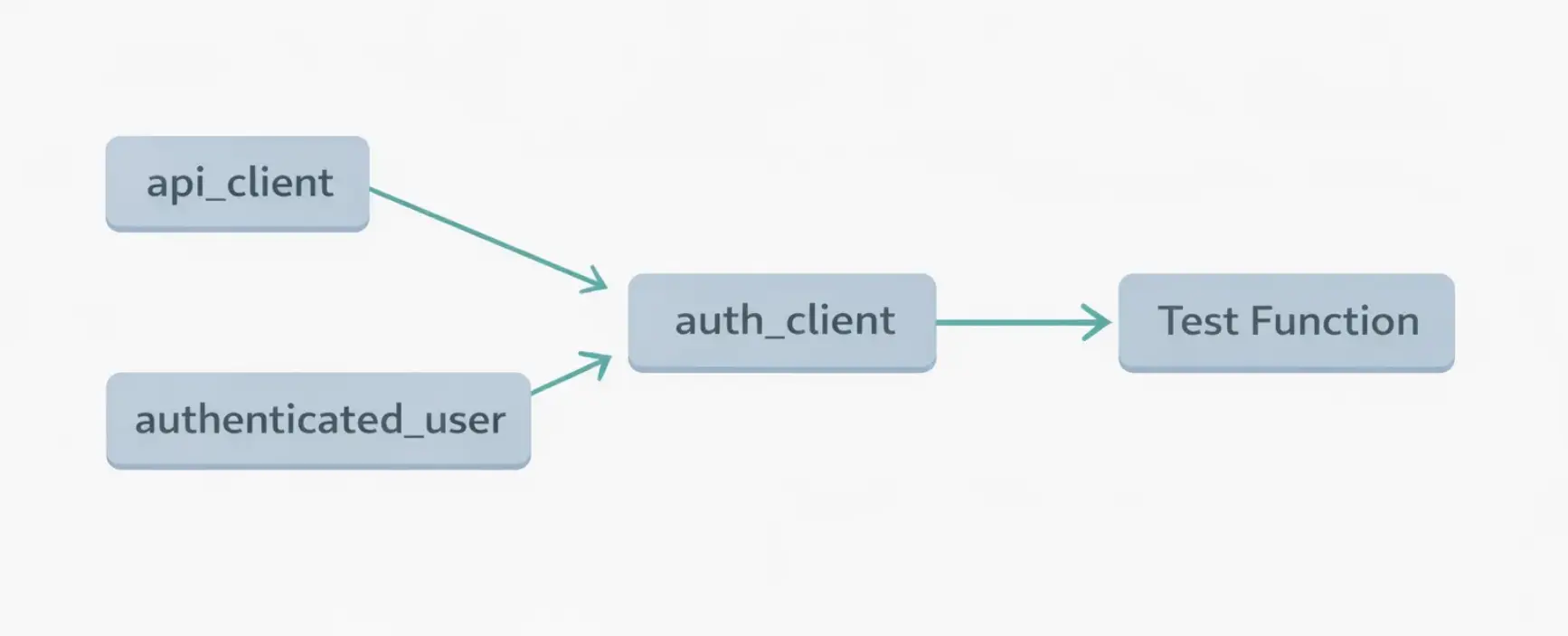
Fixtures compose. auth_client depends on api_client and authenticated_user. pytest resolves the dependency chain automatically. Every test that needs an authenticated API client just declares auth_client as a parameter — no inheritance hierarchy, no setUp methods that grow into a hundred lines.
Factory Boy for Test Data
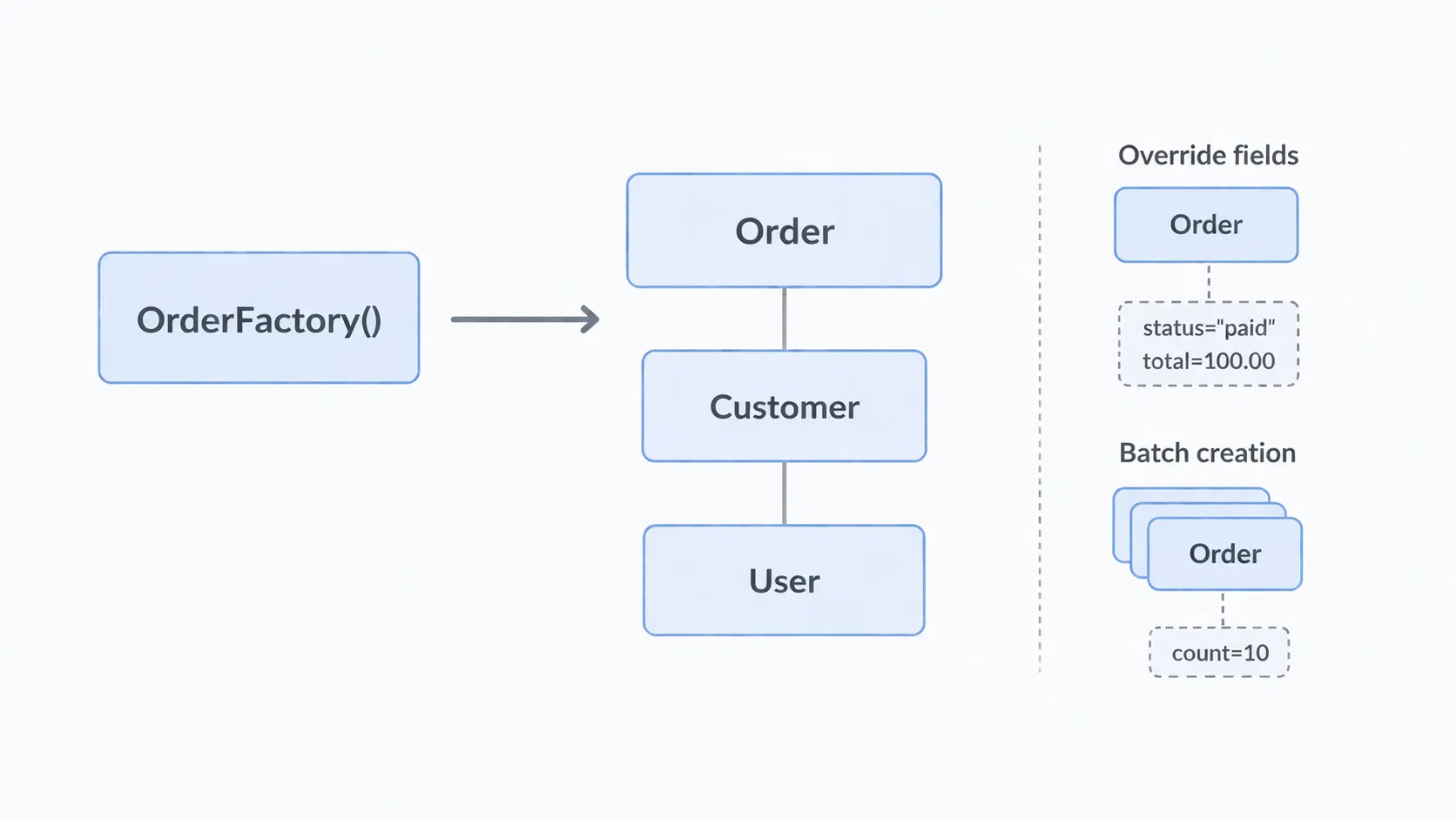 Django - Factory-Based Test Data Creation
Constructing test data manually is tedious and fragile. When you add a required field to a model, every test that creates that model breaks.
Factory Boy generates test data from declarations:
# factories.py
import factory
from factory.django import DjangoModelFactory

class UserFactory(DjangoModelFactory):
    class Meta:
        model = 'accounts.User'

    username = factory.Sequence(lambda n: f'user_{n}')
    email = factory.LazyAttribute(lambda obj: f'{obj.username}@example.com')
    password = factory.PostGenerationMethodCall('set_password', 'defaultpass')

class CustomerFactory(DjangoModelFactory):
    class Meta:
        model = 'orders.Customer'

    user = factory.SubFactory(UserFactory)
    name = factory.Faker('company')
    email = factory.LazyAttribute(lambda obj: obj.user.email)

class OrderFactory(DjangoModelFactory):
    class Meta:
        model = 'orders.Order'

    customer = factory.SubFactory(CustomerFactory)
    status = 'pending'
    total = factory.Faker('pydecimal', left_digits=4, right_digits=2, positive=True)
Now creating test data is one line:
order = OrderFactory()  # Creates order, customer, and user
order = OrderFactory(status='shipped', total=Decimal('500.00'))  # Override defaults
orders = OrderFactory.create_batch(10)  # Create 10 orders
When you add a required field to the Order model, you update the factory once. Every test that uses OrderFactory continues to work.
Database Transactions for Speed
By default, Django wraps each test in a transaction and rolls it back when the test ends. This is fast because it avoids actually writing data to disk.
# pytest.ini or pyproject.toml
[tool.pytest.ini_options]
DJANGO_SETTINGS_MODULE = "myproject.settings.test"

# settings/test.py
DATABASES = {
    'default': {
        'ENGINE': 'django.db.backends.postgresql',
        'NAME': 'test_myproject',
        'OPTIONS': {
            'options': '-c default_transaction_isolation=read\ committed'
        }
    }
}

# Disable password hashing in tests for speed
PASSWORD_HASHERS = [
    'django.contrib.auth.hashers.MD5PasswordHasher',
]
The MD5PasswordHasher swap is a significant optimization. Bcrypt and Argon2 are intentionally slow (to resist brute force attacks). Using MD5 in tests eliminates this overhead. A test suite that creates hundreds of users can be minutes faster with this one change.
Unit Tests: Testing Logic in Isolation
Unit tests verify the smallest pieces of your application: model methods, utility functions, validators, and calculations. They’re fast, focused, and should make up a significant portion of your test suite.
Testing Model Methods
class TestOrderModel:
    def test_can_cancel_pending_order(self):
        order = OrderFactory.build(status='pending')
        assert order.can_cancel() is True

    def test_cannot_cancel_delivered_order(self):
        order = OrderFactory.build(status='delivered')
        assert order.can_cancel() is False

    def test_total_with_discount(self):
        order = OrderFactory.build(total=Decimal('100.00'))
        assert order.discounted_total(percent=10) == Decimal('90.00')

    def test_total_with_zero_discount(self):
        order = OrderFactory.build(total=Decimal('100.00'))
        assert order.discounted_total(percent=0) == Decimal('100.00')
Notice OrderFactory.build() instead of OrderFactory.create(). The build method creates an in-memory instance without touching the database. For tests that only exercise model methods and don't need persistence, this eliminates database overhead entirely.
Testing Validators
from django.core.exceptions import ValidationError
from myapp.validators import validate_business_email

class TestBusinessEmailValidator:
    def test_accepts_business_email(self):
        validate_business_email('contact@acmecorp.com')  # Should not raise

    def test_rejects_gmail(self):
        with pytest.raises(ValidationError, match="business email"):
            validate_business_email('user@gmail.com')

    def test_rejects_yahoo(self):
        with pytest.raises(ValidationError, match="business email"):
            validate_business_email('user@yahoo.com')

    def test_case_insensitive(self):
        with pytest.raises(ValidationError):
            validate_business_email('user@GMAIL.COM')
pytest.raises is cleaner than assertRaises. The match parameter checks the error message, which verifies that the right validation rule triggered — not just that some validation failed.
Testing Utility Functions
from myapp.utils import calculate_shipping_cost

class TestShippingCalculation:
    def test_standard_shipping(self):
        cost = calculate_shipping_cost(weight_kg=2.5, method='standard')
        assert cost == Decimal('5.99')

    def test_express_shipping_surcharge(self):
        cost = calculate_shipping_cost(weight_kg=2.5, method='express')
        assert cost == Decimal('14.99')

    def test_free_shipping_above_threshold(self):
        cost = calculate_shipping_cost(weight_kg=1.0, method='standard', order_total=Decimal('100.00'))
        assert cost == Decimal('0.00')

    def test_heavy_package_additional_fee(self):
        cost = calculate_shipping_cost(weight_kg=35.0, method='standard')
        assert cost > calculate_shipping_cost(weight_kg=5.0, method='standard')
Pure functions are the easiest code to test. No database, no network, no state. If you can extract logic into pure functions, do it — not just for testability, but for clarity.
Integration Tests: Where Real Bugs Live
Integration tests exercise multiple components together. In Django, the most common pattern is making HTTP requests through the test client and verifying the response — including database state, response content, and side effects.
Testing Views and API Endpoints
@pytest.mark.django_db
class TestOrderAPI:
    def test_create_order(self, auth_client, authenticated_user):
        customer = CustomerFactory(user=authenticated_user)
        payload = {
            'customer': customer.id,
            'total': '150.00',
        }

        response = auth_client.post('/api/orders/', payload, format='json')

        assert response.status_code == 201
        assert Order.objects.count() == 1
        order = Order.objects.first()
        assert order.customer == customer
        assert order.total == Decimal('150.00')
        assert order.status == 'pending'  # Default status

    def test_create_order_unauthenticated(self, api_client):
        response = api_client.post('/api/orders/', {}, format='json')
        assert response.status_code in (401, 403)

    def test_list_orders_shows_only_own(self, auth_client, authenticated_user):
        own_customer = CustomerFactory(user=authenticated_user)
        own_order = OrderFactory(customer=own_customer)
        other_order = OrderFactory()  # Belongs to a different user

        response = auth_client.get('/api/orders/')

        assert response.status_code == 200
        order_ids = [o['id'] for o in response.data['results']]
        assert own_order.id in order_ids
        assert other_order.id not in order_ids
The third test is the most valuable. It verifies that one user cannot see another user’s orders. This is the type of access control bug that slips into production when a developer forgets to filter by user in a queryset. A test like this catches it permanently.
Testing Form Submissions
@pytest.mark.django_db
class TestContactForm:
    def test_valid_submission_sends_email(self, client, mailoutbox):
        response = client.post('/contact/', {
            'name': 'Jane Doe',
            'email': 'jane@example.com',
            'message': 'I have a question about your product.',
            'priority': 'normal',
        })

        assert response.status_code == 302  # Redirect on success
        assert len(mailoutbox) == 1
        assert mailoutbox[0].to == ['support@example.com']
        assert 'Jane Doe' in mailoutbox[0].body

    def test_invalid_email_shows_error(self, client):
        response = client.post('/contact/', {
            'name': 'Jane Doe',
            'email': 'not-an-email',
            'message': 'Hello',
            'priority': 'normal',
        })

        assert response.status_code == 200  # Re-renders form
        assert 'Enter a valid email' in response.content.decode()
mailoutbox is a pytest-django fixture that captures emails sent during the test. No actual emails are sent. You verify the email was created with the right recipient and content.
Testing Permissions Systematically
Permission bugs are among the most damaging. A systematic approach tests each permission scenario explicitly:
@pytest.mark.django_db
class TestOrderPermissions:
    def test_owner_can_view_order(self, api_client):
        user = UserFactory()
        customer = CustomerFactory(user=user)
        order = OrderFactory(customer=customer)
        api_client.force_authenticate(user=user)

        response = api_client.get(f'/api/orders/{order.id}/')
        assert response.status_code == 200

    def test_other_user_cannot_view_order(self, api_client):
        order = OrderFactory()
        other_user = UserFactory()
        api_client.force_authenticate(user=other_user)

        response = api_client.get(f'/api/orders/{order.id}/')
        assert response.status_code in (403, 404)

    def test_staff_can_view_any_order(self, api_client):
        order = OrderFactory()
        staff_user = UserFactory(is_staff=True)
        api_client.force_authenticate(user=staff_user)

        response = api_client.get(f'/api/orders/{order.id}/')
        assert response.status_code == 200

    def test_anonymous_cannot_view_orders(self, api_client):
        order = OrderFactory()
        response = api_client.get(f'/api/orders/{order.id}/')
        assert response.status_code in (401, 403)

    def test_owner_can_cancel_pending_order(self, api_client):
        user = UserFactory()
        customer = CustomerFactory(user=user)
        order = OrderFactory(customer=customer, status='pending')
        api_client.force_authenticate(user=user)

        response = api_client.post(f'/api/orders/{order.id}/cancel/')
        assert response.status_code == 200
        order.refresh_from_db()
        assert order.status == 'cancelled'

    def test_owner_cannot_cancel_delivered_order(self, api_client):
        user = UserFactory()
        customer = CustomerFactory(user=user)
        order = OrderFactory(customer=customer, status='delivered')
        api_client.force_authenticate(user=user)

        response = api_client.post(f'/api/orders/{order.id}/cancel/')
        assert response.status_code == 400
Six tests. Six permission scenarios. Each one protects against a specific access control failure. This is the kind of test coverage that prevents security incidents.
Testing Celery Tasks
Celery tasks introduce complexity because they execute asynchronously in a different process. In tests, you want them to run synchronously and immediately.
The Eager Mode Approach
# settings/test.py
CELERY_TASK_ALWAYS_EAGER = True
CELERY_TASK_EAGER_PROPAGATES = True
Eager mode executes tasks inline — task.delay() becomes a regular function call. EAGER_PROPAGATES makes task exceptions bubble up to the calling code instead of being swallowed.
This is the simplest approach, but it doesn’t test the serialization boundary. In production, task arguments are serialized to JSON and deserialized on the worker. If you pass a Decimal or a model instance (which can't be serialized to JSON), eager mode works but production breaks.
Testing Tasks as Functions
A more reliable approach is to test tasks as regular functions and test the dispatch separately:
@pytest.mark.django_db
class TestOrderConfirmationTask:
    def test_sends_confirmation_email(self, mailoutbox):
        order = OrderFactory(status='confirmed')

        # Call the function directly, not through Celery
        send_order_confirmation(order.id)

        assert len(mailoutbox) == 1
        assert order.customer.email in mailoutbox[0].to

    def test_skips_if_already_sent(self, mailoutbox):
        order = OrderFactory(
            status='confirmed',
            confirmation_sent_at=timezone.now(),
        )

        send_order_confirmation(order.id)

        assert len(mailoutbox) == 0  # Idempotency check worked

    def test_retries_on_smtp_failure(self):
        order = OrderFactory(status='confirmed')

        with mock.patch('orders.tasks.send_email', side_effect=SMTPException):
            with pytest.raises(SMTPException):
                send_order_confirmation(order.id)
The third test verifies retry behavior by mocking the email sending function to raise an exception. In eager mode, the retry would execute immediately, so testing the retry logic requires either mocking or testing the task configuration separately.
Testing with Mocks: When and How Much
Mocking is a tool for isolating code from external dependencies. It’s essential for testing code that calls third-party APIs, sends emails, or interacts with services you don’t control.
But mocking is overused. Every mock is an assumption about how the mocked dependency behaves. If that assumption is wrong, your tests pass while your production code fails.
When to Mock
Mock external services that you can’t or shouldn’t call in tests:
@pytest.mark.django_db
class TestPaymentProcessing:
    @mock.patch('orders.services.payment_gateway.charge')
    def test_successful_payment(self, mock_charge):
        mock_charge.return_value = {'transaction_id': 'txn_123', 'status': 'success'}
        order = OrderFactory(total=Decimal('99.99'))

        result = process_payment(order.id)

        assert result['status'] == 'success'
        mock_charge.assert_called_once_with(
            customer_id=order.customer.payment_id,
            amount=Decimal('99.99'),
            currency='USD',
        )
        order.refresh_from_db()
        assert order.payment_status == 'completed'

    @mock.patch('orders.services.payment_gateway.charge')
    def test_declined_payment(self, mock_charge):
        mock_charge.side_effect = PaymentDeclinedError("Insufficient funds")
        order = OrderFactory(total=Decimal('99.99'))

        result = process_payment(order.id)

        assert result['status'] == 'declined'
        order.refresh_from_db()
        assert order.payment_status == 'failed'
The mock replaces the payment gateway call with a controlled return value. This lets you test how your code handles both success and failure without actually charging a credit card.
When Not to Mock
Don’t mock Django’s ORM. Don’t mock your own models, forms, or serializers. Don’t mock the test client. These are the components you’re trying to test. Mocking them creates tests that pass regardless of whether the actual code works.
# ❌ BAD: Mocking what you're testing
@mock.patch('orders.models.Order.objects.filter')
def test_pending_orders(self, mock_filter):
    mock_filter.return_value = [mock_order]
    # This test tells you nothing about whether the actual filter works

# ✅ GOOD: Testing the real query
def test_pending_orders(self):
    pending = OrderFactory(status='pending')
    shipped = OrderFactory(status='shipped')

    result = Order.objects.filter(status='pending')

    assert pending in result
    assert shipped not in result
The guideline: mock at the boundary of your system. External APIs, email services, file storage, third-party SDKs — these are the boundaries. Everything inside those boundaries should be tested with real code.
Fixtures and Test Data Patterns
How you manage test data determines whether your tests are readable or cryptic.
Fixtures for Shared State
pytest fixtures provide reusable test data with clear dependency chains:
# conftest.py
@pytest.fixture
def active_subscription(authenticated_user):
    customer = CustomerFactory(user=authenticated_user)
    return SubscriptionFactory(customer=customer, plan='pro', is_active=True)

@pytest.fixture
def expired_subscription(authenticated_user):
    customer = CustomerFactory(user=authenticated_user)
    return SubscriptionFactory(
        customer=customer,
        plan='basic',
        is_active=False,
        expired_at=timezone.now() - timedelta(days=30),
    )
Tests declare which fixtures they need:
def test_pro_features_accessible(auth_client, active_subscription):
    response = auth_client.get('/api/features/advanced-export/')
    assert response.status_code == 200

def test_pro_features_blocked_after_expiry(auth_client, expired_subscription):
    response = auth_client.get('/api/features/advanced-export/')
    assert response.status_code == 403
The fixture names tell the story. You don’t need to read the setup code to understand the test scenario.
Avoid JSON Fixture Files
Django supports loading test data from JSON fixture files (loaddata). Don't use them for application tests. They're brittle (they break when your model changes), opaque (you can't see the relationships between objects), and slow (they bypass model validation).
Factory Boy is better in every way. The factories document the data structure, they adapt to model changes, and they let you override specific fields per test.
Testing Database Constraints
If you’ve added database-level constraints (as discussed in the PostgreSQL article), test that they actually prevent invalid data:
from django.db import IntegrityError

@pytest.mark.django_db
class TestDatabaseConstraints:
    def test_cannot_create_negative_total(self):
        with pytest.raises(IntegrityError):
            OrderFactory(total=Decimal('-10.00'))

    def test_one_active_subscription_per_user(self):
        user = UserFactory()
        customer = CustomerFactory(user=user)
        SubscriptionFactory(customer=customer, is_active=True)

        with pytest.raises(IntegrityError):
            SubscriptionFactory(customer=customer, is_active=True)

    def test_no_overlapping_reservations(self):
        room = RoomFactory()
        ReservationFactory(
            room=room,
            dates=DateRange(date(2024, 7, 1), date(2024, 7, 5)),
        )

        with pytest.raises(IntegrityError):
            ReservationFactory(
                room=room,
                dates=DateRange(date(2024, 7, 3), date(2024, 7, 8)),
            )
These tests verify that the database rejects invalid data regardless of how it’s inserted. They’re a safety net for your safety net.
Django Performance Testing: Catching Slow Code Early
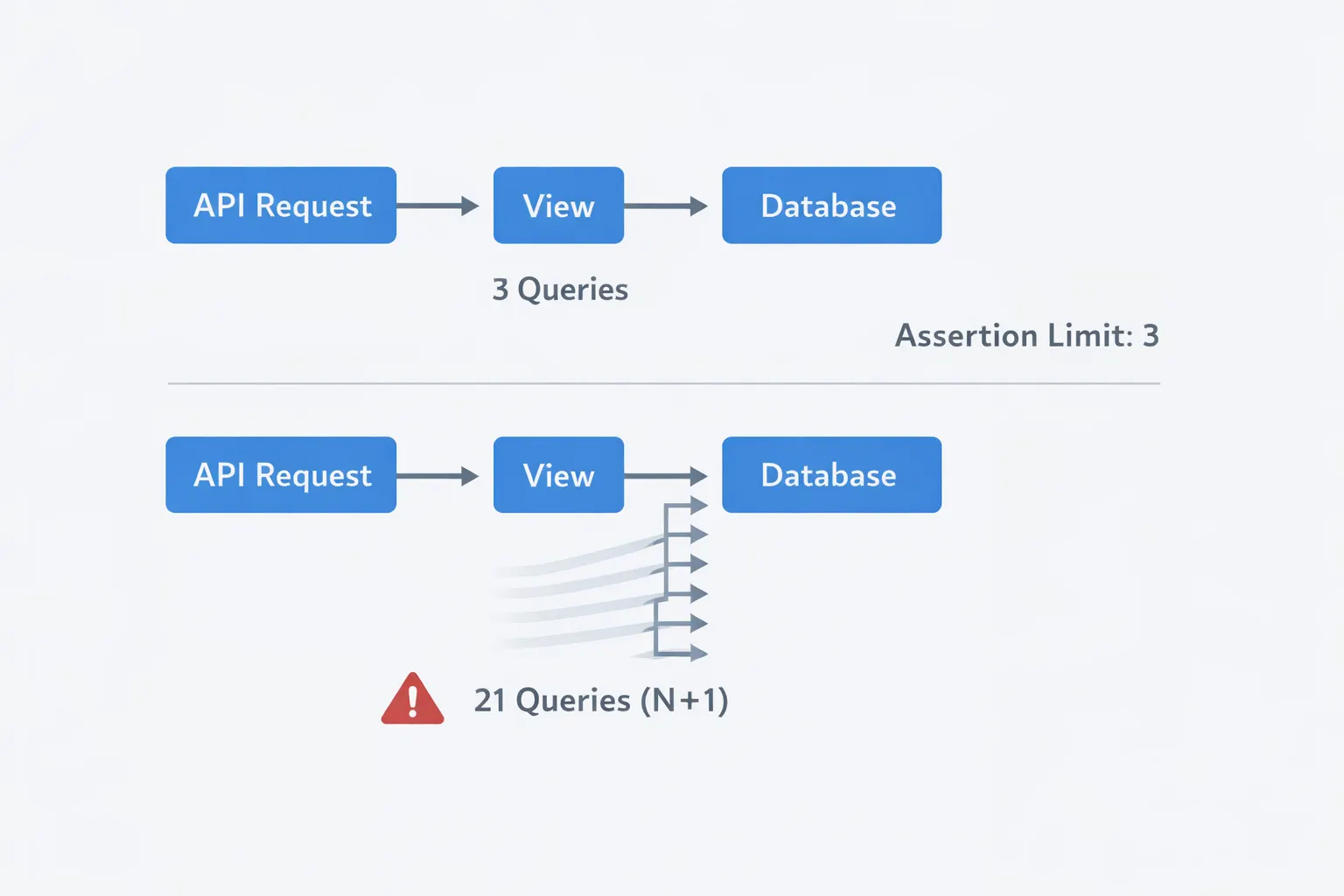 Django Performance Testing
A test that verifies correctness but ignores performance misses an entire category of production failures. Django provides tools to catch performance problems in tests.
Asserting Query Counts
from django.test.utils import override_settings

@pytest.mark.django_db
class TestQueryPerformance:
    def test_order_list_query_count(self, auth_client, authenticated_user, django_assert_num_queries):
        customer = CustomerFactory(user=authenticated_user)
        OrderFactory.create_batch(20, customer=customer)

        with django_assert_num_queries(3):  # 1 auth + 1 orders + 1 count
            response = auth_client.get('/api/orders/')
            assert response.status_code == 200
django_assert_num_queries fails if the view generates more queries than expected. This catches N+1 problems before they reach production. The assertion is a contract: this endpoint should never generate more than 3 queries, regardless of how many orders exist.
When a developer adds a new field to the serializer that accesses a related object, this test fails immediately — before the change is merged.
Testing with Realistic Data Volumes
@pytest.mark.django_db
@pytest.mark.slow  # Mark so these can be skipped in fast test runs
class TestScalePerformance:
    def test_order_list_with_large_dataset(self, auth_client, authenticated_user):
        customer = CustomerFactory(user=authenticated_user)
        OrderFactory.create_batch(1000, customer=customer)

        import time
        start = time.monotonic()
        response = auth_client.get('/api/orders/')
        duration = time.monotonic() - start

        assert response.status_code == 200
        assert duration < 1.0  # Should respond within 1 second
Mark slow tests with @pytest.mark.slow so they can be excluded from the fast feedback loop (pytest -m "not slow") but still run in CI.
End-to-End Tests: The Final Layer
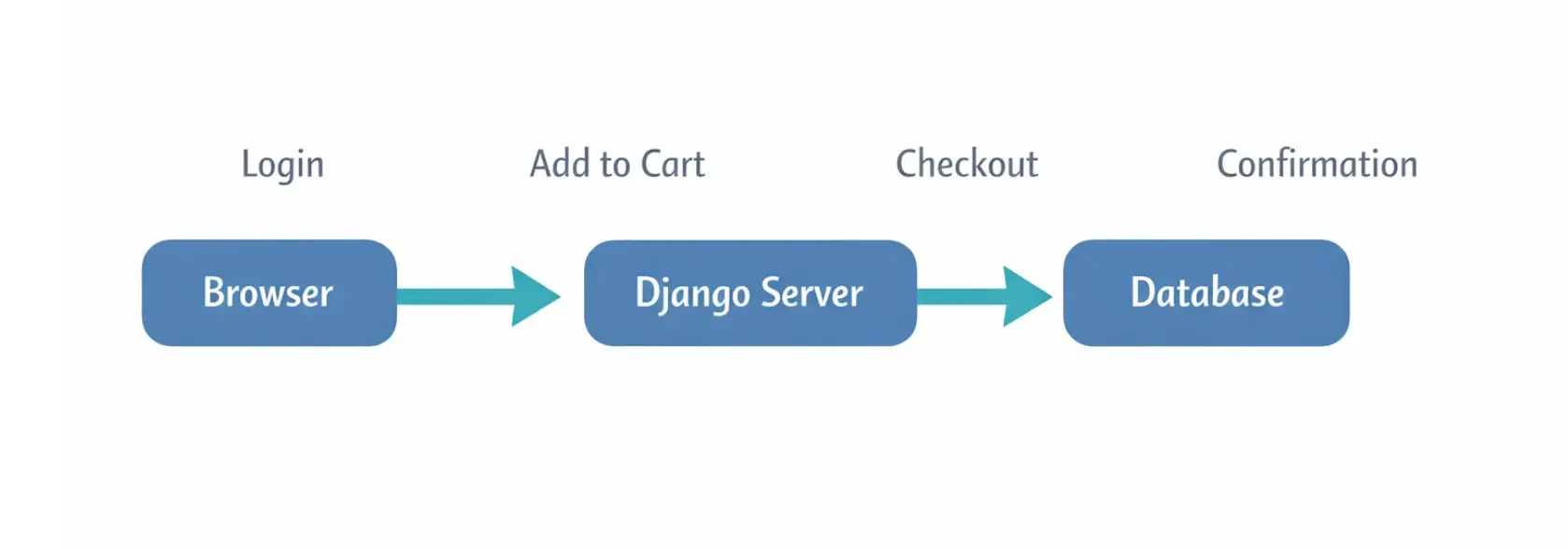 Django End-to-End tests
End-to-end tests exercise the full stack through a real browser. They’re slow, sometimes flaky, and absolutely necessary for critical user flows.
Playwright has become the standard for browser automation in Python projects:
Further reading: Playwright Tricks
# test_e2e.py
from playwright.sync_api import Page

def test_checkout_flow(live_server, page: Page):
    # Login
    page.goto(f'{live_server.url}/login/')
    page.fill('#id_username', 'testuser')
    page.fill('#id_password', 'testpass123')
    page.click('button[type="submit"]')

    # Add item to cart
    page.goto(f'{live_server.url}/products/')
    page.click('[data-product-id="1"] .add-to-cart')
    page.wait_for_selector('.cart-count:has-text("1")')

    # Checkout
    page.goto(f'{live_server.url}/checkout/')
    page.fill('#id_shipping_address', '123 Test St')
    page.fill('#id_zip_code', '10001')
    page.click('#place-order')

    # Verify
    page.wait_for_url('**/order-confirmation/**')
    assert 'Thank you' in page.text_content('h1')
live_server is a pytest-django fixture that starts a real Django server for the test. Playwright controls a real browser that interacts with it.
Limit end-to-end tests to critical paths: login, checkout, signup, and any flow where a failure means lost revenue or broken trust. Don’t test every form validation edge case through the browser — that’s what integration tests are for.
Organizing Tests for Large Projects
As your test suite grows, organization prevents chaos.
tests/
├── conftest.py              # Shared fixtures
├── factories.py             # Factory Boy factories
├── unit/
│   ├── test_models.py
│   ├── test_validators.py
│   └── test_utils.py
├── integration/
│   ├── test_api_orders.py
│   ├── test_api_auth.py
│   ├── test_forms.py
│   └── test_permissions.py
├── e2e/
│   ├── test_checkout.py
│   └── test_signup.py
└── performance/
    └── test_query_counts.py
Run tests in layers. During development, run unit and integration tests (seconds). In CI, run everything including end-to-end and performance tests (minutes). Before deployment, run the full suite.
# Fast feedback during development
~] pytest tests/unit tests/integration -x --fail-first

# Full suite in CI
~] pytest --tb=short

# Skip slow tests locally
~] pytest -m "not slow and not e2e"
The -x flag stops on the first failure. --fail-first runs previously failing tests first. These flags tighten the feedback loop during development.
Practical Lessons From Production
Test behavior, not implementation. A test that verifies “the view calls Order.objects.filter(status='pending')" breaks when you refactor the query. A test that verifies "the endpoint returns only pending orders" survives any refactoring that preserves the behavior.
Every bug gets a test. When a bug is found in production, write a test that reproduces it before writing the fix. The test proves the bug exists, proves the fix works, and prevents the bug from recurring. Over time, your test suite becomes a catalog of every mistake the application has made.
Don’t test Django itself. You don’t need to test that CharField enforces max_length or that @login_required redirects anonymous users. Django's own test suite covers these. Test your application's specific behavior — the business rules, the permission logic, the data transformations.
Use pytest.mark.parametrize for multiple scenarios. When the same logic needs testing with different inputs, parametrize instead of writing separate tests:
@pytest.mark.parametrize("status,can_cancel", [
    ('pending', True),
    ('confirmed', True),
    ('shipped', False),
    ('delivered', False),
    ('cancelled', False),
])
def test_order_cancellation_by_status(status, can_cancel):
    order = OrderFactory.build(status=status)
    assert order.can_cancel() == can_cancel
Five scenarios, one test function. The test output shows each parameterized case individually, so failures are specific.
Keep tests independent. Every test should create its own data and clean up after itself (Django’s test transaction handling does the cleanup). Tests that depend on data created by other tests break when run in isolation or in a different order. If pytest-randomly breaks your tests, you have hidden dependencies.
Key Takeaways
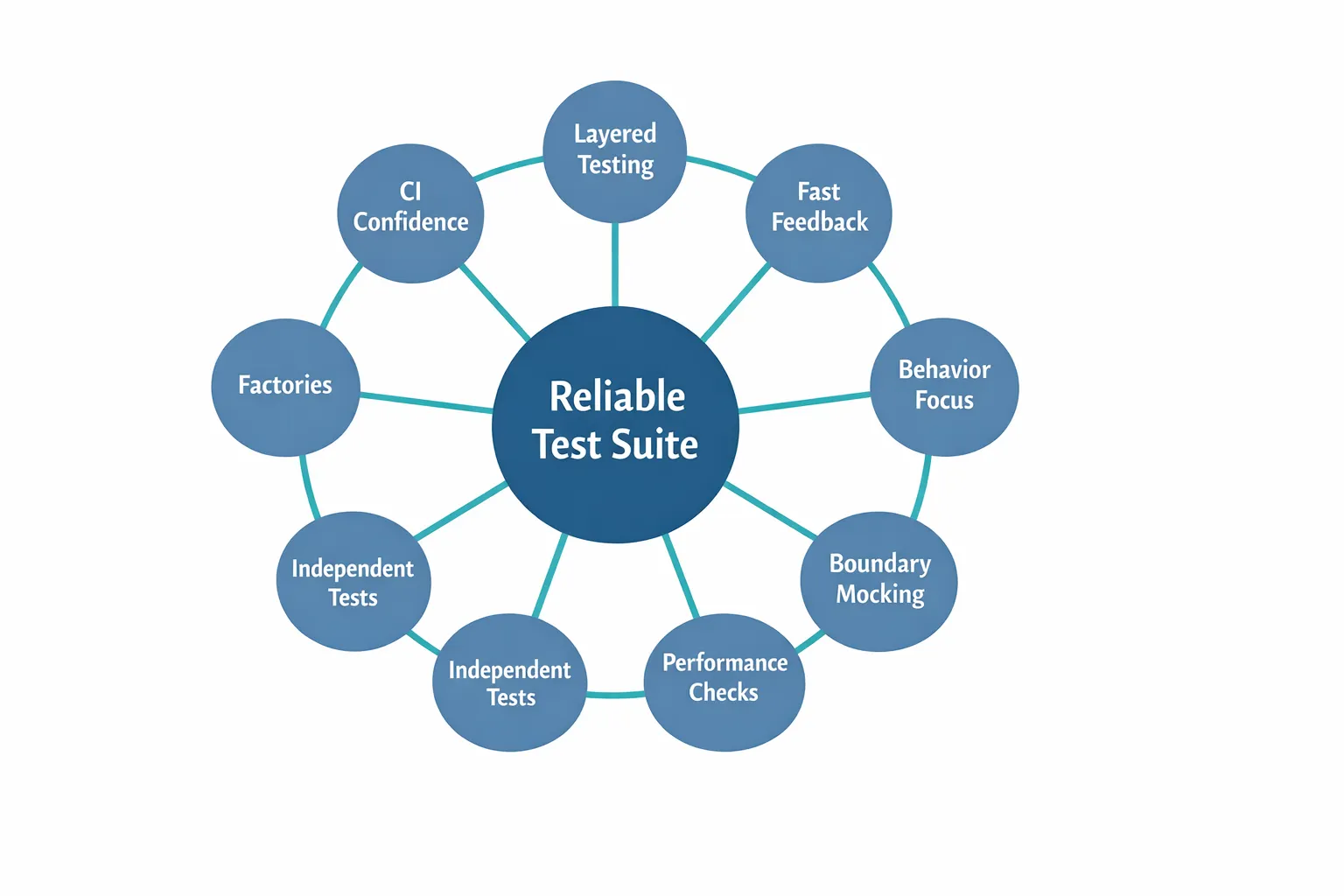 Reliable Test Suite Mental Model
- Build a layered test suite: many integration tests, some unit tests, few end-to-end tests. In Django, integration tests catch the most real-world bugs.
- Use pytest-django and Factory Boy. They reduce boilerplate and make tests readable.
- Use
MD5PasswordHasherin test settings. It eliminates the intentional slowness of production hashers. - Test permissions systematically. For every endpoint, verify what each user role can and cannot access. Permission bugs are the most damaging.
- Mock at the boundaries — external APIs and services. Don’t mock Django internals or your own code.
- Assert query counts to catch N+1 problems before they reach production.
- Write a test for every bug found in production. The test suite becomes your institutional memory.
- Limit end-to-end tests to critical user flows. Use integration tests for everything else.
- Test behavior, not implementation. Tests that survive refactoring are tests worth maintaining.
- Keep tests independent, fast, and readable. A test suite that developers avoid running is a test suite that doesn’t prevent bugs.