Django select_related vs prefetch_related: The Visual Guide
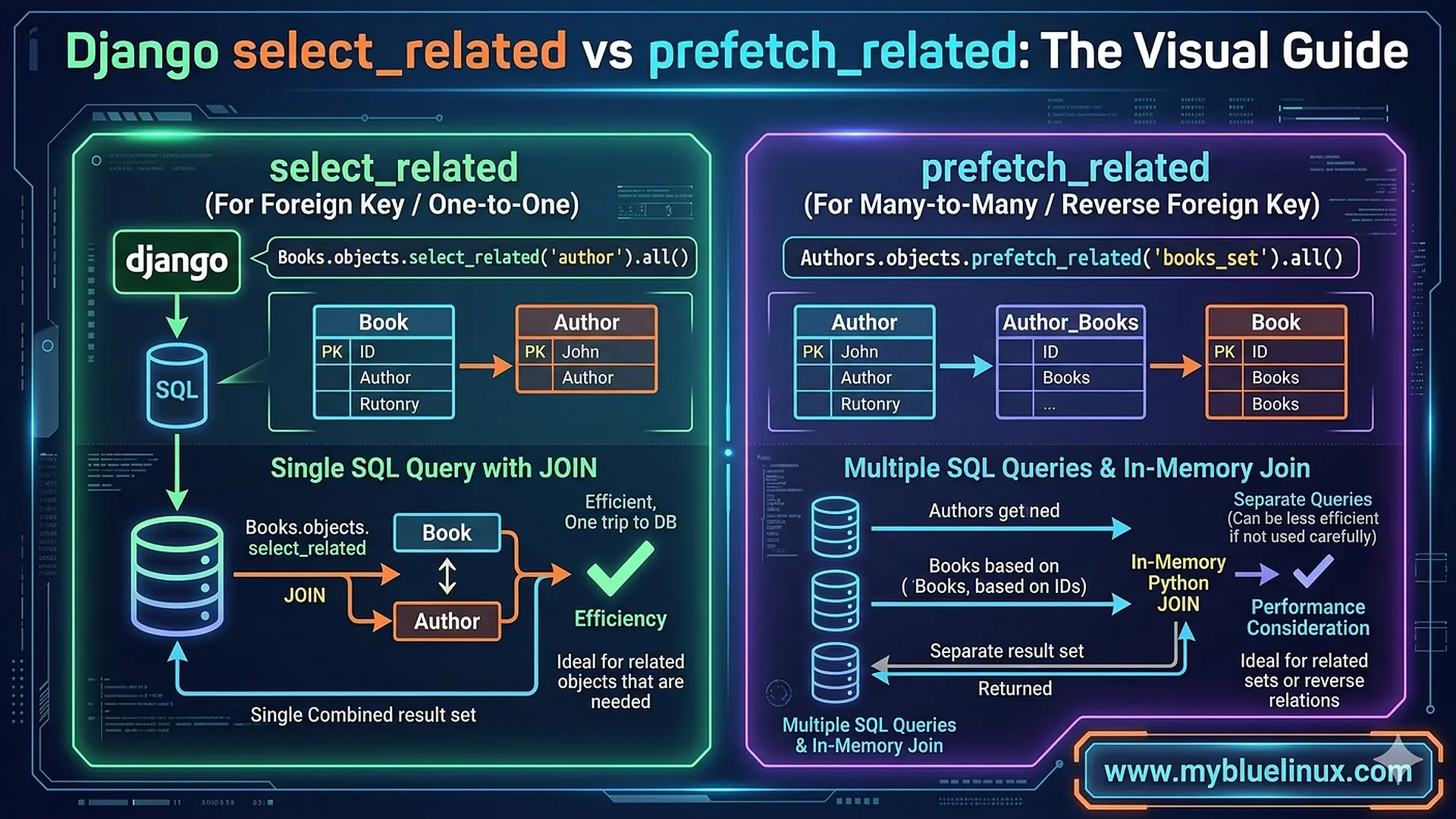
I was pair-programming with a junior developer on our team. She had a view that listed blog posts with their authors and tags. Simple page — title, author name, list of tags. About 50 posts on the page.
She opened Django Debug Toolbar and froze. “Why is this page making 152 database queries?”
One query for the posts. Fifty queries to fetch each post’s author. Fifty more to fetch each post’s tags. Plus a couple extra for pagination. The classic N+1 problem, hiding behind Django’s lazily-loaded relationships.
“Just add select_related ," someone on the team said.
“Wait — which one?” she asked. “There’s also prefetch_related . What's the difference?"
I realized I’d never actually seen anyone explain the difference visually — showing what SQL each one produces, what data flows where, and why picking the wrong one doesn’t just fail to help but can actually make things worse. So I drew it on a whiteboard. That whiteboard sketch eventually became this article.
The Setup: Models We’ll Use
Let’s use a real-world example that hits both relationship types. A blog with posts, authors, and tags:
class Author(models.Model):
    name = models.CharField(max_length=100)
    email = models.EmailField()


class Tag(models.Model):
    name = models.CharField(max_length=50)


class Post(models.Model):
    title = models.CharField(max_length=200)
    content = models.TextField()
    author = models.ForeignKey(Author, on_delete=models.CASCADE, related_name='posts')
    tags = models.ManyToManyField(Tag, related_name='posts')
    created_at = models.DateTimeField(auto_now_add=True)
- Two relationships here:
- author is a ForeignKey — each post has exactly one author
- tags is a ManyToManyField — each post can have multiple tags, each tag can be on multiple posts
This distinction is everything. It determines which method you use.
The N+1 Problem: Understand Why It Happens
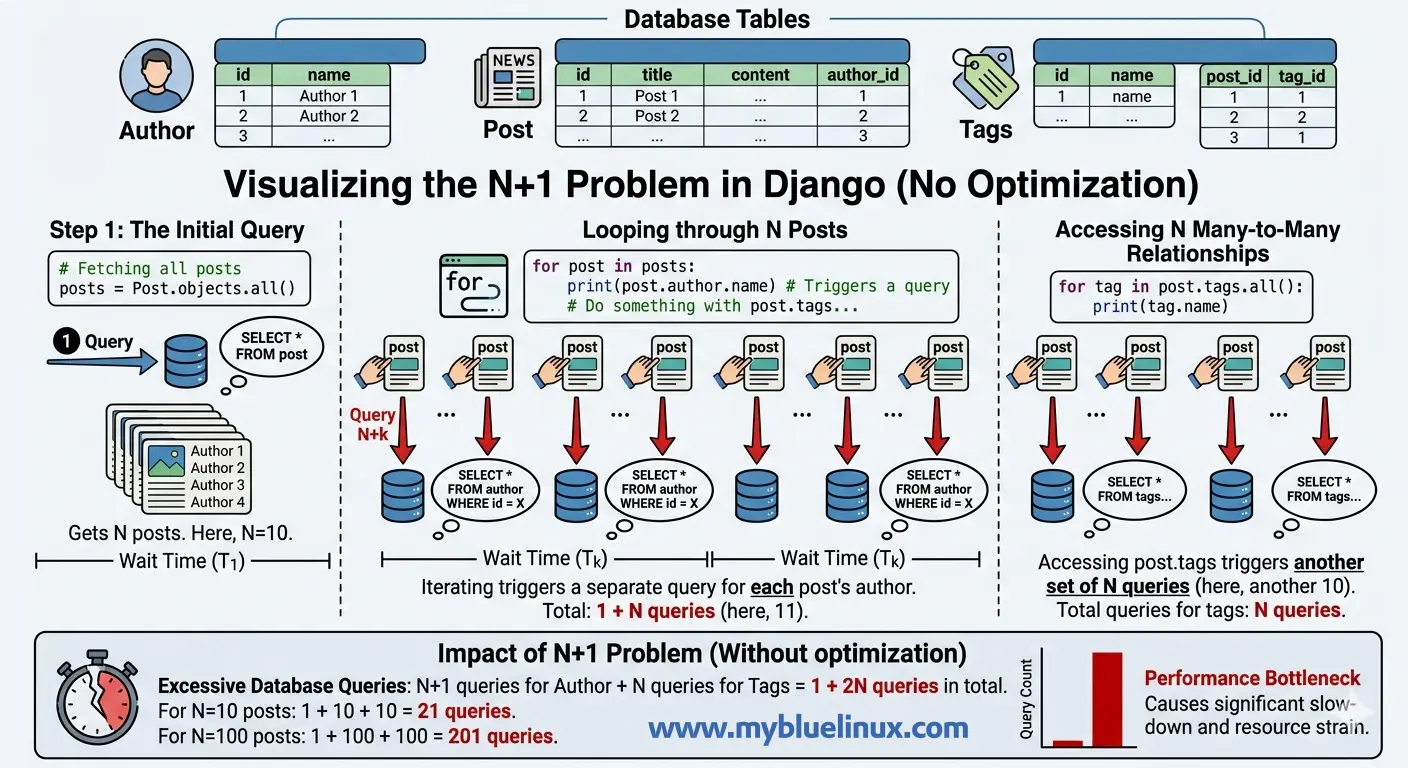 N+1 Problem - Query Explosion
# views.py
def post_list(request):
    posts = Post.objects.all()[:50]
    for post in posts:
        print(post.author.name)         # Hits the database
        print(list(post.tags.all()))    # Hits the database again
Here’s what Django does behind the scenes:
-- Query 1: Get all posts
SELECT * FROM blog_post LIMIT 50;

-- Query 2: Get author for post 1
SELECT * FROM blog_author WHERE id = 3;

-- Query 3: Get author for post 2
SELECT * FROM blog_author WHERE id = 7;

-- ... 48 more author queries ...

-- Query 52: Get tags for post 1
SELECT tag.* FROM blog_tag
  INNER JOIN blog_post_tags ON tag.id = blog_post_tags.tag_id
  WHERE blog_post_tags.post_id = 1;

-- Query 53: Get tags for post 2
SELECT tag.* FROM blog_tag
  INNER JOIN blog_post_tags ON tag.id = blog_post_tags.tag_id
  WHERE blog_post_tags.post_id = 2;

-- ... 48 more tag queries ...
Total: 101 queries. One for posts, fifty for authors, fifty for tags. Each author and tag fetch is a separate round trip to the database. On a page with 50 posts, this takes about 120ms of pure database time — most of it wasted on connection overhead, not actual data retrieval.
Further reading: How detect N+1 problem
This is the N+1 problem. One query to get N items, then N more queries to get each item’s related data. Django does this because querysets are lazy — related objects aren’t loaded until you access them. It’s a reasonable default for cases where you don’t always need the related data, but it’s devastating when you do.
SQL N+1 Problem in Django Template
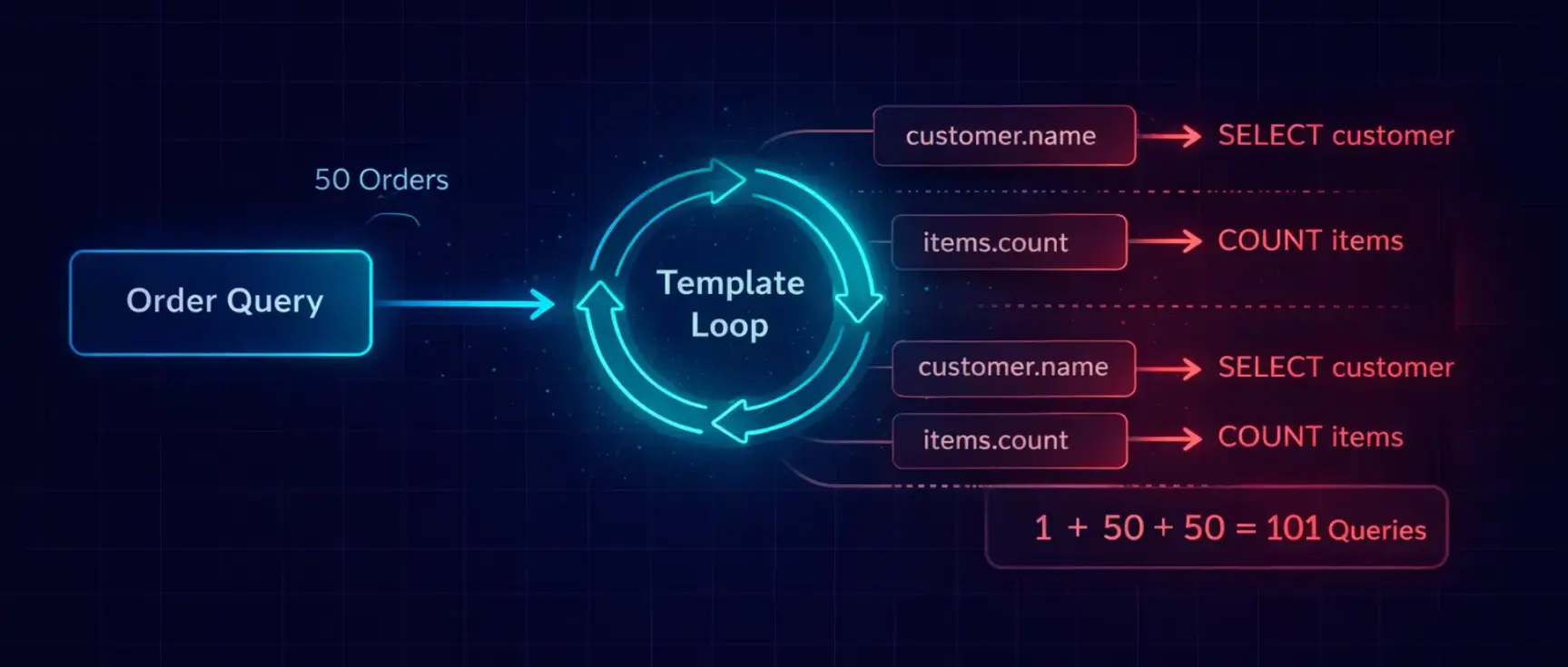
N+1 queries happen because Django’s ORM is lazy. When you access a related object, Django doesn’t fetch it until the moment you use it. This is smart for single objects but catastrophic in loops.
Let me show the exact progression from invisible to disastrous:
# models.py
class Customer(models.Model):
    name = models.CharField(max_length=100)
    email = models.EmailField()


class Order(models.Model):
    customer = models.ForeignKey(Customer, on_delete=models.CASCADE)
    total = models.DecimalField(max_digits=10, decimal_places=2)
    status = models.CharField(max_length=20)
    created_at = models.DateTimeField(auto_now_add=True)


class OrderItem(models.Model):
    order = models.ForeignKey(Order, on_delete=models.CASCADE, related_name='items')
    product_name = models.CharField(max_length=200)
    quantity = models.IntegerField()
    price = models.DecimalField(max_digits=10, decimal_places=2)
# The view that generates 253 queries
def order_list(request):
    orders = Order.objects.all()[:50]
    return render(request, 'orders/list.html', {'orders': orders})
<!-- The template that triggers the cascade -->
{% for order in orders %}
<tr>
    <td>{{ order.id }}</td>
    <td>{{ order.customer.name }}</td>       <!-- Query per order -->
    <td>{{ order.customer.email }}</td>      <!-- Cached from previous -->
    <td>{{ order.items.count }}</td>         <!-- Query per order -->
    <td>{{ order.total }}</td>
    <td>{{ order.status }}</td>
</tr>
{% endfor %}
What happens:
- Query 1: SELECT * FROM orders LIMIT 50 — fetches all orders
- Query 2: SELECT * FROM customers WHERE id = 3 — for order 1's customer
- Query 3: SELECT COUNT(*) FROM order_items WHERE order_id = 1 — for order 1's item count
- Query 4: SELECT * FROM customers WHERE id = 7 — for order 2's customer
- Query 5: SELECT COUNT(*) FROM order_items WHERE order_id = 2 — for order 2's item count
- … repeat 48 more times …
Total: 1 + 50 + 50 = 101 queries. And that’s a simple example with only two related fields. The 253-query page I mentioned had five related lookups per order.
The template looks innocent. {{ order.customer.name }} is just accessing an attribute. But behind that dot notation, Django fires a SELECT query. In a loop of 50 iterations, that's 50 queries — for one field.
See the Problem (You Can’t Fix What You Can’t Measure)
 Django SQL Query Monitoring Pipeline
Before you optimize anything, you need to see your queries. There are three tools I use, depending on the situation.
In Development: Django Debug Toolbar
This is non-negotiable. If you don’t have django-debug-toolbar installed, stop reading and install it now.
Further reading: Best Django Extensions and Plugins
pip install django-debug-toolbar
# settings.py
if DEBUG:
    INSTALLED_APPS += ['debug_toolbar']
    MIDDLEWARE.insert(0, 'debug_toolbar.middleware.DebugToolbarMiddleware')
    INTERNAL_IPS = ['127.0.0.1']
The SQL panel shows every query, how long it took, and — critically — it highlights duplicate queries. When you see 50 nearly identical SELECT statements that differ only by a WHERE clause ID, that's your N+1.
In Views and Tests: assertNumQueries
from django.test import TestCase

class OrderListTest(TestCase):
    def test_order_list_query_count(self):
        # Create test data
        self._create_50_orders()

        with self.assertNumQueries(4):
            response = self.client.get('/api/orders/')
            self.assertEqual(response.status_code, 200)
This test fails if the view executes more than 4 queries. I write these for every list endpoint. When someone adds a new serializer field that triggers a lazy load, the test catches it immediately.
In Production: Query Logging
When Debug Toolbar isn’t available, log the query count per request:
# middleware/query_count.py
from django.db import connection, reset_queries
from django.conf import settings
import logging

logger = logging.getLogger('django.db')


class QueryCountMiddleware:
    def __init__(self, get_response):
        self.get_response = get_response

    def __call__(self, request):
        reset_queries()

        response = self.get_response(request)

        query_count = len(connection.queries)
        if query_count > 20:
            logger.warning(
                f"HIGH QUERY COUNT: {request.method} {request.path} "
                f"executed {query_count} queries"
            )

        return response
Further reading: Django Middleware Guide
Any endpoint that fires more than 20 queries gets flagged. I’ve caught N+1 regressions in production before a single user complained — because this middleware alerted us first.
select_related — The SQL JOIN Approach
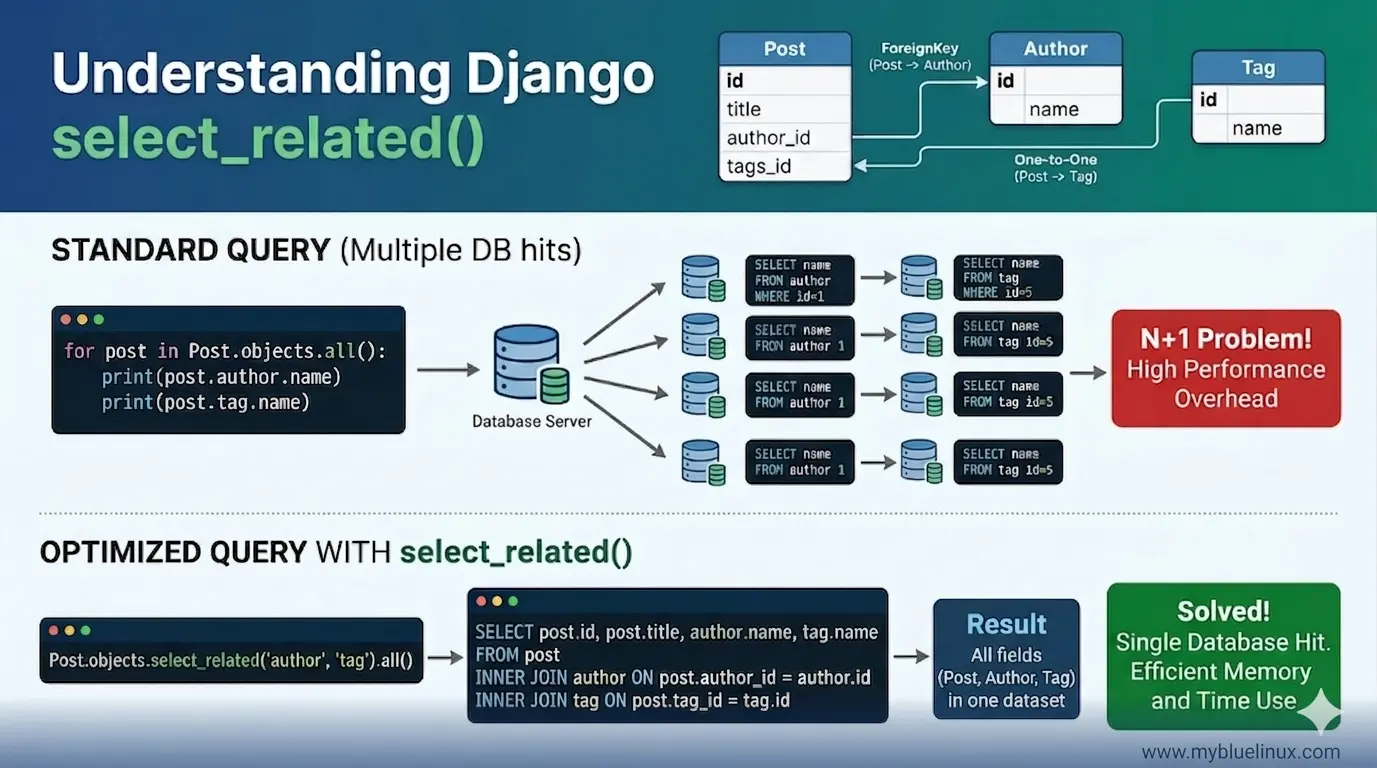
posts = Post.objects.select_related('author').all()[:50]
Here’s the SQL:
SELECT
    blog_post.id,
    blog_post.title,
    blog_post.content,
    blog_post.author_id,
    blog_post.created_at,
    blog_author.id,
    blog_author.name,
    blog_author.email
FROM blog_post
INNER JOIN blog_author ON blog_post.author_id = blog_author.id
LIMIT 50;
Further reading: more select_related examples
One query. Django joins the post and author tables, pulls all the columns from both, and creates fully populated Post objects with their Author objects already attached. When you access post.author.name, there's no database hit.
— the data is already in memory.
What it looks like conceptually:
Database sends back ONE result set:
┌─────────────────────────────────────────────────────┐
│ post.id │ post.title │ author.id │ author.name      │
├─────────┼────────────┼───────────┼──────────────────┤
│ 1       │ "Hello"    │ 3         │ "Alice"          │
│ 2       │ "World"    │ 7         │ "Bob"            │
│ 3       │ "Django"   │ 3         │ "Alice"          │
└─────────────────────────────────────────────────────┘

Django creates Post objects with Author already attached:
Post(id=1, title="Hello", author=Author(id=3, name="Alice"))
Post(id=2, title="World", author=Author(id=7, name="Bob"))
Post(id=3, title="Django", author=Author(id=3, name="Alice"))
50 queries → 1 query. That’s the magic.
When Django select_related Works
select_related only works on relationships that point to a single object:
- ForeignKey — post.author (one post → one author)
- OneToOneField — user.profile (one user → one profile)
It works by creating a SQL INNTER JOIN , which means the result set has one row per parent object. This is efficient because the result set stays the same size as the original query.
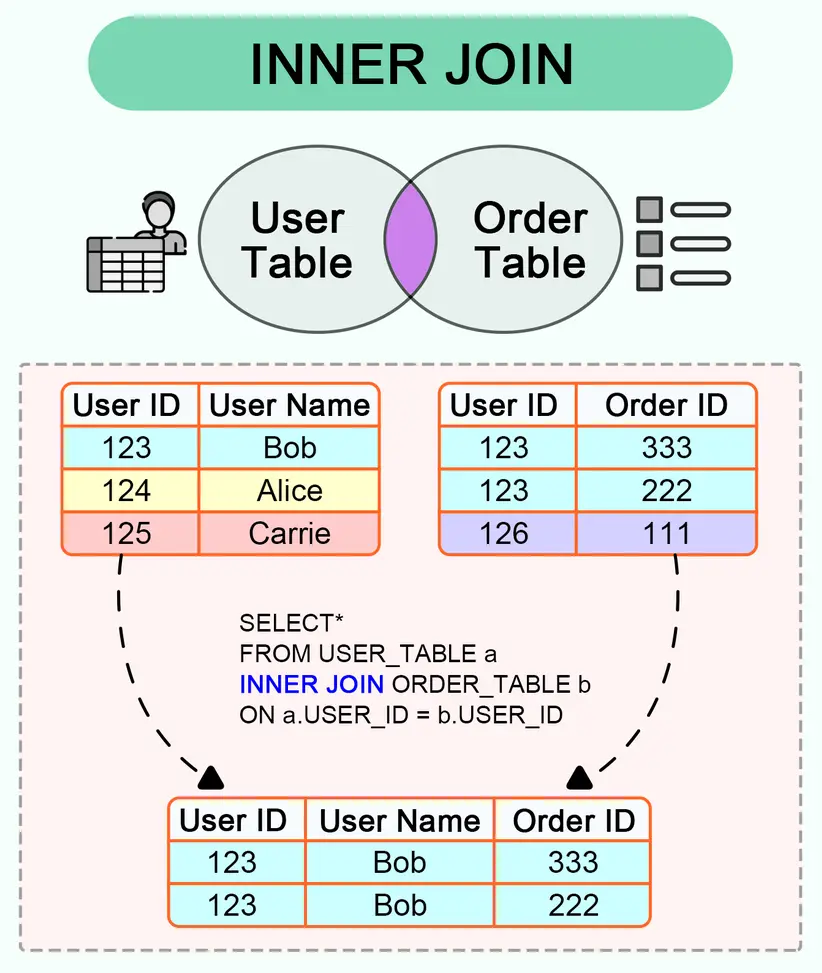 SQL INNER JOIN
When select_related Breaks
You cannot use select_related for:
- ManyToManyField — post.tags (one post → many tags)
- Reverse ForeignKey — author.posts (one author → many posts)
Why? Because a JOIN on a many-relationship multiplies the rows. If post 1 has 3 tags, the JOIN would create 3 rows for that one post. With 50 posts averaging 4 tags each, your 50-row result becomes 200 rows — with the post data duplicated in every row. The more tags per post, the worse it gets.
Django’s documentation says exactly this: to avoid the much larger result set from joining across a ‘many’ relationship, select_related is limited to single-valued relationships.
Further reading: Common Mistakes when select_related breaks
prefetch_related — The Separate Queries Approach
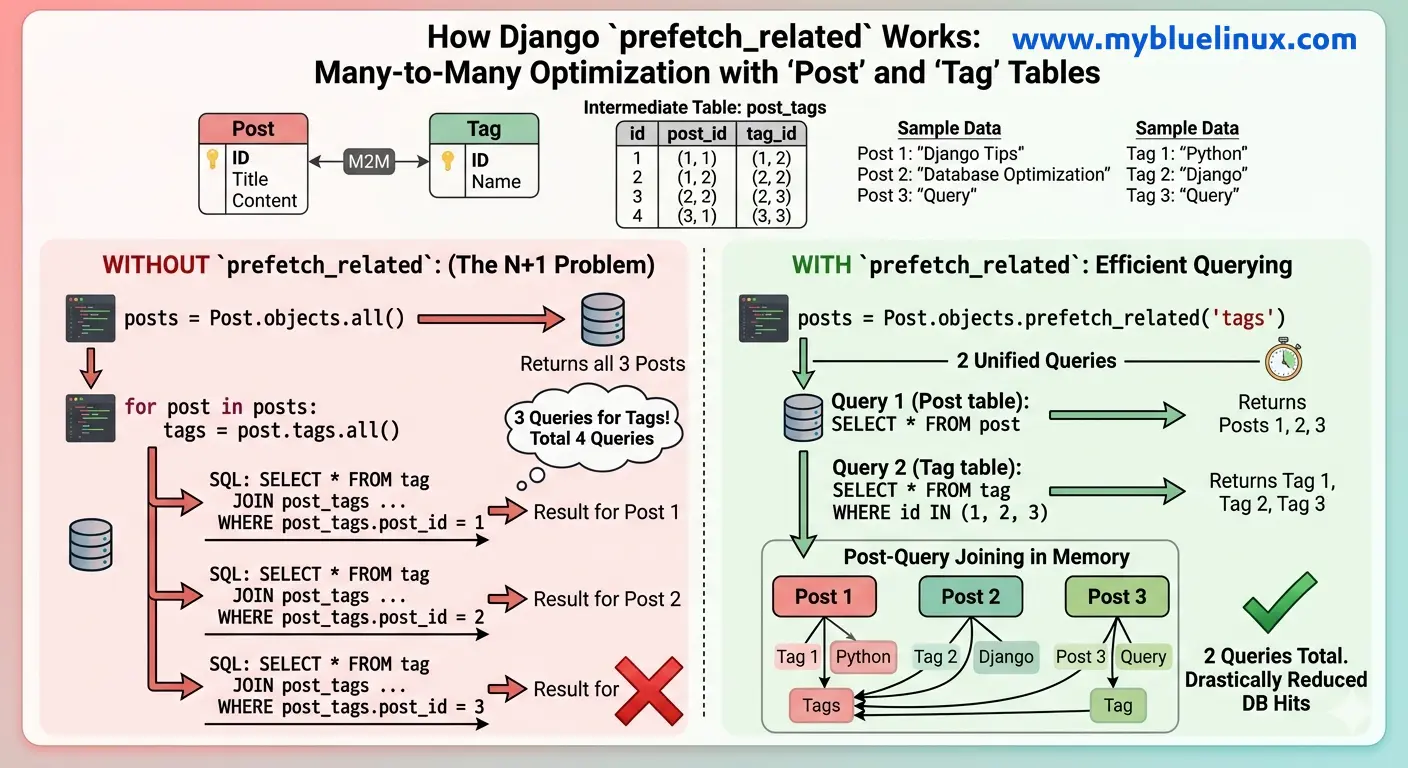
posts = Post.objects.prefetch_related('tags').all()[:50]
Here’s the SQL:
-- Query 1: Get all posts
SELECT * FROM blog_post LIMIT 50;

-- Query 2: Get ALL tags for ALL those posts in one shot
SELECT
    blog_tag.id,
    blog_tag.name,
    blog_post_tags.post_id
FROM blog_tag
INNER JOIN blog_post_tags ON blog_tag.id = blog_post_tags.tag_id
WHERE blog_post_tags.post_id IN (1, 2, 3, 4, ... 50);
Two queries. Not 51. Not 101. Just 2.
- The first query gets the posts.
- The second query gets ALL tags for ALL those posts at once, using an IN clause with the post IDs.
- Django then matches them up in Python: "tag X belongs to post 1 and post 3, tag Y belongs to post 2" — and attaches them to the correct objects.
What it looks like conceptually:
Query 1 returns posts:
┌─────────┬────────────┐
│ post.id │ post.title │
├─────────┼────────────┤
│ 1       │ "Hello"    │
│ 2       │ "World"    │
│ 3       │ "Django"   │
└─────────┴────────────┘

Query 2 returns ALL tags for those posts:
┌─────────┬─────────────┬──────────┐
│ tag.id  │ tag.name    │ post_id  │
├─────────┼─────────────┼──────────┤
│ 10      │ "python"    │ 1        │
│ 11      │ "tutorial"  │ 1        │
│ 10      │ "python"    │ 2        │
│ 12      │ "django"    │ 3        │
│ 10      │ "python"    │ 3        │
└─────────┴─────────────┴──────────┘

Django matches them in Python:
Post 1 → [Tag("python"), Tag("tutorial")]
Post 2 → [Tag("python")]
Post 3 → [Tag("django"), Tag("python")]
When prefetch_related Works
- prefetch_related works on any relationship:
- ManyToManyField — post.tags
- Reverse ForeignKey — author.posts (all posts by an author)
- It can even be used for ForeignKey, though select_related is more efficient for that
prefetch_related - The Subtle Trap
Here’s something that catches experienced developers. prefetch_related caches the results and attaches them to the parent objects. But if you filter the related queryset after prefetching, Django ignores the cache and runs a new query:
posts = Post.objects.prefetch_related('tags').all()

for post in posts:
    # This uses the prefetch cache — no extra query
    all_tags = post.tags.all()

    # This IGNORES the prefetch cache — new query per post!
    python_tags = post.tags.filter(name='python')
The .filter() on the prefetched relationship breaks the cache because Django can't know in advance what filters you'll apply. If you need filtered prefetches, use the Prefetch object :
from django.db.models import Prefetch

posts = Post.objects.prefetch_related(
    Prefetch(
        'tags',
        queryset=Tag.objects.filter(name='python'),
        to_attr='python_tags'    # Stores result in a new attribute
    )
).all()

for post in posts:
    # This uses the prefetch — no extra query
    print(post.python_tags)
Further reading: Prefetch Objects: Fine-Grained Control (with examples)
The Prefetch object lets you customize the query used for prefetching. The to_attr parameter stores the result in a list attribute instead of overriding the manager, so you can even have multiple prefetches for the same relationship with different filters.
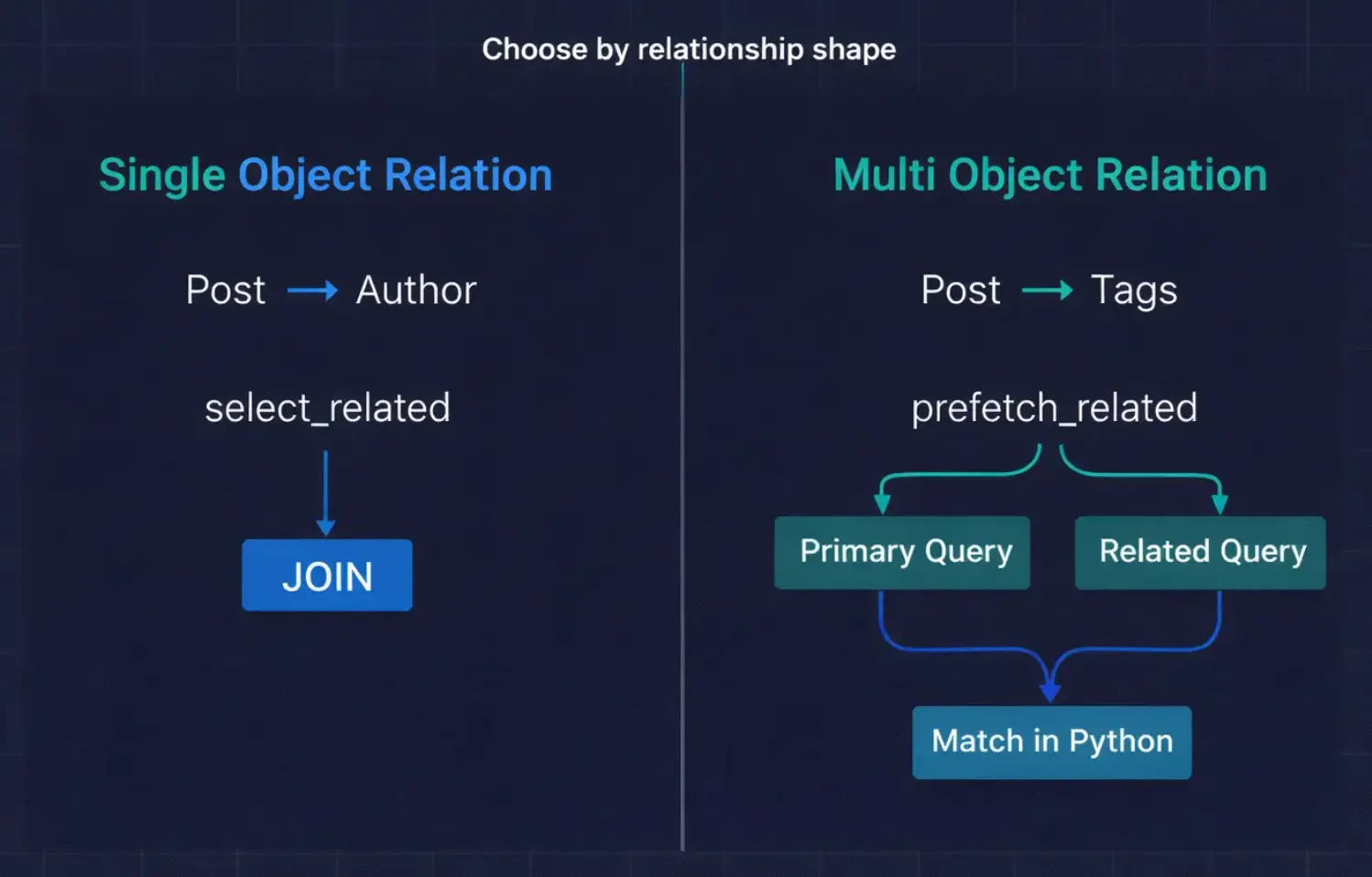 django select_related vs prefetch_related When to Use Which
Combining Both—The Real-World Pattern
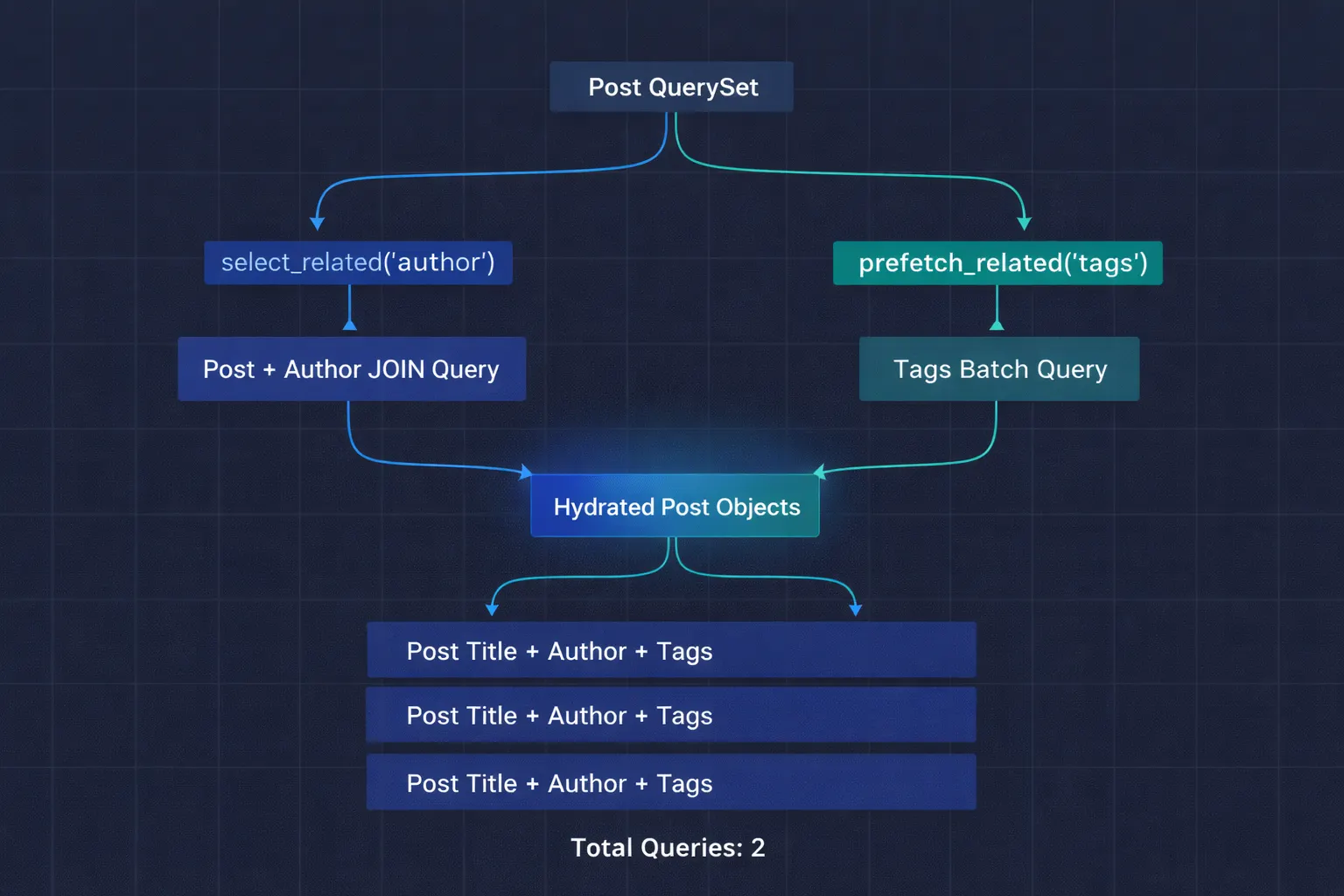 select_related combined with prefetech_related
In practice, you almost always need both. Our blog post list needs the author (ForeignKey) and the tags (ManyToMany):
posts = (
    Post.objects
    .select_related('author')           # JOIN for the FK
    .prefetch_related('tags')           # Separate query for M2M
    .filter(is_published=True)
    .order_by('-created_at')[:50]
)
- Total queries: 2.
- One joined query for posts + authors.
- One batch query for all tags.
- Down from 101.
For more complex scenarios, you can chain multiple levels:
# A dashboard showing orders with customer info and order items with products
orders = (
    Order.objects
    .select_related(
        'customer',                      # FK: order → customer
        'customer__company',             # FK: customer → company (chained)
    )
    .prefetch_related(
        'items',                         # Reverse FK: order → items
        'items__product',                # FK on the prefetched items
        Prefetch(
            'items__product__reviews',
            queryset=Review.objects.filter(rating__gte=4),
            to_attr='top_reviews'
        ),
    )
)
select_related follows FK chains with double underscore notation . prefetch_related can also follow chains, and you can mix in Prefetch objects for filtered lookups.
Further reading: more complex examples
Fix N+1 Problem step by step
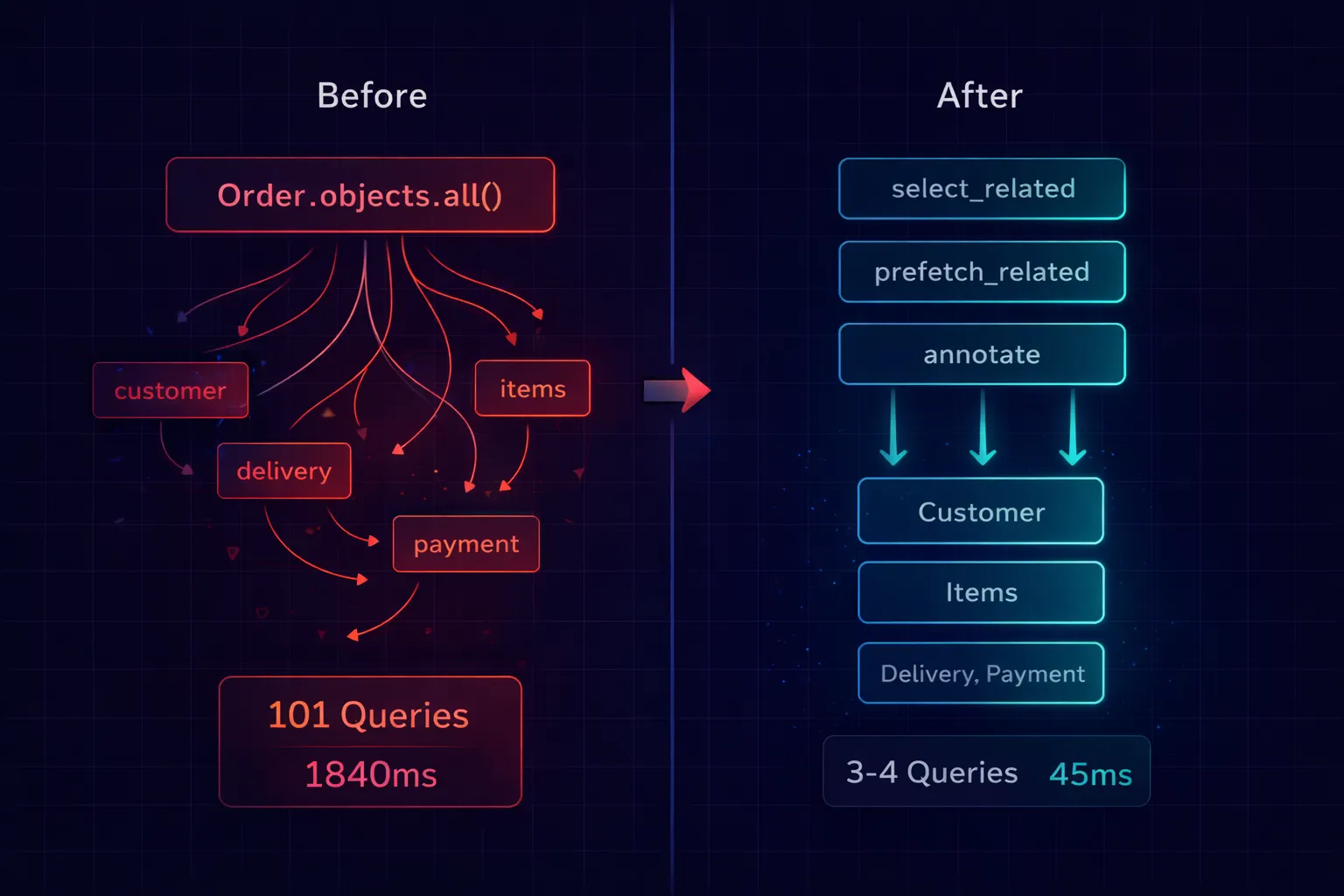 Django N+1 Problem Debugging Workflow
# models.py
class Customer(models.Model):
    name = models.CharField(max_length=100)
    email = models.EmailField()


class Order(models.Model):
    customer = models.ForeignKey(Customer, on_delete=models.CASCADE)
    total = models.DecimalField(max_digits=10, decimal_places=2)
    status = models.CharField(max_length=20)
    created_at = models.DateTimeField(auto_now_add=True)


class OrderItem(models.Model):
    order = models.ForeignKey(Order, on_delete=models.CASCADE, related_name='items')
    product_name = models.CharField(max_length=200)
    quantity = models.IntegerField()
    price = models.DecimalField(max_digits=10, decimal_places=2)
# The view that generates 253 queries
def order_list(request):
    orders = Order.objects.all()[:50]
    return render(request, 'orders/list.html', {'orders': orders})
<!-- The template that triggers the cascade -->
{% for order in orders %}
<tr>
    <td>{{ order.id }}</td>
    <td>{{ order.customer.name }}</td>       <!-- Query per order -->
    <td>{{ order.customer.email }}</td>      <!-- Cached from previous -->
    <td>{{ order.items.count }}</td>         <!-- Query per order -->
    <td>{{ order.total }}</td>
    <td>{{ order.status }}</td>
</tr>
{% endfor %}
Here’s the exact sequence I follow, from simplest to most advanced.
Fix Level 1: select_related and prefetch_related
This solves 80% of N+1 problems in one line:
def order_list(request):
    orders = (
        Order.objects
        .select_related('customer')              # JOIN customer table
        .prefetch_related('items')                # Batch fetch items
        .all()[:50]
    )
    return render(request, 'orders/list.html', {'orders': orders})
- Before: 101 queries, 1,840ms
- After: 3 queries, 45ms
Fix Level 2: annotate Instead of Counting in Loops
The template uses {{ order.items.count }}, which fires a SELECT COUNT(*) per order — even with prefetch_related. The prefetch caches the items, but .count() on a manager makes a fresh query.
The fix: calculate the count in the database with annotate:
from django.db.models import Count

def order_list(request):
    orders = (
        Order.objects
        .select_related('customer')
        .annotate(item_count=Count('items'))    # Calculated in SQL
        .order_by('-created_at')[:50]
    )
    return render(request, 'orders/list.html', {'orders': orders})
<!-- Use the annotated field instead of .count -->
<td>{{ order.item_count }}</td>
Now the count is part of the original query — no extra queries at all. This is the single most impactful optimization most Django developers miss. Every time you see .count() inside a loop, replace it with annotate(Count(...)).
Fix Level 3: Prefetch With Custom Querysets
Sometimes you need filtered or sorted related objects. The Prefetch object lets you customize exactly what gets prefetched:
from django.db.models import Prefetch

def order_detail(request, order_id):
    order = (
        Order.objects
        .select_related('customer')
        .prefetch_related(
            Prefetch(
                'items',
                queryset=OrderItem.objects.order_by('-price'),
                to_attr='sorted_items'    # List, not manager
            ),
            Prefetch(
                'items',
                queryset=OrderItem.objects.filter(quantity__gt=5),
                to_attr='bulk_items'      # Different filter, different attr
            ),
        )
        .get(id=order_id)
    )
    # order.sorted_items → items sorted by price (list)
    # order.bulk_items → only items with quantity > 5 (list)
    return render(request, 'orders/detail.html', {'order': order})
to_attr is critical here. Without it, you can only have one prefetch per relationship. With to_attr, you can have multiple prefetches with different filters stored in different attributes. And because to_attr returns a Python list (not a queryset manager), accessing it never triggers additional queries.
Fix Level 4: Subqueries for Single Values from Related Tables
When you need one specific value from a related table — like the most recent item or the highest price — a subquery is more efficient than prefetching the entire related set:
from django.db.models import Subquery, OuterRef, Max

def order_list(request):
    most_expensive_item = (
        OrderItem.objects
        .filter(order=OuterRef('pk'))
        .order_by('-price')
        .values('product_name')[:1]
    )

    orders = (
        Order.objects
        .select_related('customer')
        .annotate(
            item_count=Count('items'),
            total_value=Sum('items__price'),
            top_item=Subquery(most_expensive_item),
        )
        .order_by('-created_at')[:50]
    )
    return render(request, 'orders/list.html', {'orders': orders})
One query. It returns the order, the customer (joined), the item count, the total value, and the name of the most expensive item — all calculated in SQL. No Python loops. No extra queries. This is the ORM doing what databases are built for.
Prevent It From Coming Back
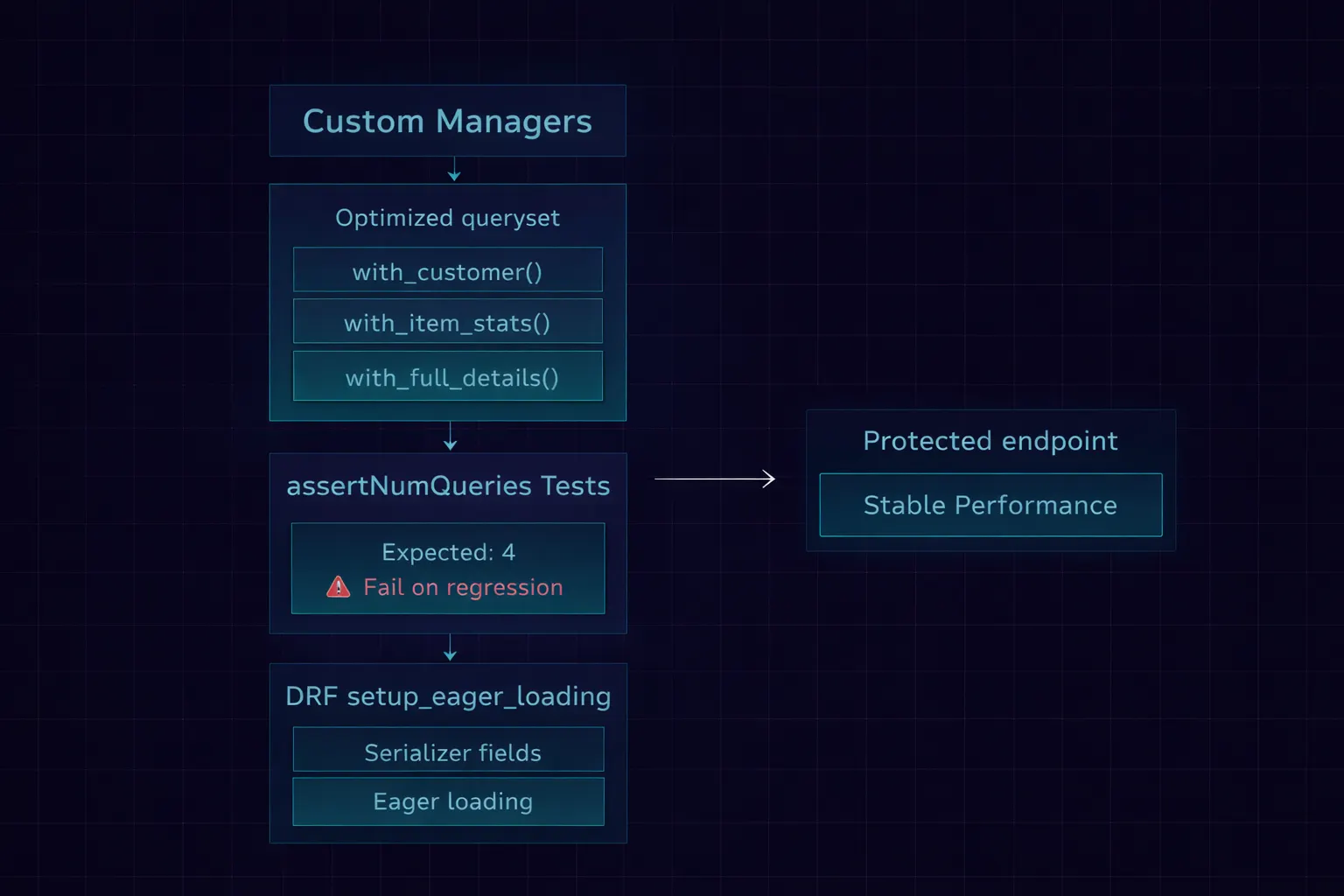
The biggest risk with N+1 fixes is regression. Someone adds a new field to the template or serializer, and the lazy-loaded query silently reappears. Here’s how I prevent that.
Pattern 1: Custom Managers That Encode Optimizations
# models.py
class OrderQuerySet(models.QuerySet):
    def with_customer(self):
        return self.select_related('customer')

    def with_item_stats(self):
        return self.annotate(
            item_count=Count('items'),
            total_value=Sum('items__price'),
        )

    def with_full_details(self):
        return (
            self.with_customer()
            .with_item_stats()
            .prefetch_related('items')
        )


class OrderManager(models.Manager):
    def get_queryset(self):
        return OrderQuerySet(self.model, using=self._db)

    def with_full_details(self):
        return self.get_queryset().with_full_details()


class Order(models.Model):
    customer = models.ForeignKey(Customer, on_delete=models.CASCADE)
    total = models.DecimalField(max_digits=10, decimal_places=2)
    status = models.CharField(max_length=20)

    objects = OrderManager()
Now the optimization is baked into the model:
# In views — one method call includes all optimizations
orders = Order.objects.with_full_details()[:50]
Further reading: Django Model Manager to prevent N+1 Problem
New developers don’t need to know which select_related and prefetch_related calls to add. They call with_full_details() and get an optimized queryset. The knowledge is encoded in the model, not spread across twenty different views.
Pattern 2: assertNumQueries in Every List Test
class OrderAPITest(TestCase):
    def setUp(self):
        self._create_test_data(orders=50)

    def test_list_endpoint_query_count(self):
        """Ensure the list endpoint doesn't regress on query count."""
        with self.assertNumQueries(4):
            response = self.client.get('/api/orders/')

        self.assertEqual(response.status_code, 200)
        self.assertEqual(len(response.json()['results']), 50)
When someone adds order.customer.company.name to the serializer without updating select_related, this test fails. The query count jumps from 4 to 54, the assertion fires, and the PR can't merge until the queryset is fixed.
I have this test for every list endpoint in every project. It’s the cheapest insurance against N+1 regressions.
Pattern 3: DRF Setup Eager Loading Pattern
For Django REST Framework projects, attach the optimization to the serializer itself:
class OrderSerializer(serializers.ModelSerializer):
    customer_name = serializers.CharField(source='customer.name')
    item_count = serializers.IntegerField()

    class Meta:
        model = Order
        fields = ['id', 'total', 'status', 'customer_name', 'item_count']

    @staticmethod
    def setup_eager_loading(queryset):
        """Call this from the view's get_queryset."""
        return queryset.select_related(
            'customer'
        ).annotate(
            item_count=Count('items')
        )


class OrderViewSet(viewsets.ModelViewSet):
    serializer_class = OrderSerializer

    def get_queryset(self):
        qs = Order.objects.all()
        return OrderSerializer.setup_eager_loading(qs)
The setup_eager_loading static method lives on the serializer — right next to the fields that need the optimization. When a developer adds a new field to the serializer, the method is right there reminding them to update the eager loading too. Co-location of concern is the best documentation.
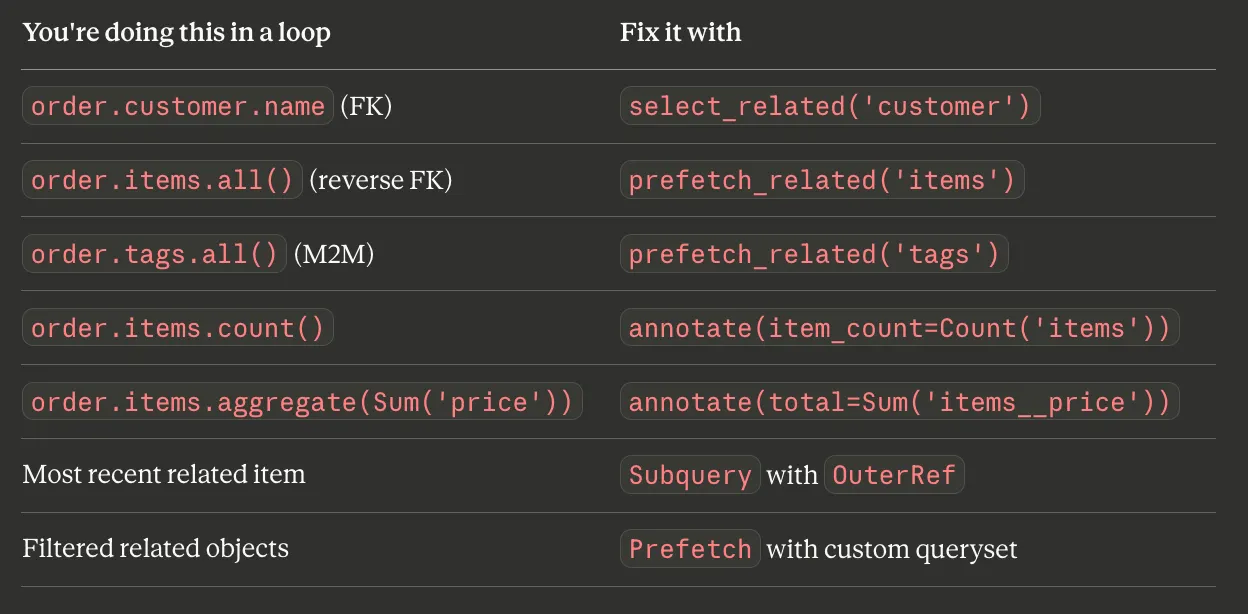
The Cheat Sheet
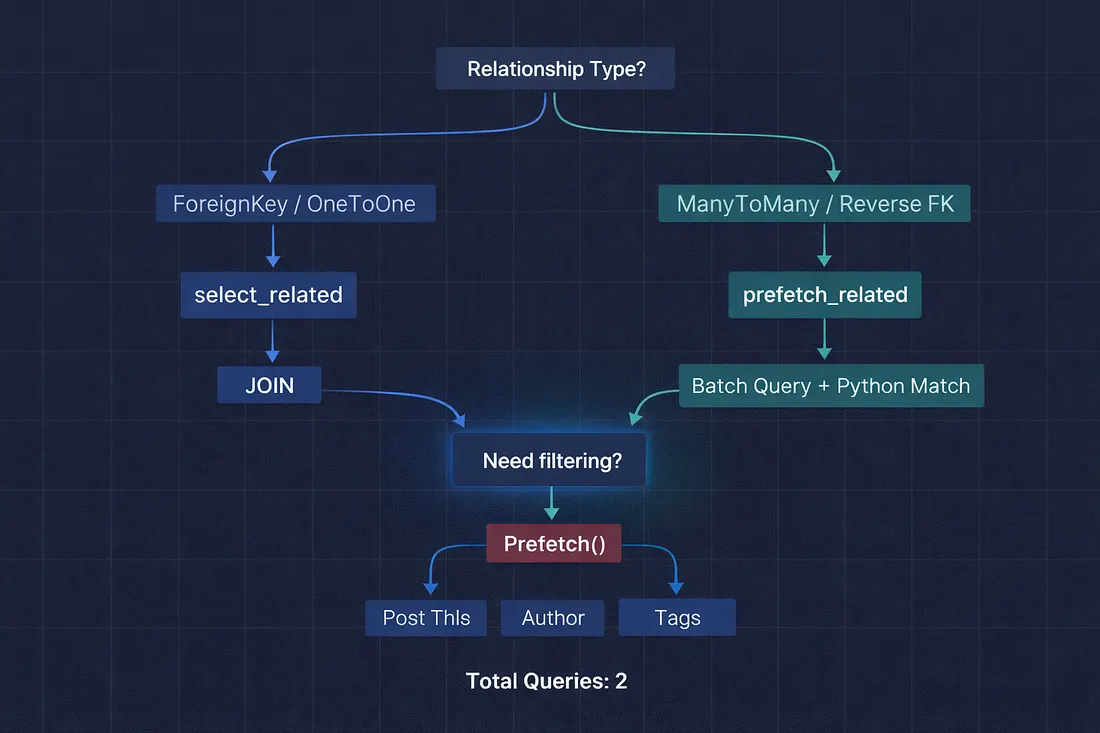
- Here’s the decision tree I keep in my head:
- Is the relationship a ForeignKey or OneToOneField? → Use select_related. It creates a JOIN and fetches everything in one query.
- Is the relationship a ManyToManyField or reverse ForeignKey? → Use prefetch_related. It runs a separate batch query with an IN clause.
- Do you need to filter the related objects? → Use Prefetch() object inside prefetch_related with a custom queryset.
- Not sure which one to use? → prefetch_related works for everything. It's slightly less efficient than select_related for ForeignKey lookups (2 queries instead of 1), but it never gives wrong results. When in doubt, prefetch.
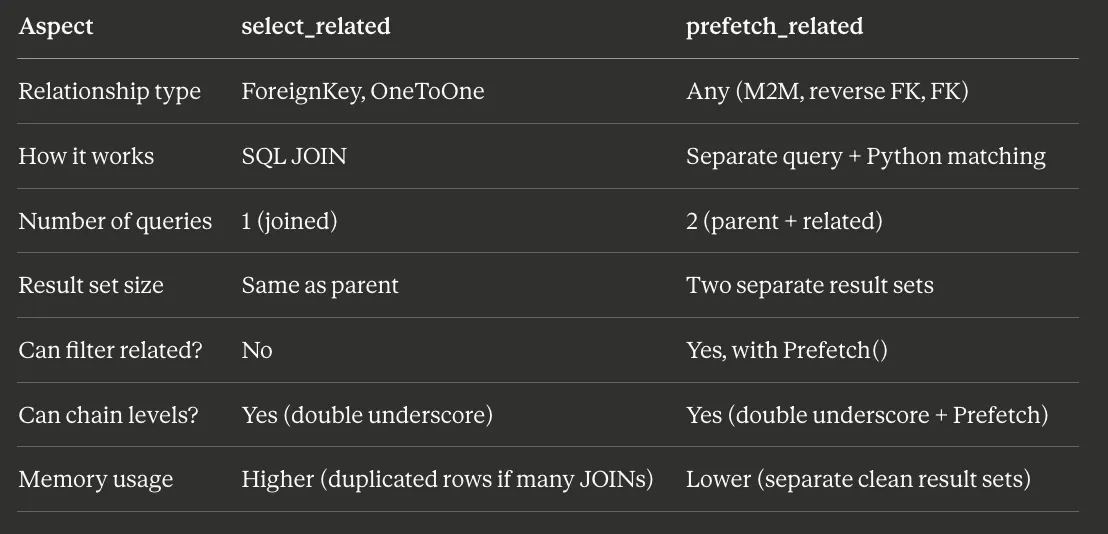
| Feature | select_related | prefetch_related |
|---|---|---|
| Primary Use | ForeignKey, OneToOne | ManyToManyField, Reverse ForeignKey |
| SQL Strategy | Single query with JOIN | Multiple separate queries |
| Where Join Occurs | Database level | Application level (Python) |
| Query Count | Always 1 query | 2 or more queries |
The Performance Numbers
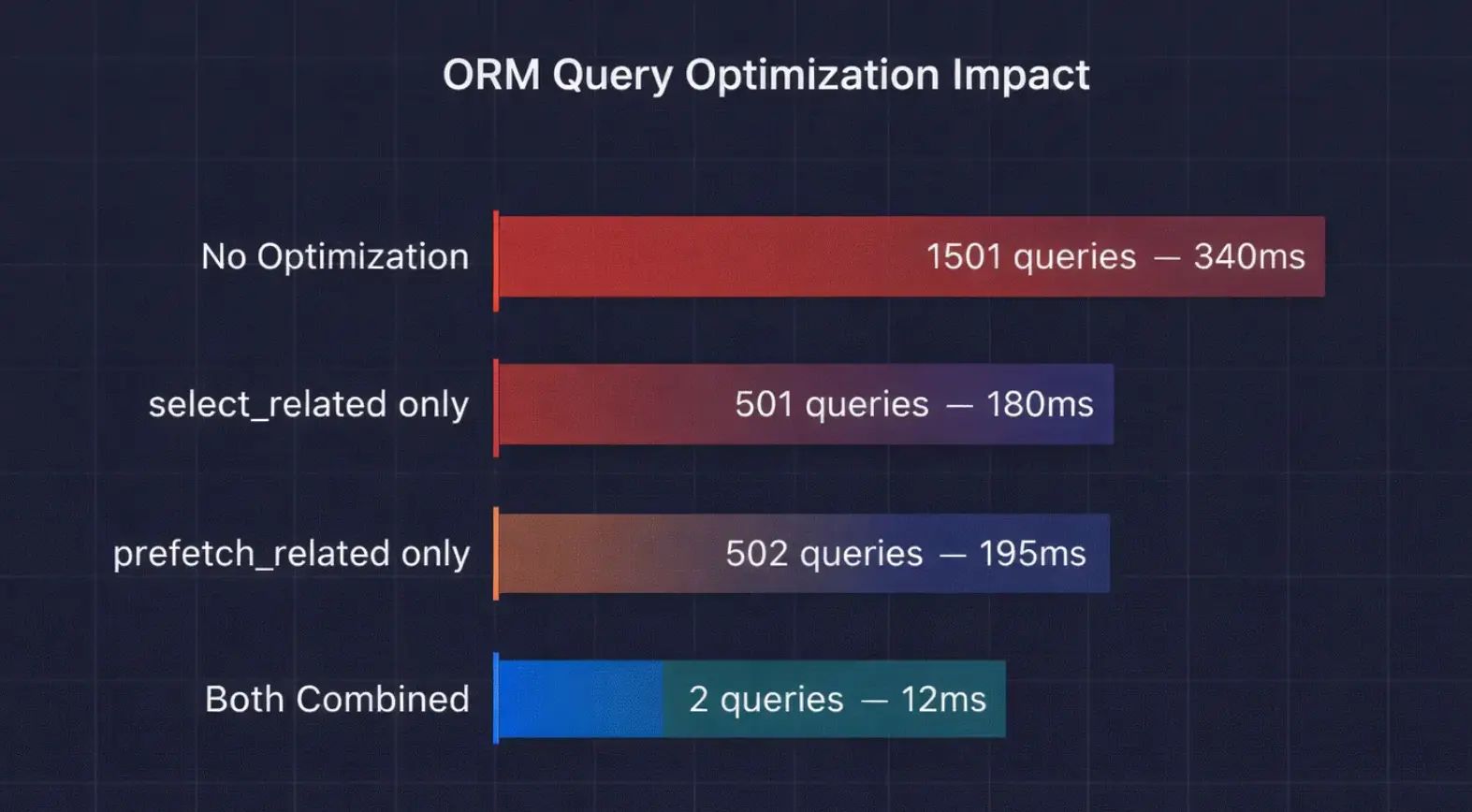
I benchmarked all three approaches on our blog model with 500 posts, each having 1 author and 3–5 tags:
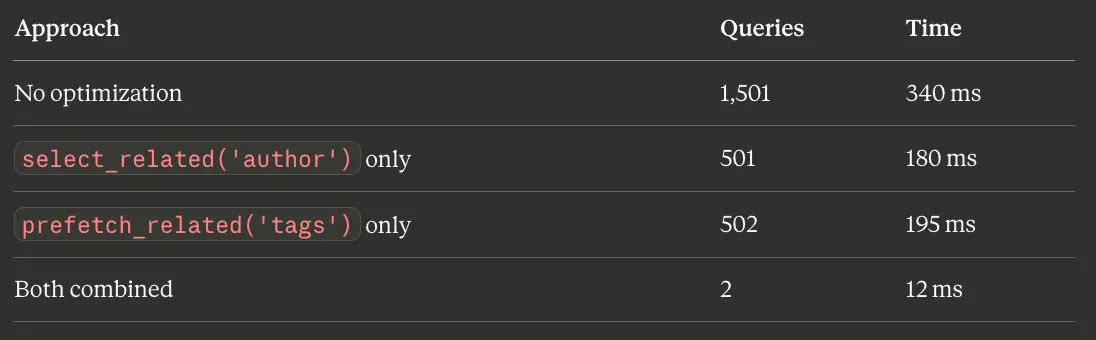
From 1,501 queries and 340ms to 2 queries and 12ms. That’s a 28x speedup from adding two method calls to the queryset. This is the highest-leverage optimization available in Django — nothing else comes close for the effort involved.
Bottom Line
Django’s ORM is lazy by default — it doesn’t fetch related data until you ask for it. This is smart for most cases but devastating when you loop through a queryset and access related objects on every iteration.
The fix is two methods: select_related for single-object relationships (ForeignKey, OneToOne) and prefetch_related for multi-object relationships (ManyToMany, reverse FK). Together, they can turn 1,500 queries into 2.
My rule for every queryset that touches a template or serializer: before you pass it to the response, check every relationship you access in the loop and make sure it’s either selected or prefetched. Django Debug Toolbar makes this trivial — if you see more than 10 queries on a list page, something needs optimizing.
That junior developer on my team? She added two method calls and her 152-query page dropped to 3. She pushed it, and our DBA sent a thank-you message in Slack. That’s the kind of fix that makes your whole day.
What’s the highest query count you’ve ever seen on a single Django page? I’ve personally witnessed 4,300 on an admin view with nested inlines. Drop your record in the comments — I know someone has a worse story.