Django select_related and prefetch_related Complete Guide

I once watched a senior developer cut a page load time from 12 seconds to 200 milliseconds.
No caching. No infrastructure changes. Just three lines of code.
The problem? The original code was making 847 database queries to load a single page. The fix used select_related and prefetch_related correctly.
This is the knowledge gap that separates developers who write Django code from developers who write fast Django code. The ORM makes it dangerously easy to write queries that work perfectly in development with 100 rows, then collapse in production with 100,000 rows.
Today, I’ll show you how to identify and fix the most common ORM performance killers — especially the infamous N+1 problem.
Let’s make your queries fast.
The N+1 Problem Explained
The N+1 problem is the most common performance issue in Django applications. Here’s what it looks like:
# models.py
class Author(models.Model):
    name = models.CharField(max_length=100)


class Book(models.Model):
    title = models.CharField(max_length=200)
    author = models.ForeignKey(Author, on_delete=models.CASCADE)
# views.py - THE PROBLEM
def book_list(request):
    books = Book.objects.all()  # Query 1: Get all books

    for book in books:
        print(book.author.name)  # Query 2, 3, 4... N+1: Get each author

    return render(request, 'books.html', {'books': books})
If you have 100 books, this code makes 101 database queries:
- 1 query to get all books
- 100 queries to get each book’s author (one per book)
In your template, the same thing happens:
<!-- templates/books.html - STILL THE PROBLEM -->
{% for book in books %}
    <p>{{ book.title }} by {{ book.author.name }}</p>  <!-- Hidden query per iteration -->
{% endfor %}
The ORM hides the queries, but they’re there. Every book.author triggers a database hit.
Detecting N+1 Problems
Before you can fix N+1 problems, you need to see them. Here are your tools:
1. Django Debug Toolbar
Install it immediately if you haven’t:
Further reading: How Install and use Django Debug Toolbar
The SQL panel shows every query, with timing and duplicate detection.
2. Query logging
Log all queries in development:
# settings/development.py
LOGGING = {
    'version': 1,
    'handlers': {
        'console': {
            'class': 'logging.StreamHandler',
        },
    },
    'loggers': {
        'django.db.backends': {
            'level': 'DEBUG',
            'handlers': ['console'],
        },
    },
}
3. assertNumQueries in Tests
Write tests that enforce query counts:
from django.test import TestCase

class BookListTest(TestCase):
    def test_book_list_query_count(self):
        # Create test data
        author = Author.objects.create(name='Test Author')
        for i in range(100):
            Book.objects.create(title=f'Book {i}', author=author)

        # This should use exactly 2 queries, not 101
        with self.assertNumQueries(2):
            response = self.client.get('/books/')
            # Force template rendering
            list(response.context['books'])
4. Django Silk (For Production Profiling)
pip install django-silk
Django Silk records queries in production and shows you the slowest endpoints.
The Solution: select_related
select_related performs a SQL JOIN and fetches related objects in a single query. Use it for ForeignKey and OneToOneField relationships.
# BEFORE: 101 queries
books = Book.objects.all()

# AFTER: 1 query (with JOIN)
books = Book.objects.select_related('author').all()
The generated SQL:
-- Without select_related (first query only)
SELECT * FROM books;

-- With select_related (single query)
SELECT books.*, authors.*
FROM books
INNER JOIN authors ON books.author_id = authors.id;
Further reading: Django’s select_related Didn’t Fix My N+1 Queries
Chaining Multiple Relations
class Publisher(models.Model):
    name = models.CharField(max_length=100)


class Author(models.Model):
    name = models.CharField(max_length=100)
    publisher = models.ForeignKey(Publisher, on_delete=models.CASCADE)


class Book(models.Model):
    title = models.CharField(max_length=200)
    author = models.ForeignKey(Author, on_delete=models.CASCADE)
# Fetch book -> author -> publisher in ONE query ✅
books = Book.objects.select_related('author__publisher').all()

for book in books:
    # No additional queries!
    print(f"{book.title} by {book.author.name} ({book.author.publisher.name})")
Multiple select_related Fields
class Book(models.Model):
    title = models.CharField(max_length=200)
    author = models.ForeignKey(Author, on_delete=models.CASCADE)
    editor = models.ForeignKey(Editor, on_delete=models.CASCADE, null=True)
    category = models.ForeignKey(Category, on_delete=models.CASCADE)

# ✅ Fetch all three relationships in one query
books = Book.objects.select_related('author', 'editor', 'category').all()
The Solution: prefetch_related
prefetch_related performs separate queries and joins them in Python. Use it for ManyToManyField and reverse ForeignKey relationships.
class Author(models.Model):
    name = models.CharField(max_length=100)


class Book(models.Model):
    title = models.CharField(max_length=200)
    author = models.ForeignKey(Author, on_delete=models.CASCADE, related_name='books')
# ❌ BEFORE: N+1 queries
authors = Author.objects.all()
for author in authors:
    print(author.books.all())  # Query per author!

# ✅ AFTER: 2 queries total
authors = Author.objects.prefetch_related('books').all()
for author in authors:
    print(author.books.all())  # No additional queries!
The queries:
-- Query 1: Get all authors
SELECT * FROM authors;

-- Query 2: Get all books for those authors (single query)
SELECT * FROM books WHERE author_id IN (1, 2, 3, 4, 5, ...);
Django then matches books to authors in Python.
ManyToMany Relationships
class Tag(models.Model):
    name = models.CharField(max_length=50)


class Article(models.Model):
    title = models.CharField(max_length=200)
    tags = models.ManyToManyField(Tag, related_name='articles')
# ✅ Fetch articles with their tags: 2 queries
articles = Article.objects.prefetch_related('tags').all()

for article in articles:
    tag_names = [tag.name for tag in article.tags.all()]  # No query!
Prefetch Objects: Fine-Grained Control
Sometimes you need to filter or annotate prefetched data. Use Prefetch object :
from django.db.models import Prefetch


class Order(models.Model):
    customer = models.ForeignKey(Customer, on_delete=models.CASCADE)
    created_at = models.DateTimeField(auto_now_add=True)


class OrderItem(models.Model):
    order = models.ForeignKey(Order, on_delete=models.CASCADE, related_name='items')
    product = models.ForeignKey(Product, on_delete=models.CASCADE)
    quantity = models.PositiveIntegerField()
    is_cancelled = models.BooleanField(default=False)
Filtering Prefetched Data
# Only prefetch non-cancelled items
orders = Order.objects.prefetch_related(
    Prefetch(
        'items',
        queryset=OrderItem.objects.filter(is_cancelled=False)
    )
)

for order in orders:
    # Only non-cancelled items, no additional queries
    for item in order.items.all():
        print(item.product_id)
Custom Attribute Name
# Store prefetched data in a custom attribute
orders = Order.objects.prefetch_related(
    Prefetch(
        'items',
        queryset=OrderItem.objects.filter(is_cancelled=False),
        to_attr='active_items'  # Access via order.active_items
    )
)

for order in orders:
    # Use the custom attribute (it's a list, not a queryset)
    for item in order.active_items:
        print(item.product_id)
Prefetch with select_related
Combine them for nested relationships:
# Prefetch items, and for each item, select_related the product
orders = Order.objects.prefetch_related(
    Prefetch(
        'items',
        queryset=OrderItem.objects.select_related('product')
    )
)

for order in orders:
    for item in order.items.all():
        # No additional queries for product!
        print(f"{item.product.name}: {item.quantity}")
Multiple Prefetch Objects
from datetime import timedelta
from django.utils import timezone


recent = timezone.now() - timedelta(days=30)

customers = Customer.objects.prefetch_related(
    # All orders
    Prefetch('orders'),

    # Recent orders in a separate attribute
    Prefetch(
        'orders',
        queryset=Order.objects.filter(created_at__gte=recent),
        to_attr='recent_orders'
    ),

    # High-value orders
    Prefetch(
        'orders',
        queryset=Order.objects.filter(total__gte=1000),
        to_attr='high_value_orders'
    ),
)
When to Use Which
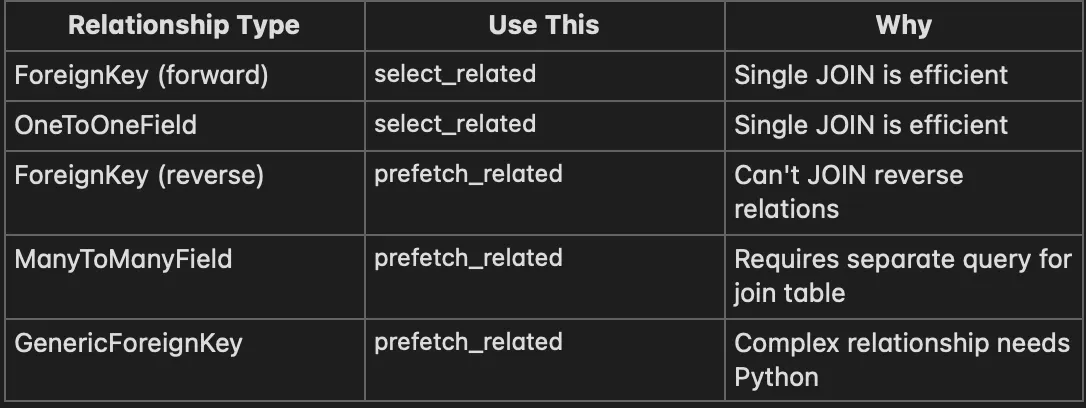
The Decision Tree
Is it a ForeignKey or OneToOne that you're following forward?
├── Yes → select_related
└── No → Is it a reverse relation or ManyToMany?
    ├── Yes → prefetch_related
    └── No → You might not need either
Common Mistakes and Fixes
Mistake 1: Prefetching Then Filtering
# ❌ WRONG: This throws away the prefetch and queries again
authors = Author.objects.prefetch_related('books')
for author in authors:
    recent_books = author.books.filter(published__year=2024)  # New query!

# ✅ RIGHT: Filter in the Prefetch
authors = Author.objects.prefetch_related(
    Prefetch(
        'books',
        queryset=Book.objects.filter(published__year=2024),
        to_attr='recent_books'
    )
)
for author in authors:
    for book in author.recent_books:  # No query!
        print(book.title)
Mistake 2: Calling .all() Defeats select_related
books = Book.objects.select_related('author')
for book in books:
    # ✅ This is fine
    print(book.author.name)

authors = Author.objects.prefetch_related('books')
for author in authors:
    for book in author.books.all():  # ✅ This works - .all() is fine
        print(book.title)

    # ❌ WRONG: .all() is fine, but .filter() would break it
    # ❌ WRONG: This queries again!
    recent = author.books.filter(year=2024)  # Breaks prefetch
Mistake 3: Forgetting to Prefetch in Serializers
# serializers.py
class AuthorSerializer(serializers.ModelSerializer):
    books = BookSerializer(many=True, read_only=True)

    class Meta:
        model = Author
        fields = ['id', 'name', 'books']


# views.py - ❌ WRONG
class AuthorViewSet(viewsets.ModelViewSet):
    queryset = Author.objects.all()  # N+1 when serializing books!
    serializer_class = AuthorSerializer


# views.py - ✅ RIGHT
class AuthorViewSet(viewsets.ModelViewSet):
    queryset = Author.objects.prefetch_related('books')
    serializer_class = AuthorSerializer
Mistake 4: Over-Prefetching
Don’t prefetch data you won’t use:
# ❌ WRONG: Prefetching everything "just in case"
books = Book.objects.select_related(
    'author', 'editor', 'publisher', 'category'
).prefetch_related(
    'reviews', 'tags', 'chapters', 'related_books'
)

# ✅ RIGHT: Only fetch what this view needs
books = Book.objects.select_related('author').only(
    'id', 'title', 'author__name'
)
Advanced: only() and defer()
Fetch only the columns you need:
# Fetch all columns (default)
books = Book.objects.all()

# Fetch only specific columns
books = Book.objects.only('id', 'title', 'author_id')

# Fetch all columns EXCEPT these
books = Book.objects.defer('content', 'summary')  # Skip large text fields
Combine with select_related:
# Fetch book.id, book.title, author.id, author.name — nothing else
books = Book.objects.select_related('author').only(
    'id', 'title', 'author__id', 'author__name'
)
# Accessing a deferred field triggers a query
books = Book.objects.only('title')
for book in books:
    print(book.title)      # ✅ Fine
    print(book.author_id)  # ❌ QUERY! Field was deferred
Advanced: Aggregation Without N+1
from django.db.models import Count, Avg, Sum


# ❌ WRONG: N+1 for counting
authors = Author.objects.all()
for author in authors:
    book_count = author.books.count()  # Query per author!


# ✅ RIGHT: Annotate in the initial query
authors = Author.objects.annotate(
    book_count=Count('books')
)
for author in authors:
    print(author.book_count)  # No query! It's already there


# Multiple annotations
authors = Author.objects.annotate(
    book_count=Count('books'),
    avg_rating=Avg('books__rating'),
    total_sales=Sum('books__sales')
)
Advanced: Subqueries for Complex Cases
When you need data that can’t be expressed with simple joins:
from django.db.models import OuterRef, Subquery, F


# Get each author's most recent book title
latest_book = Book.objects.filter(
    author=OuterRef('pk')
).order_by('-published_date')

authors = Author.objects.annotate(
    latest_book_title=Subquery(latest_book.values('title')[:1])
)

for author in authors:
    print(f"{author.name}: {author.latest_book_title}")

# Get orders with their item count (without prefetching items)
from django.db.models import Count

orders = Order.objects.annotate(
    item_count=Count('items')
).filter(
    item_count__gt=5
)
The Manager Pattern for Reusable Optimization
Encode your optimizations in managers so they’re always applied:
# models.py
class BookQuerySet(models.QuerySet):
    def with_author(self):
        return self.select_related('author')

    def with_full_details(self):
        return self.select_related(
            'author', 'publisher', 'category'
        ).prefetch_related(
            'tags',
            Prefetch(
                'reviews',
                queryset=Review.objects.select_related('user').order_by('-created_at')[:5],
                to_attr='recent_reviews'
            )
        )

    def with_stats(self):
        return self.annotate(
            review_count=Count('reviews'),
            avg_rating=Avg('reviews__rating')
        )


class BookManager(models.Manager):
    def get_queryset(self):
        return BookQuerySet(self.model, using=self._db)

    def with_author(self):
        return self.get_queryset().with_author()

    def with_full_details(self):
        return self.get_queryset().with_full_details()

    def for_list_view(self):
        """Optimized queryset for list pages."""
        return self.get_queryset().with_author().with_stats()

    def for_detail_view(self):
        """Optimized queryset for detail pages."""
        return self.get_queryset().with_full_details().with_stats()


class Book(models.Model):
    title = models.CharField(max_length=200)
    author = models.ForeignKey(Author, on_delete=models.CASCADE)
    # ...

    objects = BookManager()
Now in views:
# List view: optimized for listing
def book_list(request):
    books = Book.objects.for_list_view()
    return render(request, 'book_list.html', {'books': books})


# Detail view: optimized for detail page
def book_detail(request, pk):
    book = Book.objects.for_detail_view().get(pk=pk)
    return render(request, 'book_detail.html', {'book': book})
Quick Reference Cheat Sheet
# ForeignKey forward → select_related
Book.objects.select_related('author')

# ForeignKey reverse → prefetch_related
Author.objects.prefetch_related('books')

# ManyToMany → prefetch_related
Article.objects.prefetch_related('tags')

# Nested forward relations → chain with __
Book.objects.select_related('author__publisher')

# Filter prefetched data → Prefetch object
Author.objects.prefetch_related(
    Prefetch('books', queryset=Book.objects.filter(year=2024))
)

# Custom attribute → to_attr
Prefetch('books', queryset=..., to_attr='recent_books')

# Combine both
Order.objects.select_related('customer').prefetch_related(
    Prefetch('items', queryset=OrderItem.objects.select_related('product'))
)

# Add aggregations → annotate
Author.objects.annotate(book_count=Count('books'))

# Limit fields → only/defer
Book.objects.only('id', 'title')
Book.objects.defer('large_content_field')
Key Takeaways
- N+1 is the #1 Django performance killer — Learn to spot it with Django Debug Toolbar.
- select_related for ForeignKey/OneToOne — Uses SQL JOIN, single query.
- prefetch_related for reverse/ManyToMany — Separate queries, joined in Python.
- Use Prefetch objects for filtering — Don’t filter after prefetching.
- Encode optimizations in managers — Book.objects.for_list_view() is self-documenting.
- Test your query counts — Use assertNumQueries to prevent regressions.
- Don’t over-optimize — Only prefetch what you actually use.
The difference between 847 queries and 2 queries is the difference between a frustrated user and a happy one. Master these patterns, and you’ll never ship an N+1 problem to production again.