Django Custom User Model: The Right Way From Day One

I got a message from a friend last month. He’d been building a Django SaaS app for four months. About 35 models, 80+ migrations, a growing user base in beta. Then his product manager asked for a simple feature: “let users log in with their email instead of a username.”
He spent three days trying to swap the user model. It didn’t work. Foreign keys across the entire database pointed to auth.User. Migration history was tangled. The admin panel broke. Third-party packages that depended on the default user model threw errors he'd never seen before.
He ended up creating a separate Profile model with a OneToOneField to the built-in User, hacking together a custom authentication backend, and writing a middleware to attach the profile to every request. It works. But every time he touches the auth system, he winces.
All of this could have been avoided with 15 minutes of setup on day one.
The Django documentation itself says it: “If you’re starting a new project, it’s highly recommended to set up a custom user model, even if the default User model is sufficient for you.” That sentence has been in the docs for years. Most developers skip it because the default model works fine — until it doesn’t.
Here’s the complete setup. No shortcuts. No gotchas left unexplained.
Why the Default User Model Will Betray You
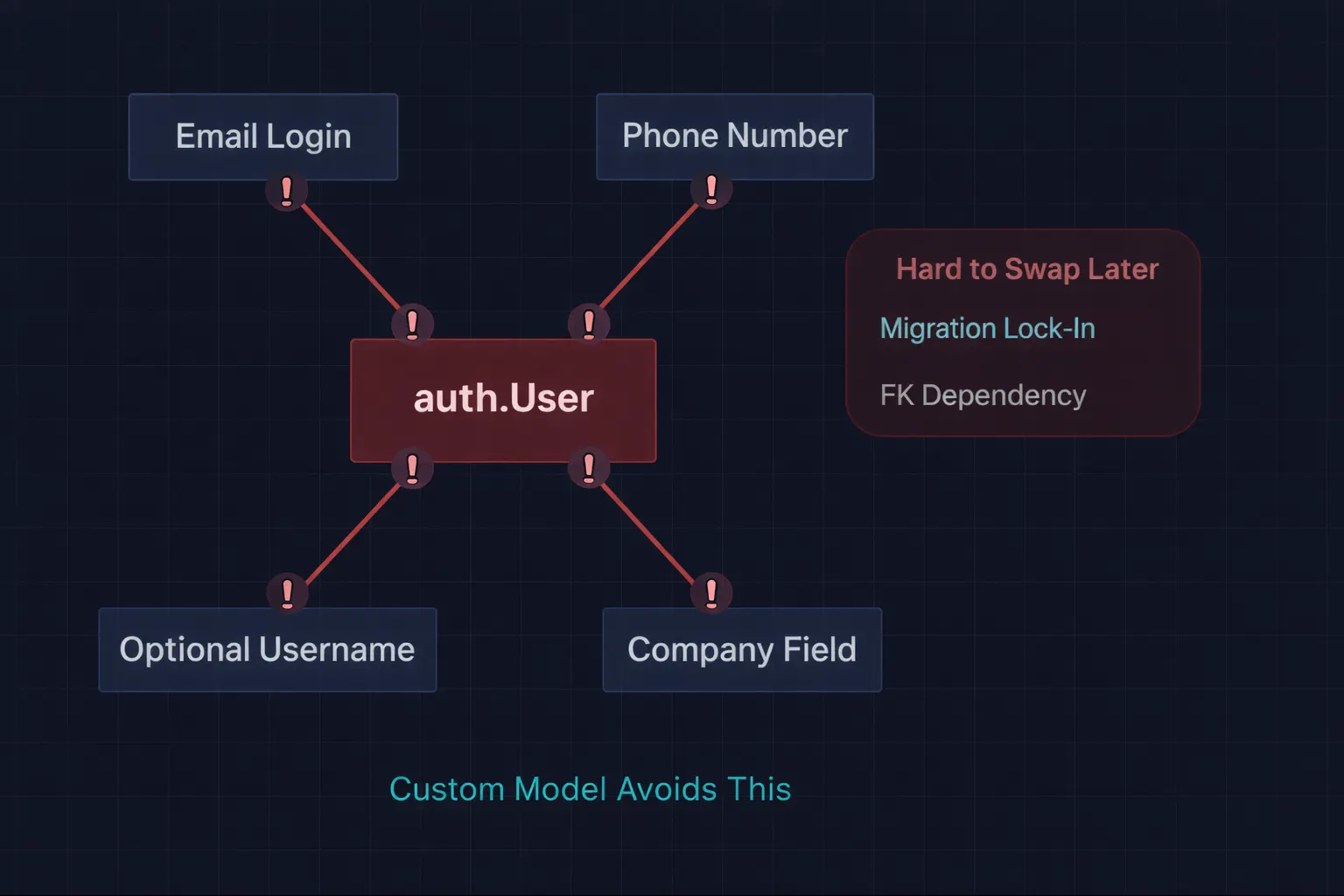 The Default User Model Trap
Django’s built-in User model lives in django.contrib.auth . It has these fields: username, email, password, first_name, last_name, is_staff, is_active, is_superuser, date_joined, last_login.
That looks reasonable. Until you hit one of these completely normal requirements:
Users should log in with email, not username. The default model uses username as the unique identifier for authentication. You can't change USERNAME_FIELD on the built-in model without subclassing it.
We need a phone number on the user model. You could add it to a separate Profile model, but then every query that needs user + phone requires a JOIN. You’re paying a performance penalty forever because you didn’t add one field at the start.
Usernames should be optional. The default model requires a username. You can’t make it nullable without a custom model.
We need to track which company a user belongs to. A ForeignKey to a Company model on the user itself is cleaner than a separate profile table — but you can’t add it to the built-in model.
The real problem isn’t any single requirement. It’s that switching user models after you’ve run your first migration is effectively impossible without starting over. Django’s migration system tracks the user model deeply — every ForeignKey to User, every migration that references AUTH_USER_MODEL, the entire auth migration history. Swapping it mid-project requires recreating your database or writing extremely complex data migrations.
That’s why you do it on day one. Before the first makemigrations. Before the first migrate. It costs 15 minutes now. It saves days later.
The Setup: AbstractUser (The Right Default)
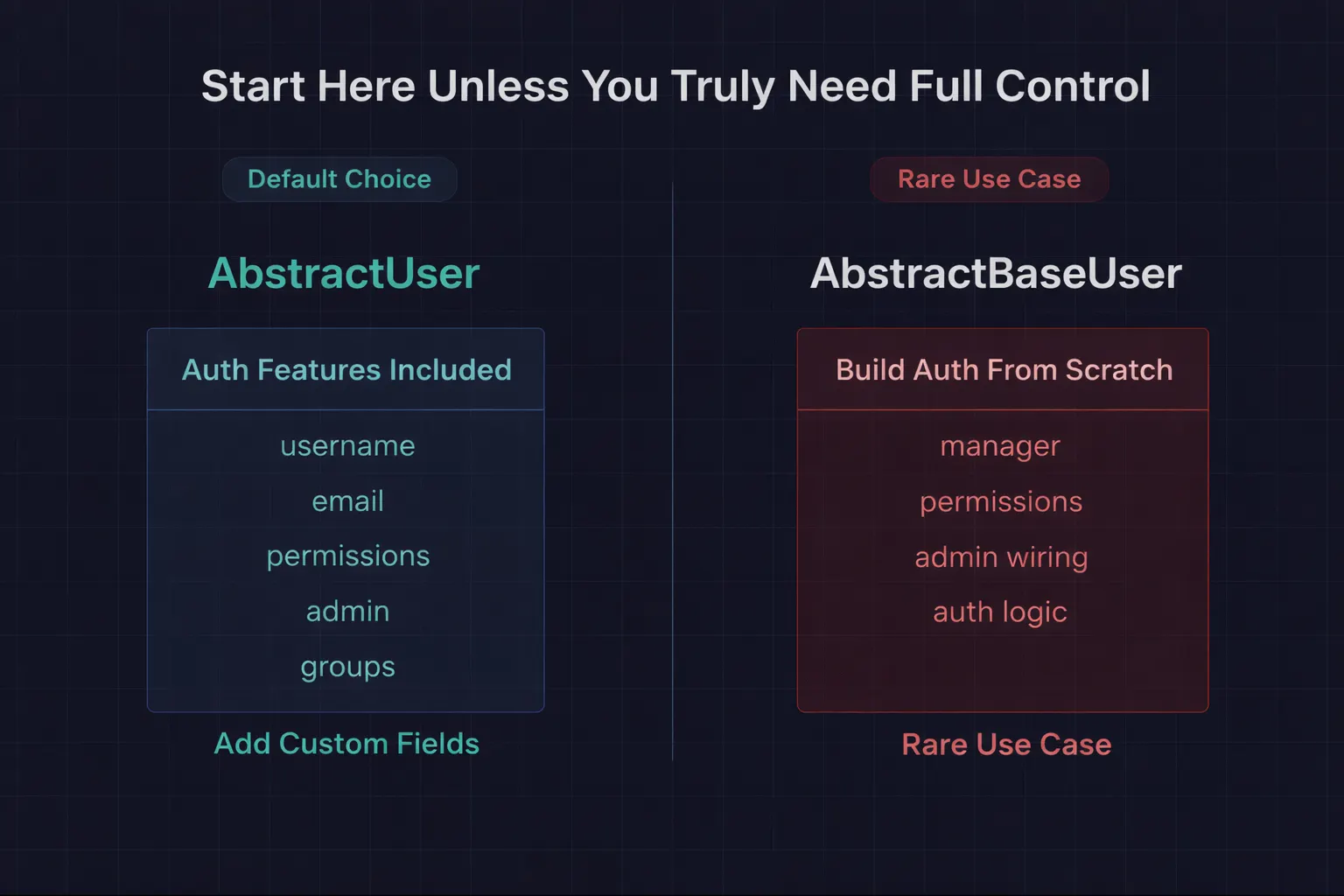 Django AbstractUser vs AbstractBaseUser
There are two base classes Django gives you: AbstractUser and AbstractBaseUser. Most tutorials make a big deal about choosing between them. Here's the simple answer:
Use AbstractUser unless you have a very specific reason not to. It gives you everything the default User model has — username, email, password, permissions, admin integration — and lets you add your own fields on top. You can also override existing fields if needed.
Use AbstractBaseUser only if you want to build authentication from scratch — no username field, completely custom field set, custom authentication logic. This is rare. In three years, I've needed it once.
Let’s set up AbstractUser. Start a new project:
django-admin startproject myproject
cd myproject
python manage.py startapp accounts
Step 1: Create the custom user model
# accounts/models.py
from django.contrib.auth.models import AbstractUser
from django.db import models


class User(AbstractUser):
    # Override email to make it unique (required for email login)
    email = models.EmailField(unique=True)

    # Add your custom fields here
    phone = models.CharField(max_length=20, blank=True)
    company = models.CharField(max_length=100, blank=True)
    avatar_url = models.URLField(blank=True)
    is_verified = models.BooleanField(default=False)

    # Use email for login instead of username
    USERNAME_FIELD = 'email'
    REQUIRED_FIELDS = ['username']  # Fields prompted during createsuperuser

    class Meta:
        db_table = 'users'  # Cleaner table name than 'accounts_user'

    def __str__(self):
        return self.email
A few things to note. USERNAME_FIELD = 'email' tells Django's authentication system to use email as the unique identifier for login. The email field is overridden with unique=True because the default AbstractUser email field isn't unique — and it needs to be if you're using it for authentication.
REQUIRED_FIELDS is only used by createsuperuser. It doesn't affect form validation or API logic. I keep username in there because some third-party packages expect it to exist.
Step 2: Tell Django to use your custom model
# myproject/settings.py

INSTALLED_APPS = [
    'django.contrib.admin',
    'django.contrib.auth',
    'django.contrib.contenttypes',
    'django.contrib.sessions',
    'django.contrib.messages',
    'django.contrib.staticfiles',

    # Your apps
    'accounts',
]

# This is the critical line
AUTH_USER_MODEL = 'accounts.User'
AUTH_USER_MODEL = 'accounts.User' is the single most important setting. Every ForeignKey to User in your entire project — including Django's built-in models — will reference your custom model instead of auth.User.
Step 3: Create the custom manager (optional but recommended)
If you want users to be created with email as the primary identifier:
# accounts/managers.py
from django.contrib.auth.models import BaseUserManager


class CustomUserManager(BaseUserManager):
    def create_user(self, email, password=None, **extra_fields):
        if not email:
            raise ValueError('Email is required')
        email = self.normalize_email(email)
        user = self.model(email=email, **extra_fields)
        user.set_password(password)
        user.save(using=self._db)
        return user

    def create_superuser(self, email, password=None, **extra_fields):
        extra_fields.setdefault('is_staff', True)
        extra_fields.setdefault('is_superuser', True)
        extra_fields.setdefault('is_active', True)

        if extra_fields.get('is_staff') is not True:
            raise ValueError('Superuser must have is_staff=True')
        if extra_fields.get('is_superuser') is not True:
            raise ValueError('Superuser must have is_superuser=True')

        return self.create_user(email, password, **extra_fields)
Then wire it up in the model:
# accounts/models.py
from accounts.managers import CustomUserManager


class User(AbstractUser):
    # ... fields from above ...

    objects = CustomUserManager()
The normalize_email method lowercases the domain part of the email — Alice@GMAIL.COM becomes Alice@gmail.com. This prevents duplicate accounts from different capitalizations.
Step 4: Set up the admin
The Django admin is tightly coupled to the user model. You need to tell it about your custom model:
# accounts/admin.py
from django.contrib import admin
from django.contrib.auth.admin import UserAdmin as BaseUserAdmin
from accounts.models import User


class UserAdmin(BaseUserAdmin):
    model = User
    list_display = ('email', 'username', 'is_staff', 'is_verified', 'date_joined')
    list_filter = ('is_staff', 'is_active', 'is_verified')
    search_fields = ('email', 'username', 'company')
    ordering = ('-date_joined',)

    # Add custom fields to the admin form
    fieldsets = BaseUserAdmin.fieldsets + (
        ('Custom Fields', {
            'fields': ('phone', 'company', 'avatar_url', 'is_verified')
        }),
    )

    add_fieldsets = BaseUserAdmin.add_fieldsets + (
        ('Custom Fields', {
            'fields': ('email', 'phone', 'company')
        }),
    )


admin.site.register(User, UserAdmin)
Extending BaseUserAdmin.fieldsets rather than redefining them keeps all the existing admin functionality — password change, permissions, groups — while adding your custom fields in a new section at the bottom.
Step 5: Run migrations
python manage.py makemigrations accounts
python manage.py migrate
python manage.py createsuperuser
Done. Your custom user model is live. Every model in your project that references users should use it.
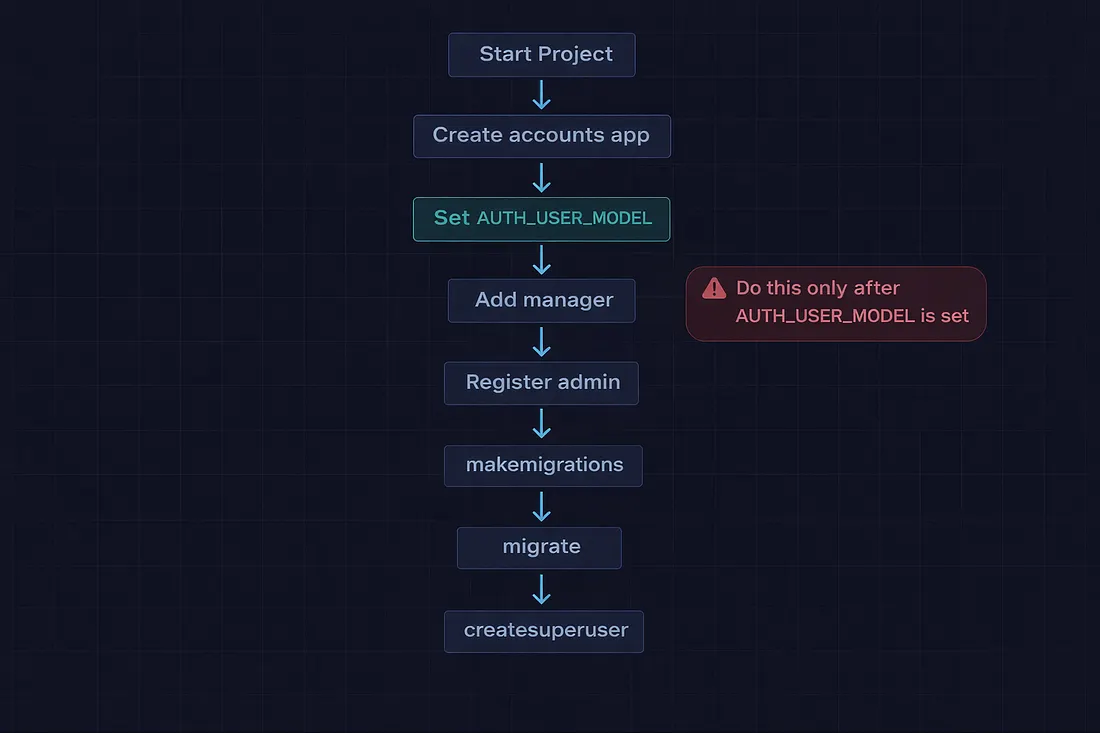
How to Reference the Custom User Model Everywhere
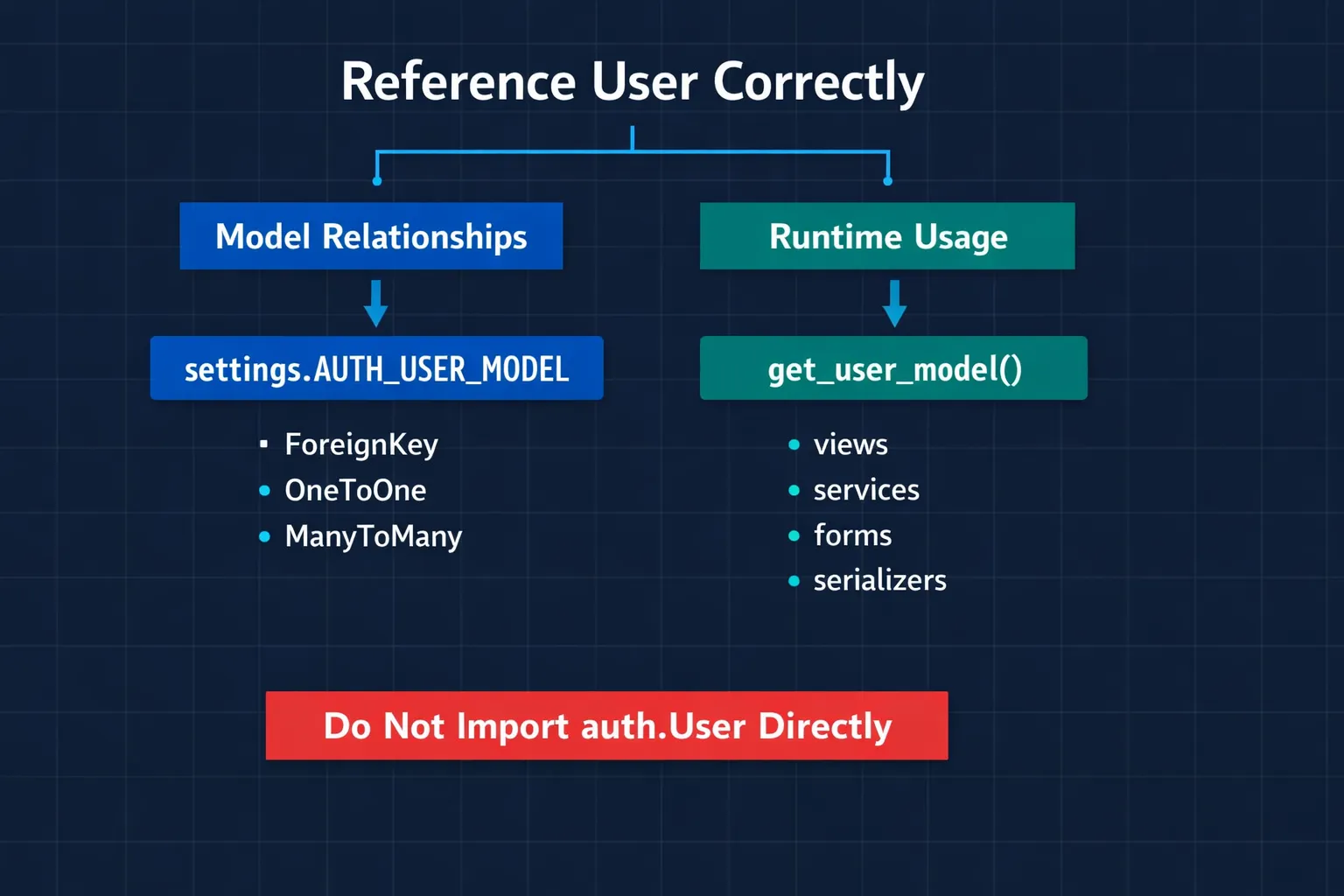
This is where most tutorials stop, and where most bugs start. There are three ways to reference the user model in Django, and only two of them are correct:
# ❌ WRONG — hardcodes the default User model
from django.contrib.auth.models import User

class Post(models.Model):
    author = models.ForeignKey(User, on_delete=models.CASCADE)


# ✅ CORRECT — for ForeignKey and model relationships
from django.conf import settings

class Post(models.Model):
    author = models.ForeignKey(
        settings.AUTH_USER_MODEL,
        on_delete=models.CASCADE
    )


# ✅ CORRECT — for runtime lookups (views, services, forms)
from django.contrib.auth import get_user_model

User = get_user_model()

def get_active_users():
    return User.objects.filter(is_active=True)
✅ In models (ForeignKey, OneToOneField, ManyToManyField): Use settings.AUTH_USER_MODEL. This is a string like 'accounts.User' that Django resolves at migration time. It works correctly regardless of import order.
✅ In everything else (views, services, forms, serializers): Use get_user_model(). This returns the actual model class at runtime.
❌ Never import User directly from django.contrib.auth.models. That's the default model, not yours. If you've set AUTH_USER_MODEL, a direct import bypasses it and creates ForeignKeys to the wrong table.
I enforce this in code reviews with a simple grep:
# Run this in your project root — should return zero results
grep -r "from django.contrib.auth.models import User" --include="*.py"
If that returns anything, someone’s referencing the wrong model.
The Patterns I’ve Built on Top
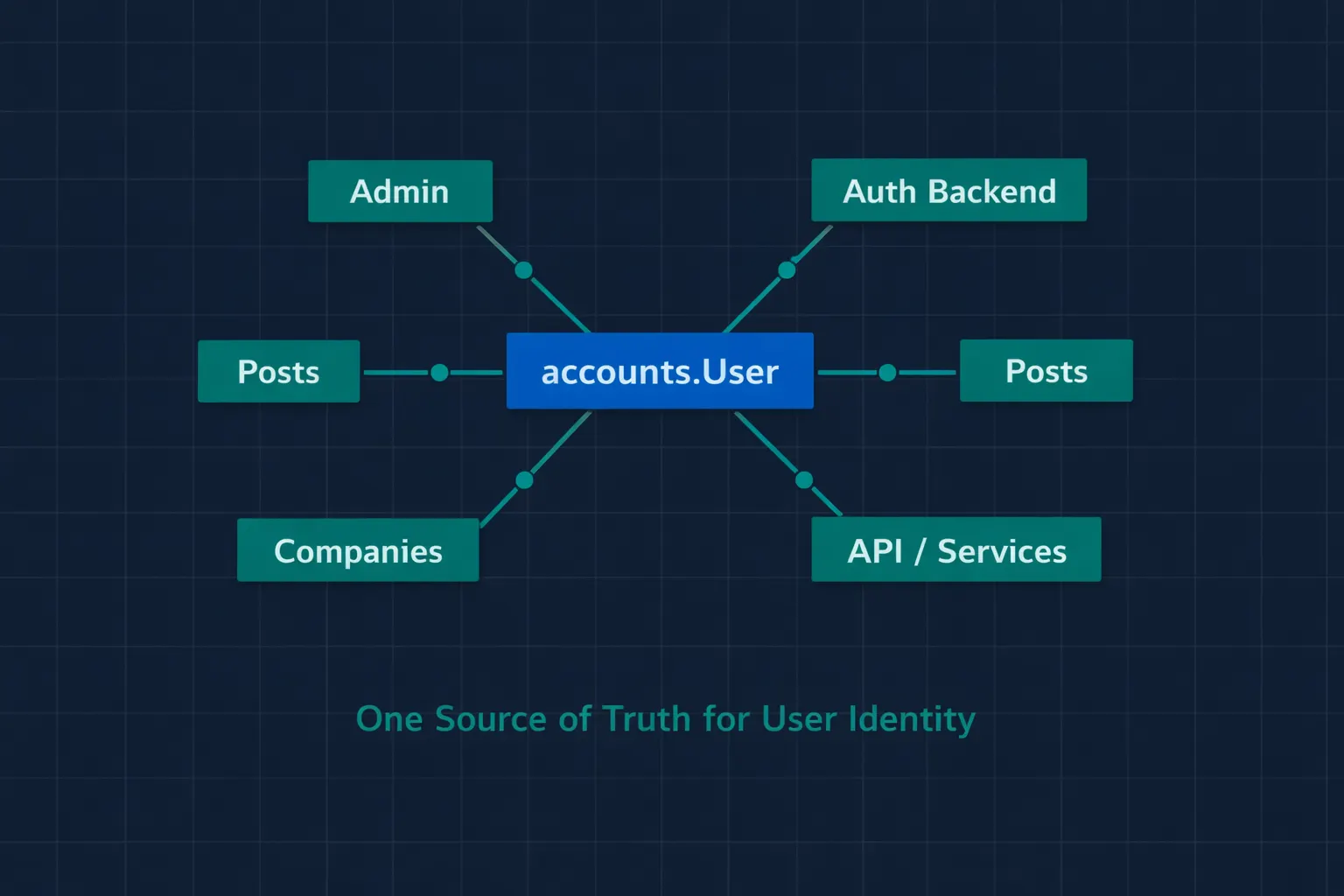 Where the Custom User Model Connects
Once you have a custom user model, certain patterns become much cleaner:
Email-Based Authentication Backend
# accounts/backends.py
from django.contrib.auth import get_user_model
from django.contrib.auth.backends import ModelBackend

User = get_user_model()


class EmailBackend(ModelBackend):
    def authenticate(self, request, username=None, password=None, **kwargs):
        email = username or kwargs.get('email')
        if email is None:
            return None
        try:
            user = User.objects.get(email=email)
        except User.DoesNotExist:
            # Run the default password hasher to prevent timing attacks
            User().set_password(password)
            return None

        if user.check_password(password) and self.user_can_authenticate(user):
            return user
        return None
# settings.py
AUTHENTICATION_BACKENDS = [
    'accounts.backends.EmailBackend',
]
Notice the User().set_password(password) call in the DoesNotExist case. This isn't a mistake — it runs the password hasher even when the user doesn't exist, so an attacker can't tell from response timing whether an email is registered. The Django documentation recommends this pattern.
Soft Delete Pattern
# accounts/models.py
class User(AbstractUser):
    # ... other fields ...
    deleted_at = models.DateTimeField(null=True, blank=True)

    class Meta:
        db_table = 'users'

    @property
    def is_deleted(self):
        return self.deleted_at is not None

    def soft_delete(self):
        from django.utils import timezone
        self.deleted_at = timezone.now()
        self.is_active = False
        self.save(update_fields=['deleted_at', 'is_active'])
Instead of actually deleting users (which cascades through every ForeignKey in your database), set a deleted_at timestamp and mark them inactive. The user data stays for audit trails, and you can "undelete" if needed.
Multi-Tenancy with Company Field
class User(AbstractUser):
    # ... other fields ...
    company = models.ForeignKey(
        'companies.Company',
        on_delete=models.SET_NULL,
        null=True,
        blank=True,
        related_name='members'
    )
Now every user belongs to a company. You can scope querysets by company without a separate join table:
def get_company_users(company_id):
    User = get_user_model()
    return User.objects.filter(company_id=company_id, is_active=True)
This is dramatically simpler than having a separate Profile model with a OneToOneField to User and a ForeignKey to Company.
The Mistakes I’ve Seen (and Made)
Mistake 1: Setting AUTH_USER_MODEL After First Migration
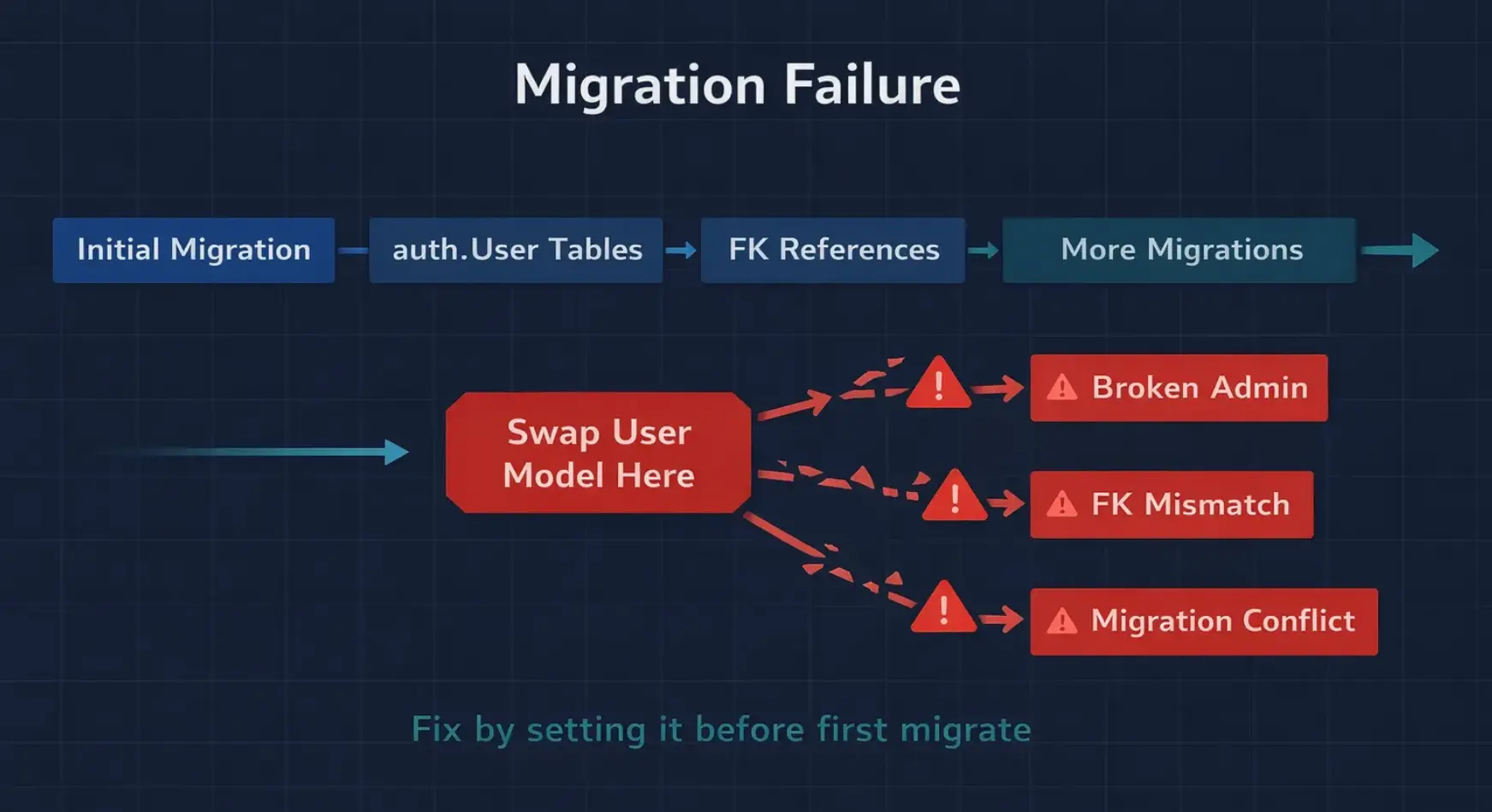 Changing AUTH_USER_MODEL Too Late
If you’ve already run python manage.py migrate with the default user model and then try to set AUTH_USER_MODEL, you'll get a cascade of errors. Django's auth migrations have already created tables referencing auth.User. Your new model creates a different table. Foreign keys don't match. Migration history is inconsistent.
The fix is ugly: drop the database, delete all migration files, and start fresh. On a project with real data, that’s not an option.
Mistake 2: Forgetting the Admin Configuration
Without a custom admin class, Django’s admin will try to render the default User form — which doesn’t include your custom fields. Worse, if you’ve removed username as a required field, the default admin form will still require it, blocking user creation from the admin panel.
Mistake 3: Using AbstractBaseUser When AbstractUser Would Work
I’ve reviewed codebases where someone used AbstractBaseUser to create a user model that's basically identical to what AbstractUser gives you out of the box — but with 150 lines of boilerplate for the manager, permissions, and admin integration. AbstractUser inherits from AbstractBaseUser and adds all of that for you.
Use AbstractBaseUser only when you genuinely don't want Django's default fields — no username, no first_name, no last_name, completely custom from the ground up. For 95% of projects, AbstractUser with a few added fields is exactly right.
Mistake 4: Not Making Email Unique
If you set USERNAME_FIELD = 'email' but forget to override the email field with unique=True, you'll get a confusing error at runtime:
ERRORS:
accounts.User: (auth.E003) 'User.USERNAME_FIELD' must be unique.
The default AbstractUser.email field doesn't have unique=True. You must override it explicitly.
The Complete Template
Here’s the full setup I copy into every new Django project. It takes 15 minutes and saves weeks of pain:
# accounts/managers.py
from django.contrib.auth.models import BaseUserManager


class CustomUserManager(BaseUserManager):
    def create_user(self, email, password=None, **extra_fields):
        if not email:
            raise ValueError('Email is required')
        email = self.normalize_email(email)
        user = self.model(email=email, **extra_fields)
        user.set_password(password)
        user.save(using=self._db)
        return user

    def create_superuser(self, email, password=None, **extra_fields):
        extra_fields.setdefault('is_staff', True)
        extra_fields.setdefault('is_superuser', True)
        extra_fields.setdefault('is_active', True)
        return self.create_user(email, password, **extra_fields)
# accounts/models.py
from django.contrib.auth.models import AbstractUser
from django.db import models
from accounts.managers import CustomUserManager


class User(AbstractUser):
    email = models.EmailField(unique=True)
    phone = models.CharField(max_length=20, blank=True)
    is_verified = models.BooleanField(default=False)

    USERNAME_FIELD = 'email'
    REQUIRED_FIELDS = ['username']

    objects = CustomUserManager()

    class Meta:
        db_table = 'users'

    def __str__(self):
        return self.email
# accounts/admin.py
from django.contrib import admin
from django.contrib.auth.admin import UserAdmin as BaseUserAdmin
from accounts.models import User


class UserAdmin(BaseUserAdmin):
    model = User
    list_display = ('email', 'username', 'is_staff', 'is_verified')
    ordering = ('-date_joined',)
    fieldsets = BaseUserAdmin.fieldsets + (
        ('Custom Fields', {'fields': ('phone', 'is_verified')}),
    )
    add_fieldsets = BaseUserAdmin.add_fieldsets + (
        ('Custom Fields', {'fields': ('email', 'phone')}),
    )


admin.site.register(User, UserAdmin)
# settings.py
AUTH_USER_MODEL = 'accounts.User'

AUTHENTICATION_BACKENDS = [
    'accounts.backends.EmailBackend',  # If using email login
    'django.contrib.auth.backends.ModelBackend',  # Fallback
]
Copy this into your project. Adjust the custom fields for your needs. Run makemigrations and migrate. You're done.
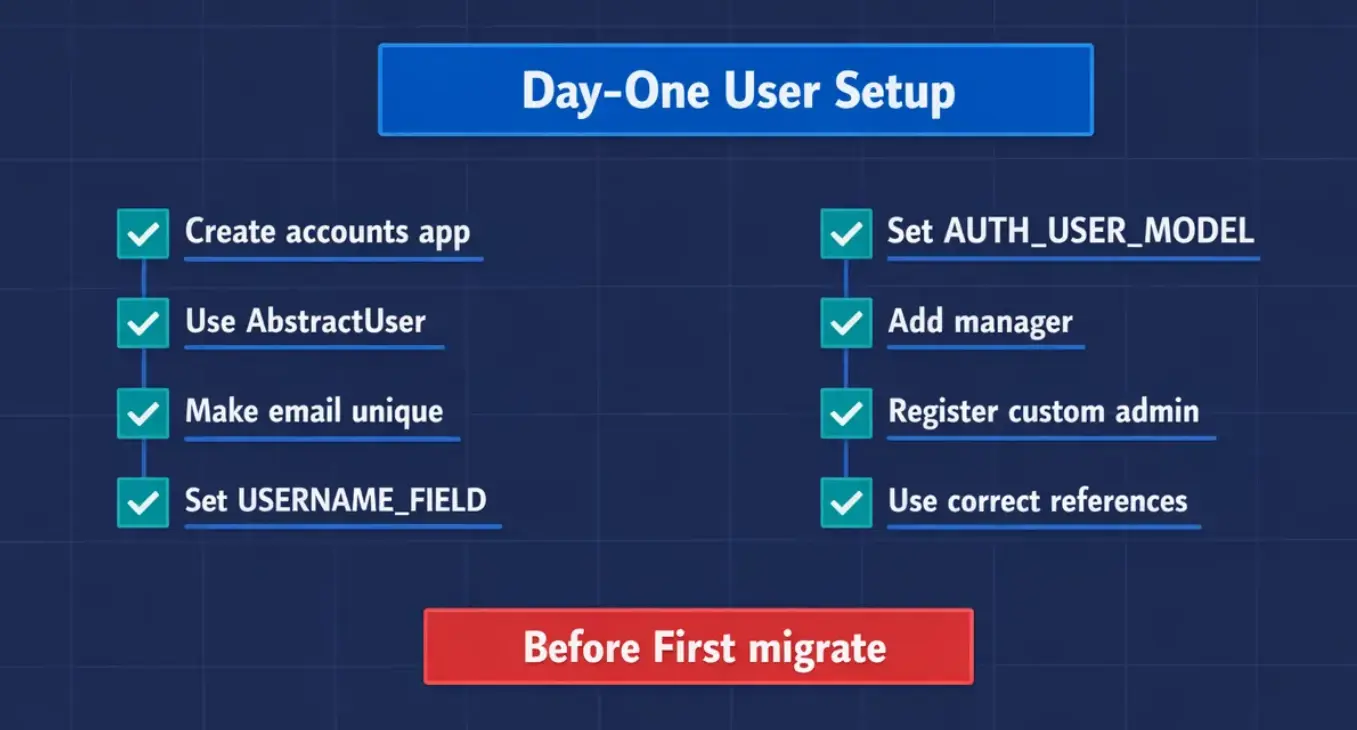 Django User Model Checklist
Bottom Line
Every Django project should start with a custom user model. Not because you need custom fields right now, but because you will. And by the time you do, switching is either a 15-minute task (if you did it on day one) or a multi-day nightmare (if you didn’t).
The setup is five files: model, manager, admin, backend, and one line in settings. It takes less time than writing a single API endpoint. And it gives you the flexibility to add email login, phone numbers, company associations, soft deletes, or any other user-related feature without touching your migration history.
The friend I mentioned at the start? He’s now telling every new Django developer the same thing: “Custom user model. First thing. Before anything else.” He learned it the hard way. You don’t have to.
Did you start your Django project with the default user model and regret it later? Or did you set up a custom model from day one? I’d love to hear what custom fields you’ve added — some of the most creative ones I’ve seen are timezone, preferred_language, and onboarding_step. Share yours in the comments.